Klaviyo + Post-Purchase Surveys: Trigger Email Flows from Survey Data
Most Klaviyo flows are too damn generic.
They react to purchases, product views, cart events, and maybe predicted churn. Useful, sure, but still blunt. Two customers can buy the same product for completely different reasons, with completely different levels of confidence, and then get shoved into the exact same email sequence.
That is lazy lifecycle marketing.
Post-purchase surveys fix that because they tell you what the customer actually meant by the order. Why they bought. How they heard about you. What they are trying to solve. What they were unsure about. Whether they are confident, skeptical, gift buying, replacing a competitor, or already half-worried they picked the wrong thing.
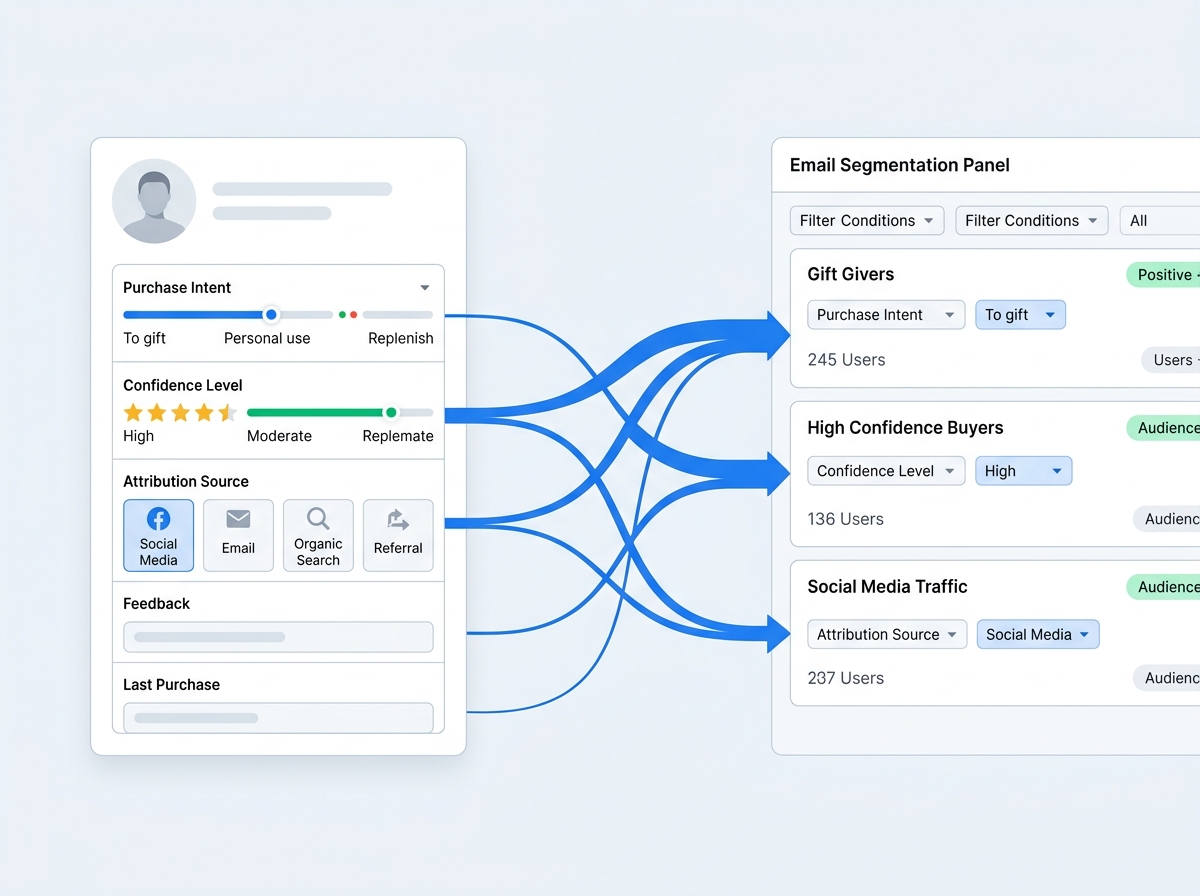
Once that survey data is available in Klaviyo, your email flows get smarter fast. You can send different education to low-confidence buyers, route attribution answers into segments, trigger product-specific onboarding, suppress premature review asks, and push the right cross-sell instead of guessing.
That is the point of this guide: how to use post-purchase survey data on Shopify to trigger better Klaviyo flows, what questions to ask, which automations matter most, and where most brands screw this up.
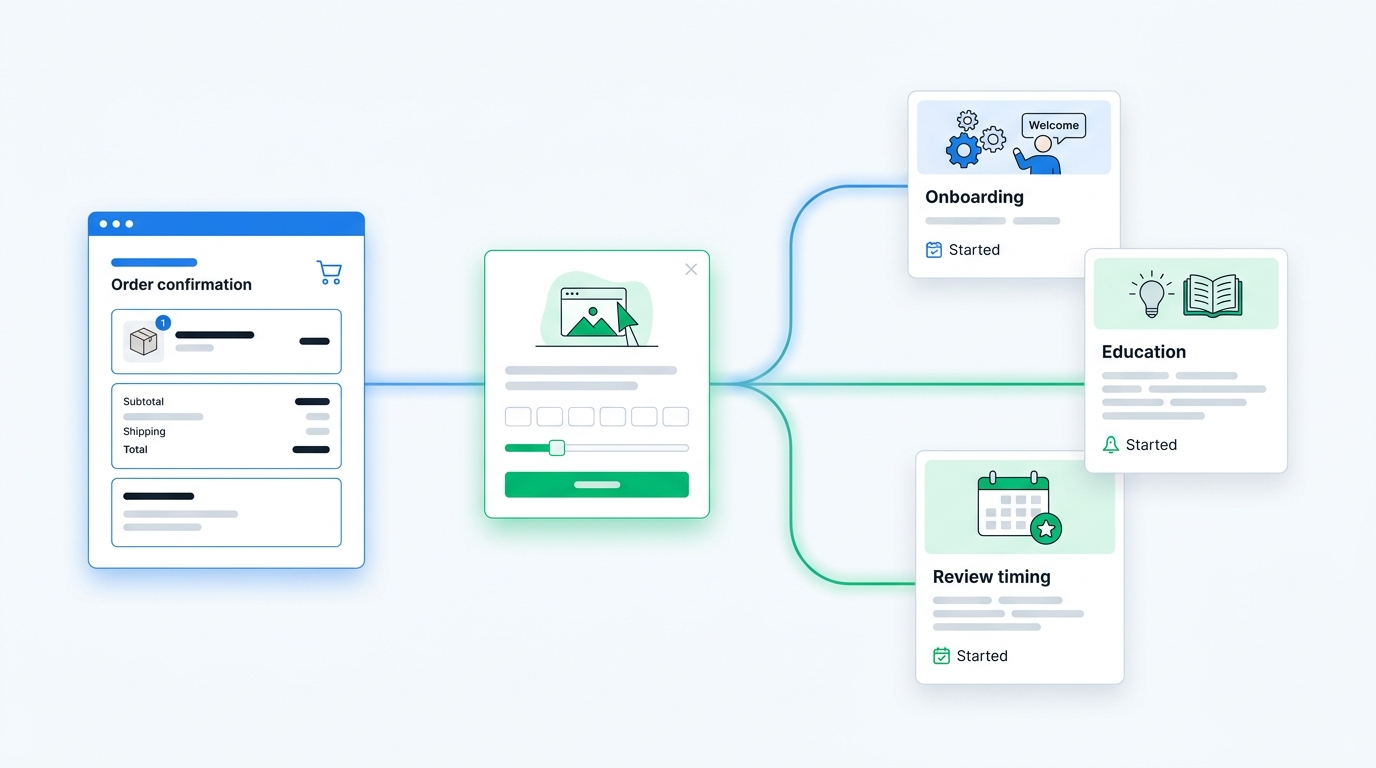
Why purchase behavior alone is not enough for Klaviyo
Klaviyo is excellent at reacting to behavior.
But behavior only tells you what happened. It usually does not tell you intent.
A purchase event can tell you:
- which product was bought
- order value
- discount usage
- whether it was a first or repeat purchase
- what collection or category was involved
Useful. Not sufficient.
It does not tell you:
- whether the customer bought for themselves or as a gift
- whether they felt confident or hesitant
- what problem they expect the product to solve
- what channel actually influenced the sale
- whether they care most about price, quality, speed, ingredients, fit, or ease of use
That missing context matters because good email is mostly about relevance. If you do not know the customer's motivation, you end up sending a one-size-fits-none sequence.
This is exactly where post-purchase surveys earn their keep. They add zero-party data to a flow stack that would otherwise be running on inference and vibes.
What post-purchase survey data is best for
Not every survey answer deserves an automation. Some are just useful for analysis.
The best flow triggers usually come from survey responses that reveal either intent, risk, or channel.
1. Intent data
Questions like:
- What convinced you to buy today?
- What will you use this product for first?
- Who is this purchase for?
These help you personalize onboarding and cross-sells.
2. Confidence or hesitation data
Questions like:
- How confident are you that this is the right fit?
- What almost stopped you from buying?
These are gold for preventing confusion, returns, and support tickets.
3. Attribution data
Questions like:
- How did you hear about us?
This is useful both for analytics and for channel-specific follow-up. A customer acquired through a creator mention may respond differently than one acquired through branded search or a discount popup.
4. Outcome or expectation data
Questions like:
- What are you hoping this product helps with?
- What matters most to you about this order?
That lets you tailor education to the job the customer hired the product to do.
If you want a full setup primer first, read The Complete Guide to Shopify Post-Purchase Surveys. If you want the attribution angle, Self-Reported Attribution vs UTM Tracking covers where survey data changes marketing decisions.
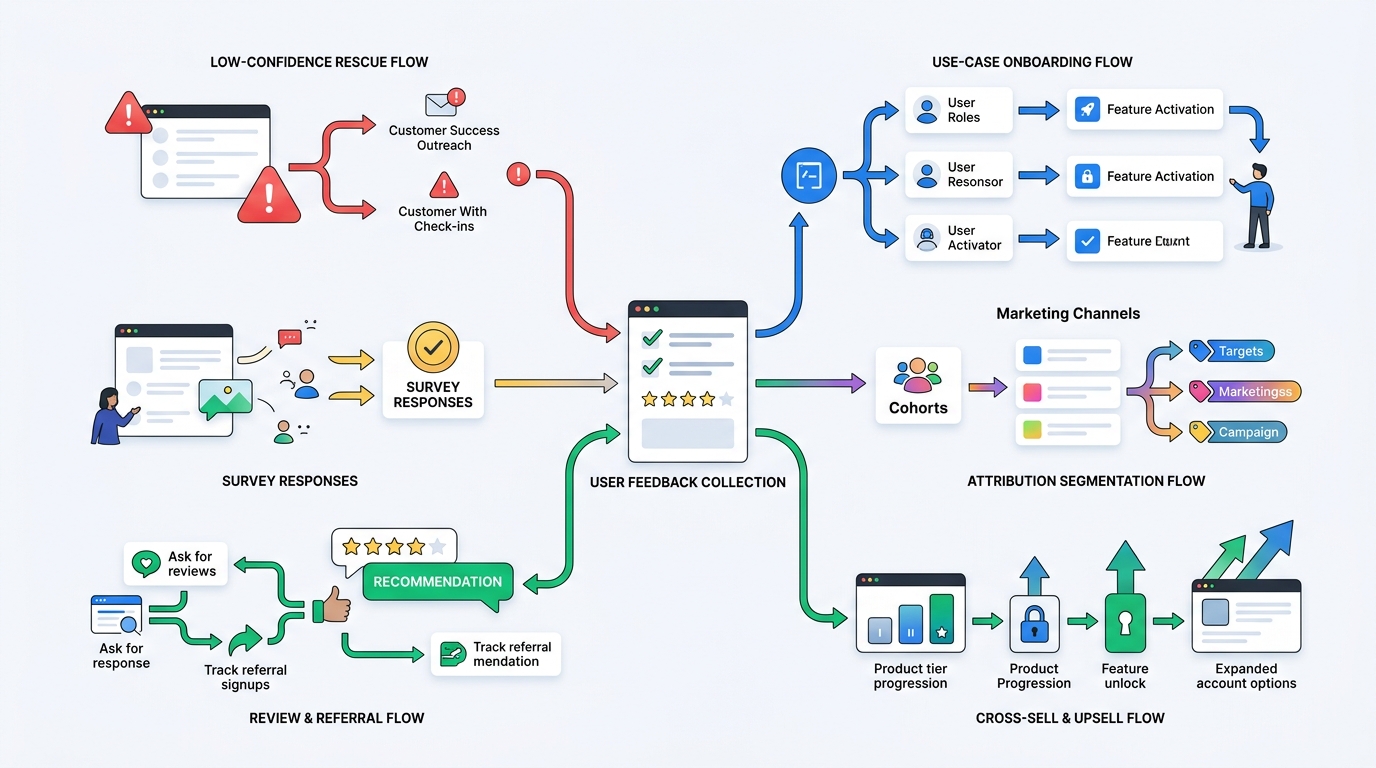
The five Klaviyo flows that get much better with survey data
You can build dozens of automations off survey responses. Most of them do not matter.
These five do.
1. Low-confidence buyer rescue flow
This is the highest-leverage one for a lot of Shopify brands.
If a customer says they are not fully confident in fit, usage, compatibility, or results, do not wait for the support ticket or return. Trigger a short educational sequence immediately.
Example trigger:
- survey response indicates low confidence
- or open-text answer contains hesitation themes like sizing, setup, compatibility, ingredients, or timeline-to-results
What to send:
- sizing or usage guidance
- setup instructions
- expectation-setting content
- FAQ answers tied to the product
- proactive support CTA
This is one of the cleanest ways to reduce buyer's remorse. It also pairs nicely with the return-reduction logic from How to Reduce Shopify Return Rates with Customer Feedback.
Bad version: send the same generic thank-you email everyone gets.
Better version: send the email that answers the exact thing the customer was worried about.
2. Use-case onboarding flow
A lot of products serve multiple use cases.
The mistake is treating all buyers as if they bought for the same job.
Say a customer buys a supplement, skincare item, or home product. One buyer wants daily maintenance. Another wants to solve an acute problem. Another is buying for a partner. Same SKU, different intent.
If your survey asks what they plan to use the product for first, Klaviyo can branch onboarding accordingly.
Examples:
- apparel: occasion-based styling and fit guidance
- skincare: routine-building sequence based on skin concern
- wellness: dosage and expectation guidance based on goal
- home goods: room-specific inspiration and setup
- pet products: age, breed, or behavior-specific education
This is the kind of personalization merchants talk about wanting, but behavior-only data rarely gets them there.
3. Attribution-aware welcome and winback segmentation
Most teams collect attribution and then leave it trapped in a dashboard.
That is a waste.
If a post-purchase survey says the customer came from a creator, podcast, community, referral, or a "How did you hear about us?" response that maps to a specific channel, that data should not just sit there looking pretty.
Use it to:
- create source-based segments in Klaviyo
- compare repeat purchase behavior by acquisition channel
- tailor winback offers by original acquisition path
- exclude or include certain audiences in future campaigns
Example: customers who discovered you through creators may respond well to social-proof-heavy follow-up. Customers who came in through search may need more product-comparison and objection-handling content.
The point is not to overfit every email. The point is to stop pretending every source behaves the same.
4. Review request timing flow
This one is underrated.
Many brands ask for reviews too early, too late, or at the wrong moment entirely.
Survey data helps you fix the timing.
If a buyer says they purchased for a special event next week, your review ask should not go out tomorrow. If they say setup looks confusing or confidence is low, do not push for a glowing review before they have had a fair shot at success.
Use survey responses to:
- delay review requests for low-confidence customers
- accelerate review asks for confident buyers with straightforward products
- send setup education before requesting feedback
- branch into NPS, CSAT, or testimonial capture first when appropriate
For some brands, this also opens the door to automated email surveys on Shopify that feed a better review and retention sequence later.
5. Cross-sell and replenishment flows based on stated need
Classic cross-sell logic usually keys off product catalog relationships.
That is fine, but a stated need is often a better signal than the SKU alone.
If someone says they bought because they want better sleep, clearer skin, easier meal prep, stronger hydration habits, or less guesswork in sizing, you can recommend the next product around that goal instead of around your internal merch taxonomy.
That is more relevant, which means it usually converts better.
What questions should you ask if the goal is Klaviyo automation?
Keep this tight. The more questions you ask, the worse your response rate gets.
For most stores, one to three questions is enough.
Best question set for intent + automation
What convinced you to buy today?
This helps identify the promise the customer bought into.
Useful response themes:
- price or offer
- social proof
- ingredient or feature confidence
- convenience
- fit with a specific need
What will you use this product for first?
This is one of the best questions for onboarding branches and cross-sells.
How confident are you that this is the right fit?
Simple. Strong. High leverage.
If confidence is low, trigger education. If confidence is high, speed up the path to reviews, referrals, or repeat purchase nudges.
Best question set for attribution + retention
How did you hear about us?
Use open text. Multiple choice is tempting, but it narrows the truth too early.
Then use AI grouping to normalize messy responses into usable channels. That is where UserLoop's attribution workflow gets more useful than static forms, especially when merchants want clean channel buckets without forcing rigid answer choices upfront.
What almost stopped you from buying?
This one is excellent for suppression logic and concern-specific support.
If someone says sizing almost stopped them, do not send a generic accessory upsell first. Send fit help.
The right data flow: Shopify to survey to Klaviyo
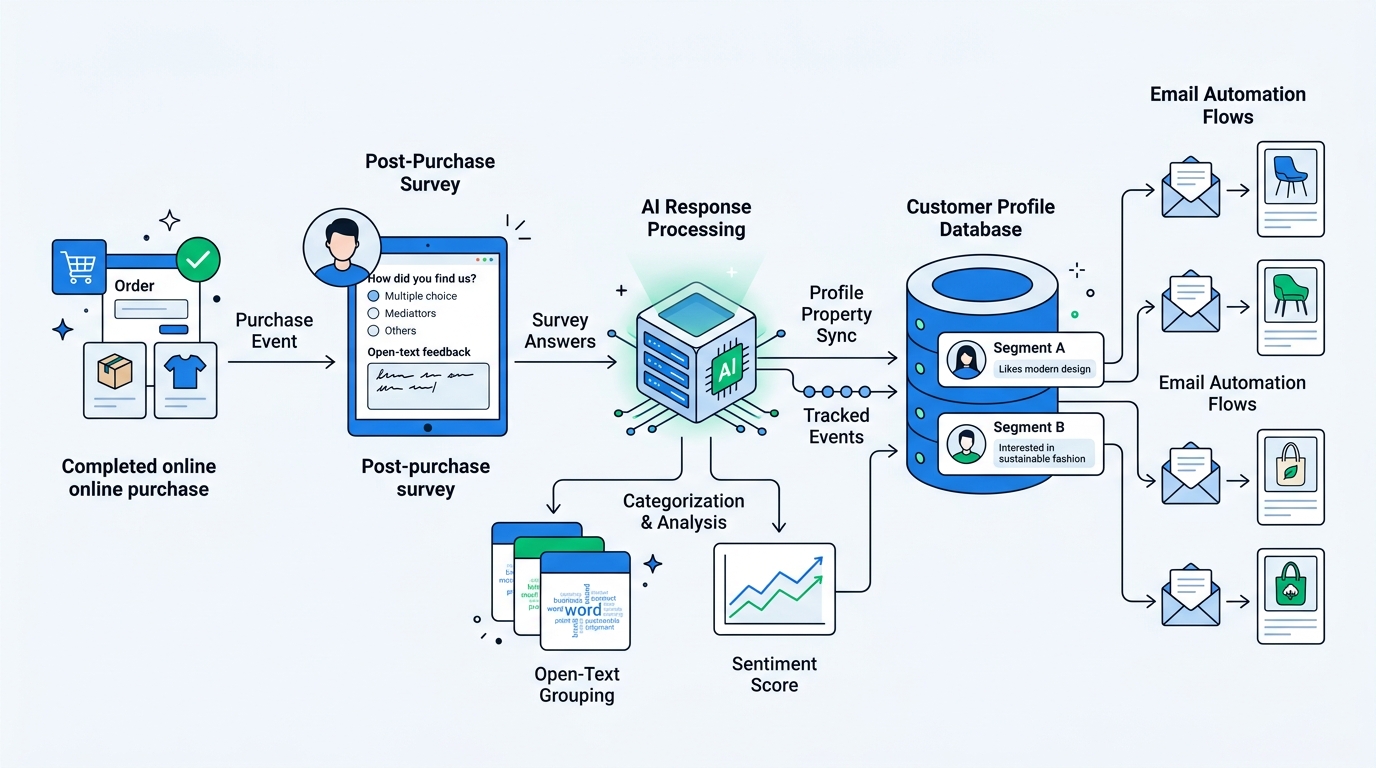
Here is the practical architecture.
- Customer purchases on Shopify.
- A post-purchase survey captures open-text or structured answers.
- Survey responses are attached to the customer profile or order context.
- Key fields sync into Klaviyo as profile properties, events, or both.
- Flows branch using those fields.
You do not need some absurd enterprise data warehouse to make this useful.
You do need consistency.
For example, if you want automation off open-text answers, you need either:
- normalized tags or grouped themes
- clear profile properties for major response buckets
- or event payloads Klaviyo can reliably filter against
This is one reason AI grouping matters. Raw text is rich, but it is messy. Automation wants structure.
The trick is not replacing open text with bad multiple-choice forms. The trick is collecting natural language first, then structuring it after the fact.
Where merchants usually mess this up
The common failure modes are boring, which is why they happen constantly.
They ask too many questions
If your post-purchase survey looks like a mini census form, response rates will crater.
Ask the smallest number of questions needed to drive a decision.
They collect data with no downstream action
If survey answers never change a flow, email, segment, or report, you are just creating decorative data.
Every survey question should have a job.
They force rigid multiple-choice answers too early
This makes reporting easier and insight worse.
Open text captures the nuance. Then AI can group it.
They send the same Klaviyo sequence anyway
This is the most embarrassing one.
The team says they want personalization, then sets up beautiful survey collection, and still dumps every customer into the same post-purchase series because nobody finished the branching logic.
That is not a tooling problem. That is a commitment problem.
They ignore buyer confidence
Low-confidence buyers are where returns, support burden, and negative reviews often start. If you are not using survey signals to spot them early, you are leaving money on the table.
A simple starting point for most Shopify brands
Do not overengineer this on day one.
Start with this:
- Ask How did you hear about us?
- Ask What almost stopped you from buying?
- Ask How confident are you that this is the right fit?
Then build three things in Klaviyo:
- a low-confidence education flow
- an attribution-based segmentation layer
- a concern-specific branch for top hesitation themes
That setup is enough to improve relevance immediately.
From there, you can expand into richer use-case onboarding, review timing logic, and better cross-sells.
If you want one platform that can handle popup surveys, post-purchase surveys, attribution analysis, and AI grouping without duct-taping together a pile of forms and spreadsheets, UserLoop is built for exactly this kind of workflow.
And if you want to see the app in action, the UserLoop Shopify app listing is the fastest place to start.
Final take
Klaviyo is powerful, but it gets smarter when it stops guessing.
Purchase behavior tells you what happened. Survey data tells you why it happened, what the customer expects next, and where the risk is hiding.
That is the difference between a post-purchase flow that merely exists and one that actually earns its keep.
If you are running Shopify email with no post-purchase survey layer, you are not really doing lifecycle personalization. You are just automating generic reactions.
That can work for a while.
But it is not the sharpest version of the job.
Choose your next survey question
Browse 56 ecommerce survey questions with answer options and a free CSV, then use UserLoop’s Shopify post-purchase surveys to collect answers linked to orders.


The agentic growth toolkit for Shopify
Ask your customers anything
UserLoop talks to your customers at scale with surveys and contests that feed one AI-queryable dataset. AI does the setup and the analysis.
- SurveysFind out why customers buy: checkout, email, link & QR.
- ContestsGiveaways that grow your list and social following.
Free plans on both apps · live in minutes