
Chat with your customer feedback in Claude and ChatGPT
UserLoop's read-only Shopify MCP server connects survey responses, CSAT, and order revenue to Claude, ChatGPT, Cursor, and any MCP client. Plain-English questions, real answers drawn as charts, no exports, no SQL.
Ask in plain English, get answers with revenue attached
The assistant calls UserLoop's MCP tools and answers from your live survey and order data, grounded in real responses, joined to real revenue.
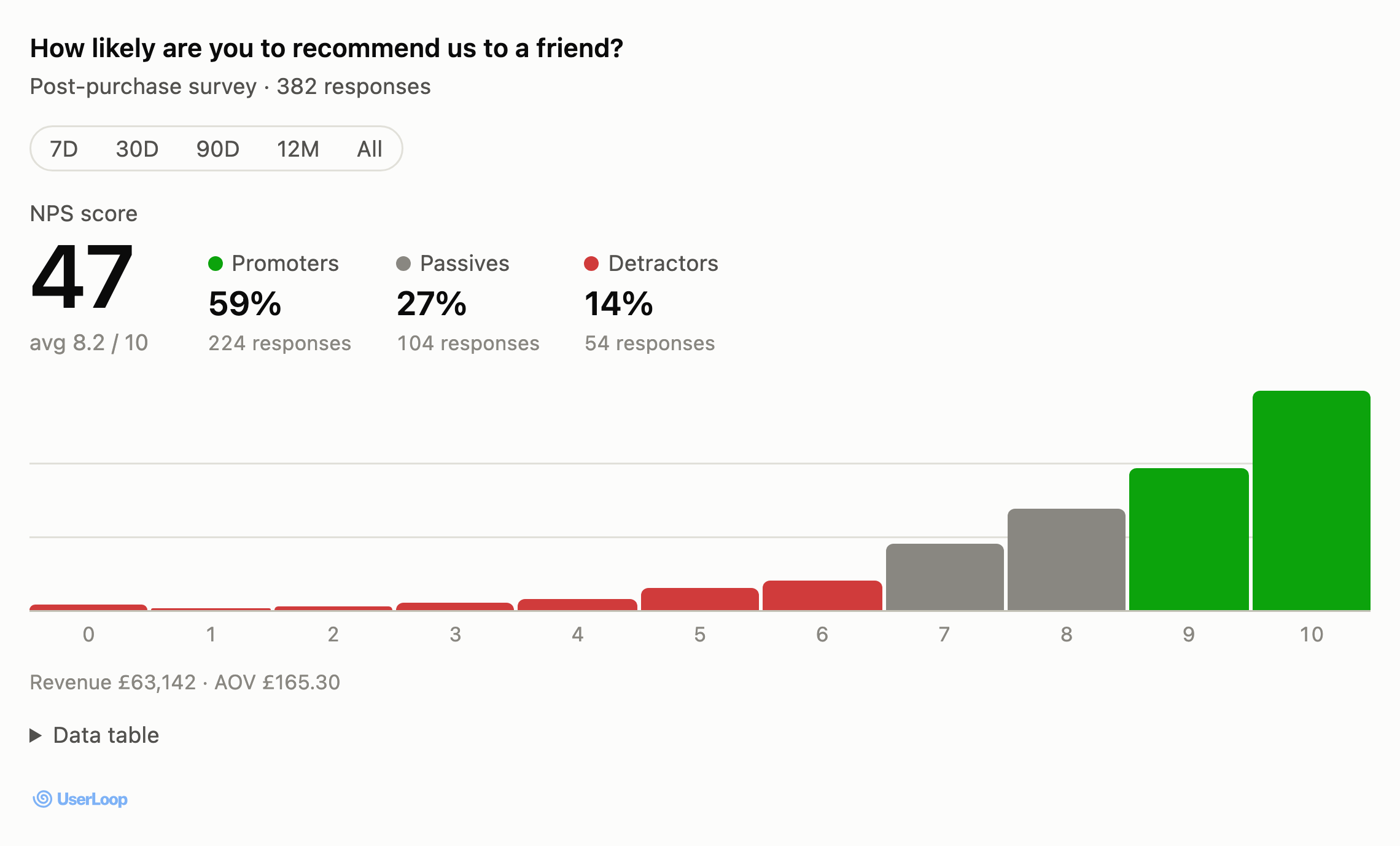
- Loyalty with money attached Promoters, passives, detractors, each segment with revenue and AOV.
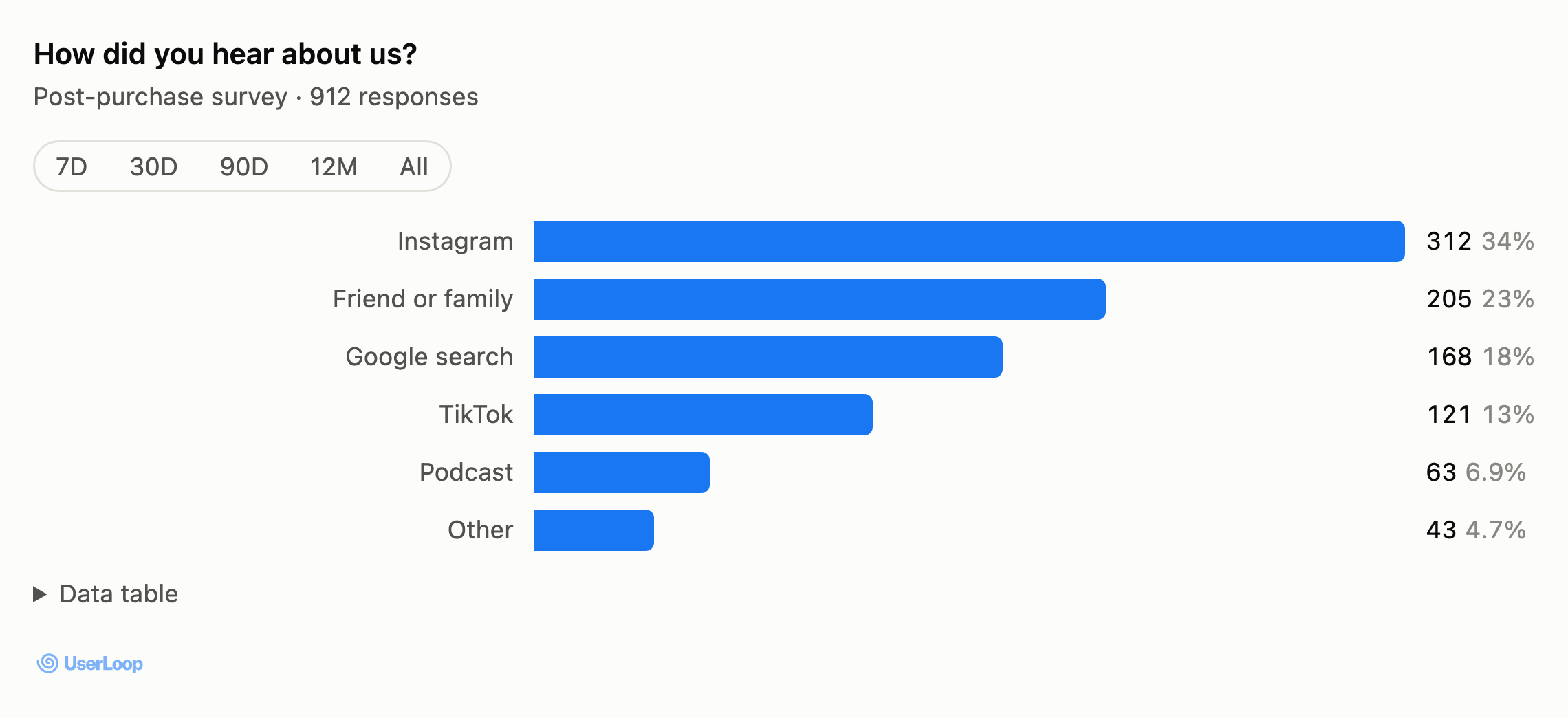
- Every breakdown on tap Multiple-choice results with counts, percentages, and revenue per option.
- Open text, summarized Pull up to 200 answers per call and let the assistant find the themes.
Answers you can see, not just read
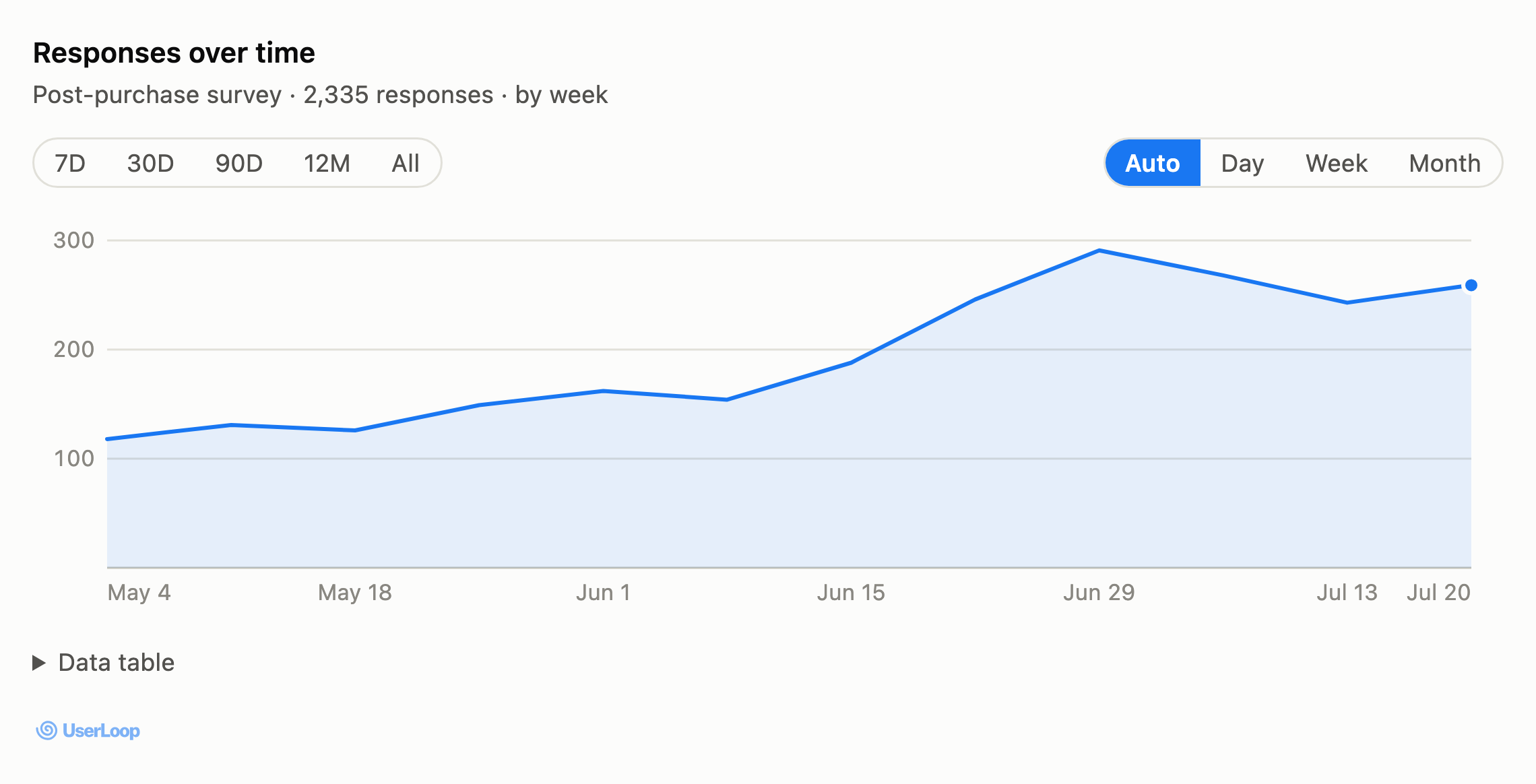
In clients that support the MCP Apps extension, UserLoop's results arrive as charts inside the conversation. They're live, not screenshots: change the date range or the day/week/month grouping and the assistant refetches from UserLoop. Clients without chart support get the same answers as text, so nothing breaks.
What is MCP (Model Context Protocol)?
MCP is an open standard that connects AI assistants to the tools and data they need. Instead of copy-pasting CSV exports into a chat, an MCP server gives the assistant a set of tools it can call directly, with your permission, against your live data.
Claude calls these connectors; ChatGPT calls them connected apps. Under the hood it's the same protocol, which is why UserLoop's MCP server works in Claude, ChatGPT, Cursor, Claude Code, and any MCP-compatible client, over plain streamable HTTP.
UserLoop's server exposes your surveys, responses, and revenue analytics as eight read-only tools. Ask a question and the assistant queries UserLoop directly, answering with your real numbers, not model guesses, and drawing the chart where the client supports it.

Works everywhere MCP does
One server, every client: Claude connectors, ChatGPT connectors, Cursor, Claude Code, and anything else that speaks MCP.
Claude
Add as a connector on claude.ai or in Claude Desktop.
ChatGPT
Connect under Settings → Apps & Connectors.
Cursor
Query your customer feedback while you build.
Claude Code
One claude mcp add command away.
Any MCP client
Streamable HTTP, works with every MCP-compatible app.
Eight read-only tools
Everything an assistant needs to answer questions about your customers, and nothing that lets it change your data.
userloop_list_surveysList every survey with its questions and question types.
userloop_get_surveyPull the full detail of a single survey.
userloop_analytics_countsAggregated results: loyalty scores with promoter, passive, and detractor segments (each with revenue and AOV), plus per-option breakdowns for multiple choice.
userloop_responses_timeseriesResponse volume over time for a survey, bucketed by day, week, or month, with every period filled in.
userloop_responses_openOpen-text answers, up to 200 per call, ready for summarizing and theming.
userloop_responses_rawRaw responses across all questions, filterable by date.
userloop_get_responseDrill into one customer's full response.
userloop_healthCheck the connection and confirm which store the key belongs to.
Questions you can ask today
Built for trust
Connected in three steps
Generate an API key
In your UserLoop dashboard, takes a few seconds.
Add the connector
Paste the UserLoop MCP URL into claude.ai, ChatGPT, or Claude Desktop.
Ask your first question
“How's customer satisfaction this month?” is a good start.
Frequently asked questions
Start with one app. Grow into the platform.
Both apps are free to start and live in minutes.