What's new in UserLoop

We're constantly improving UserLoop. Here are our latest updates, newest first.

ContestsImprovement

Manage Contests from Your Phone

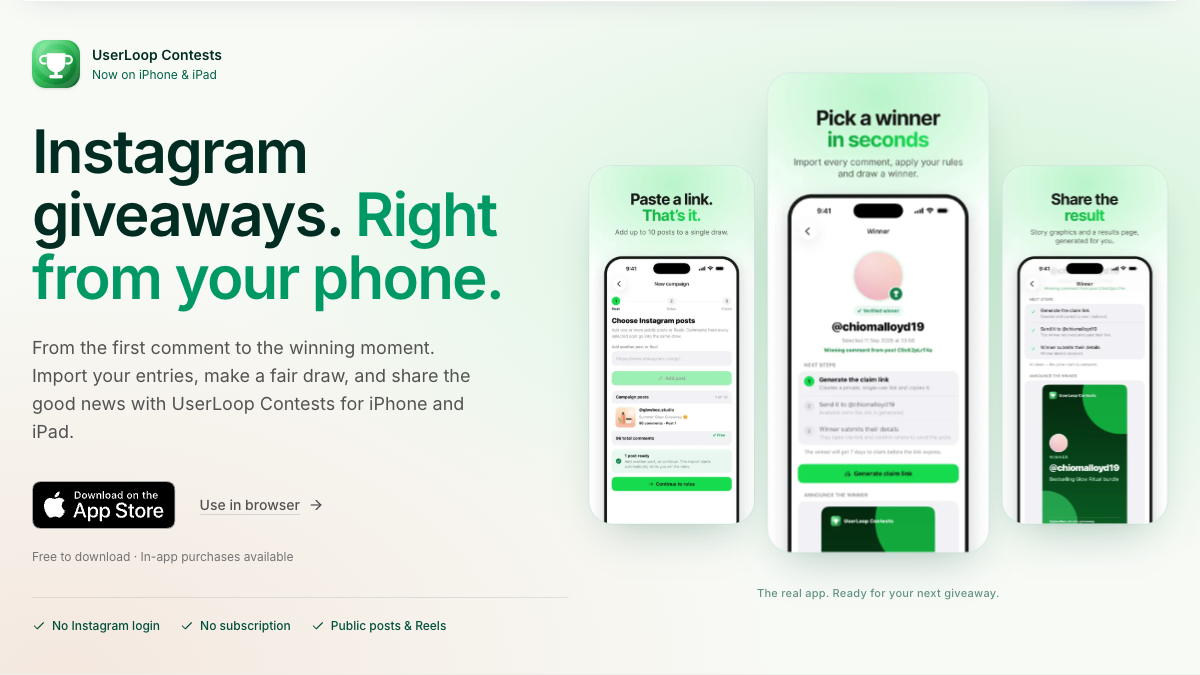
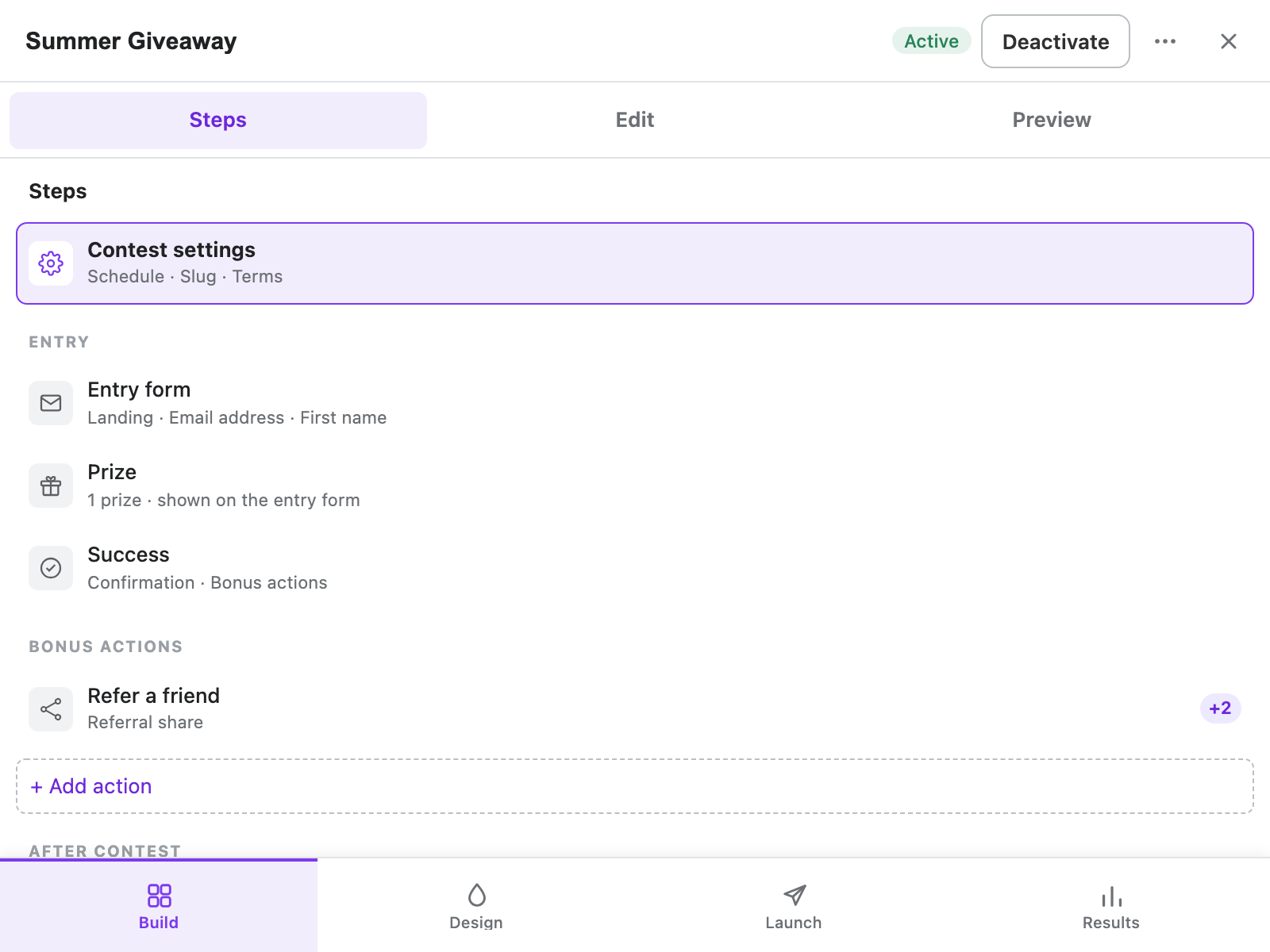
UserLoop Contests is easier to manage from your phone. Move between Build, Design, Launch, and Results with a bottom navigation bar, while each screen keeps its main actions within reach.

In Build, use Steps, Edit, and Preview to focus on one pane at a time. Design has matching Design, Preview, and Theme choices, while Results separates Overview, Entries, and Draw winners.

Open Contests in Shopify admin on your phone to create or update a contest, check entries, and select winners. Dashboard actions stay visible, and entry and referral details stack cleanly on smaller screens.

Mobile Contests editor showing Steps, Edit, and Preview tabs above contest settings and Build, Design, Launch, and Results navigation below
A code-derived mobile Build view with example contest details, showing pane tabs and bottom navigation.
ContestsNew Feature

Connect Contests to Klaviyo, Omnisend, and Campaign Monitor

UserLoop Contests on Pro connects to Klaviyo, Omnisend, and Campaign Monitor. You can add consented entrants to lists, sync contacts and tags, and send entry events where each provider supports them.

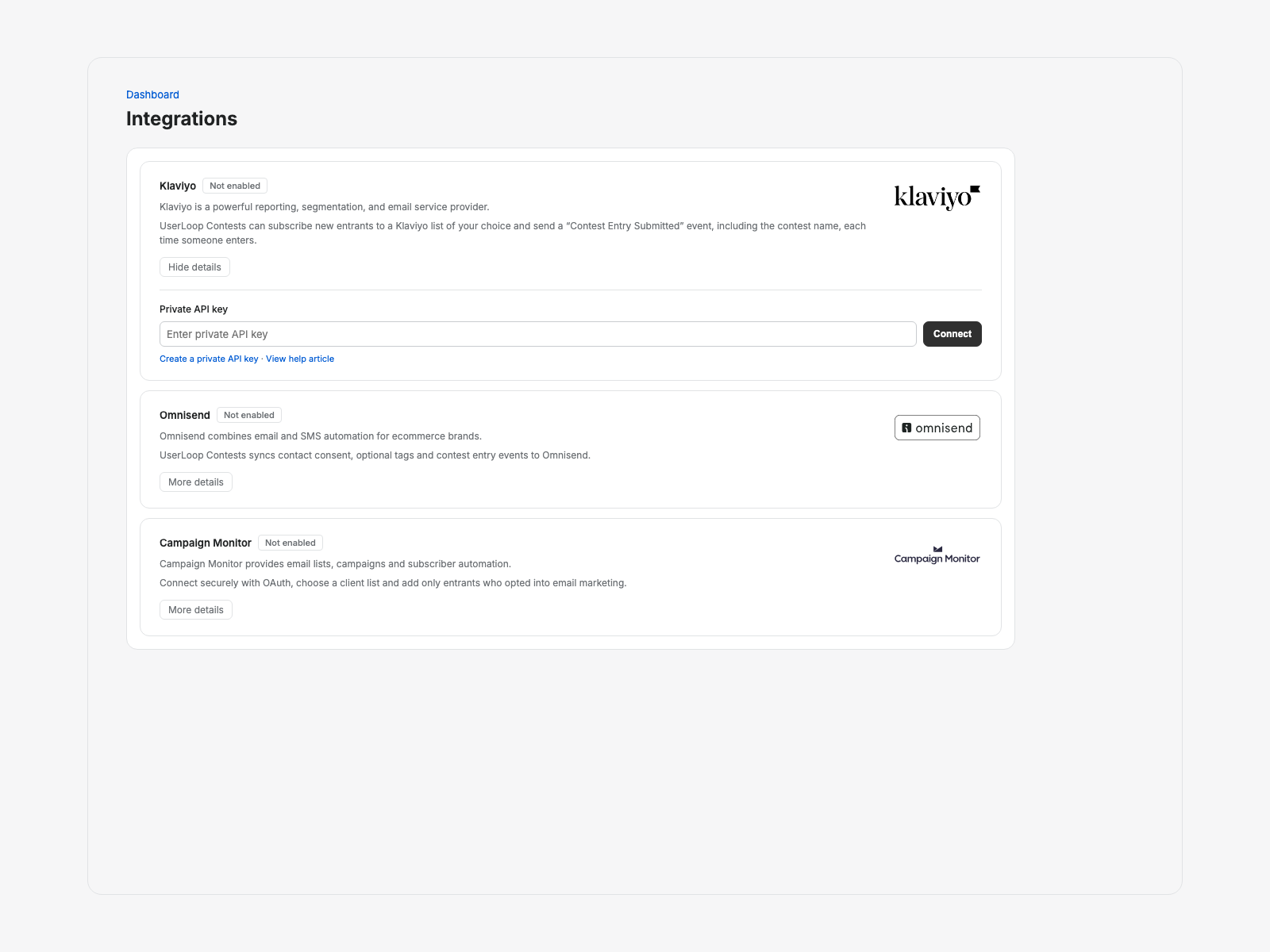
Open Integrations in Shopify admin and expand a provider to connect it. Klaviyo and Omnisend use API keys; Campaign Monitor uses a secure sign-in and returns you to the same store after approval.

Connected providers add optional, unchecked marketing opt-ins under Build > Entry form > Marketing consent. Choose a subscriber list or contact tag where offered, then submit a new test entry because earlier entries are not sent automatically.

Contests Integrations page with Klaviyo, Omnisend, and Campaign Monitor setup states
Contests Integrations rendered from the current provider-card layout with a synthetic disconnected state.
ContestsNew Feature

Reward Referrals and Track Contest Growth

UserLoop Contests can reward confirmed entrants when a friend enters through their unique link. Copying or sharing alone earns nothing, and reward limits help you keep the incentive under control.

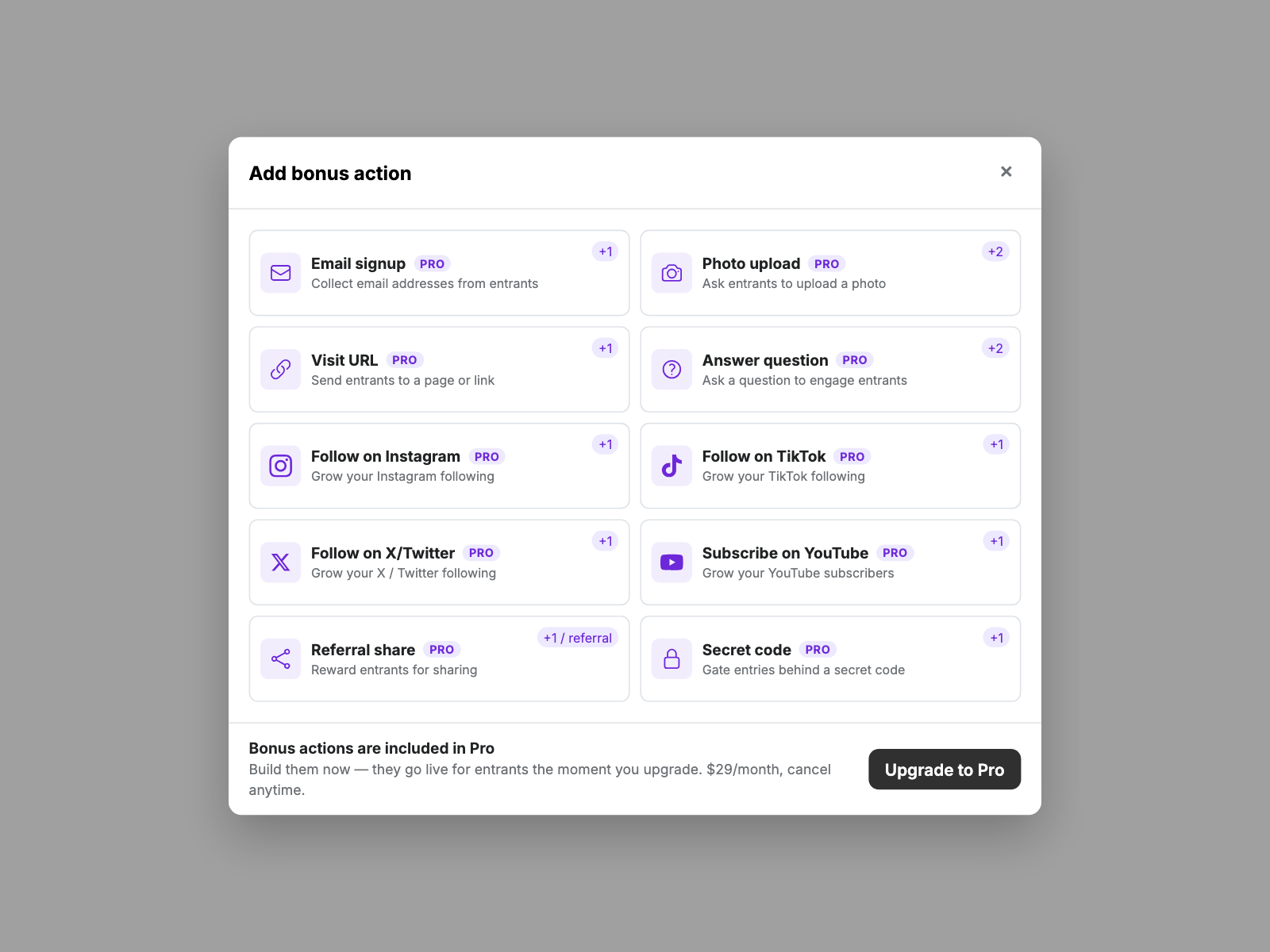
Add Referral Share from Build > Bonus actions, then choose Entries per referral and Maximum referral entries. This Pro action always stays optional because entrants receive their link after completing the base form.

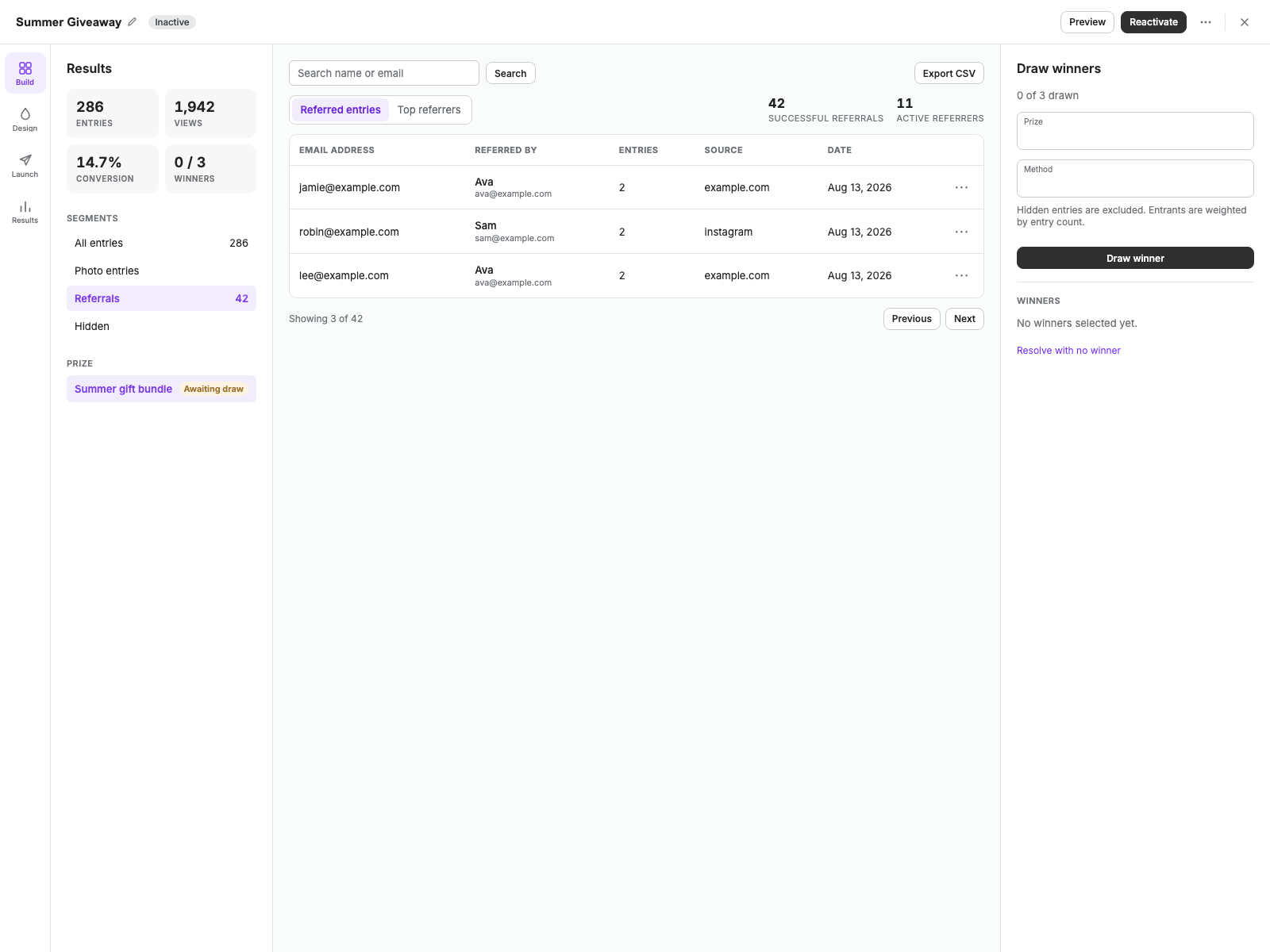
In Results, open Referrals to switch between Referred entries and Top referrers. You can see successful referrals, active referrers, bonus entries earned, and who referred each entrant.

Contests Results view with Referrals selected and referred entrant rows
Contests Results rendered from the current editor components with synthetic referral data.
ContestsImprovement

Keep Contests Moving from the Dashboard

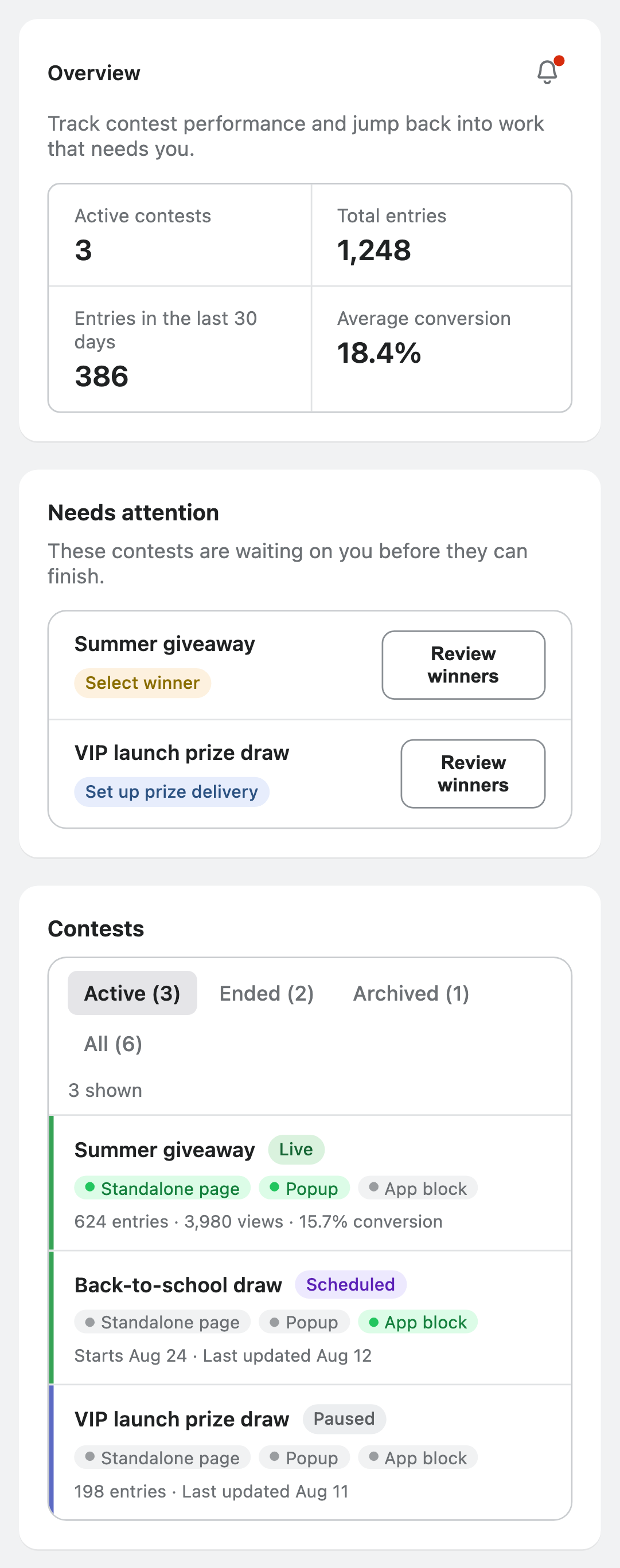
The Contests dashboard makes it easier to see what needs your attention. Ended contests that still need a winner and Pro prize deliveries that need setup appear in Needs attention.

Use Active, Ended, Archived, and All to find the right contest quickly. Each card shows whether it is Live, Scheduled, Draft, Paused, Ended, or Archived.

Open the bell beside Overview to check recent Contests updates. A red dot marks releases you have not opened yet.

Contests dashboard with a What's new bell, Needs attention tasks, status filters, and contest state labels
Illustration of the dashboard showing tasks that need action and clear contest states.
ContestsNew Feature

Manage Contest Winners and Deliver Prizes

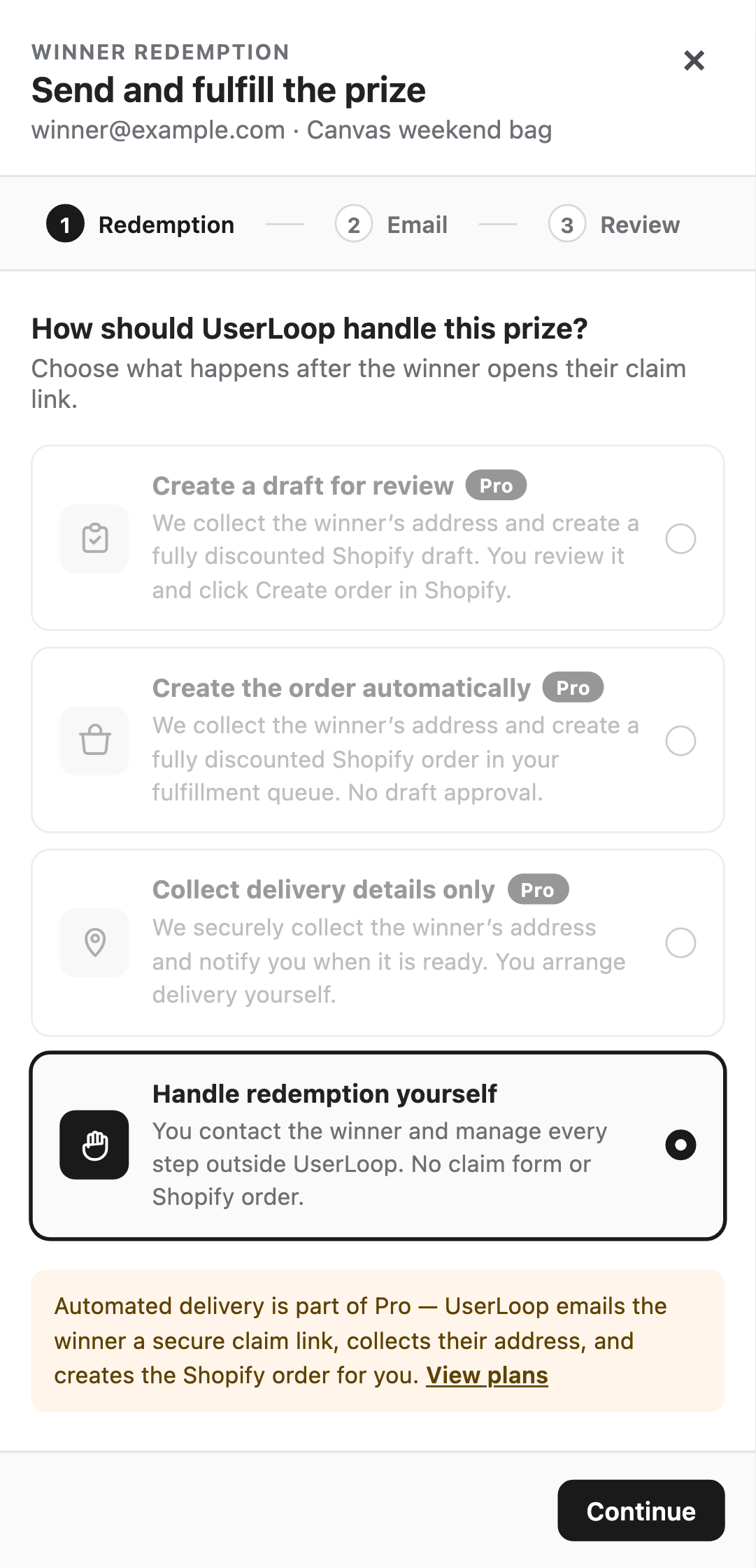
Manage each contest winner from Results. Choose Set up prize delivery to decide how you will contact them and fulfill their prize.

On Free, choose Handle redemption yourself and I'll contact them. Pro adds UserLoop emails, secure claim links, address collection, Shopify draft or automatic-order creation, and email resends.

Claims already in progress continue after a downgrade. Starting a new automated redemption or resending a UserLoop winner email requires Pro.

Free-plan winner redemption screen with automated delivery options marked Pro and manual prize handling selected
Illustration of the Free plan with automated options marked Pro and manual prize handling selected.
ContestsNew Feature

Collect More Details with Custom Contest Entry Forms

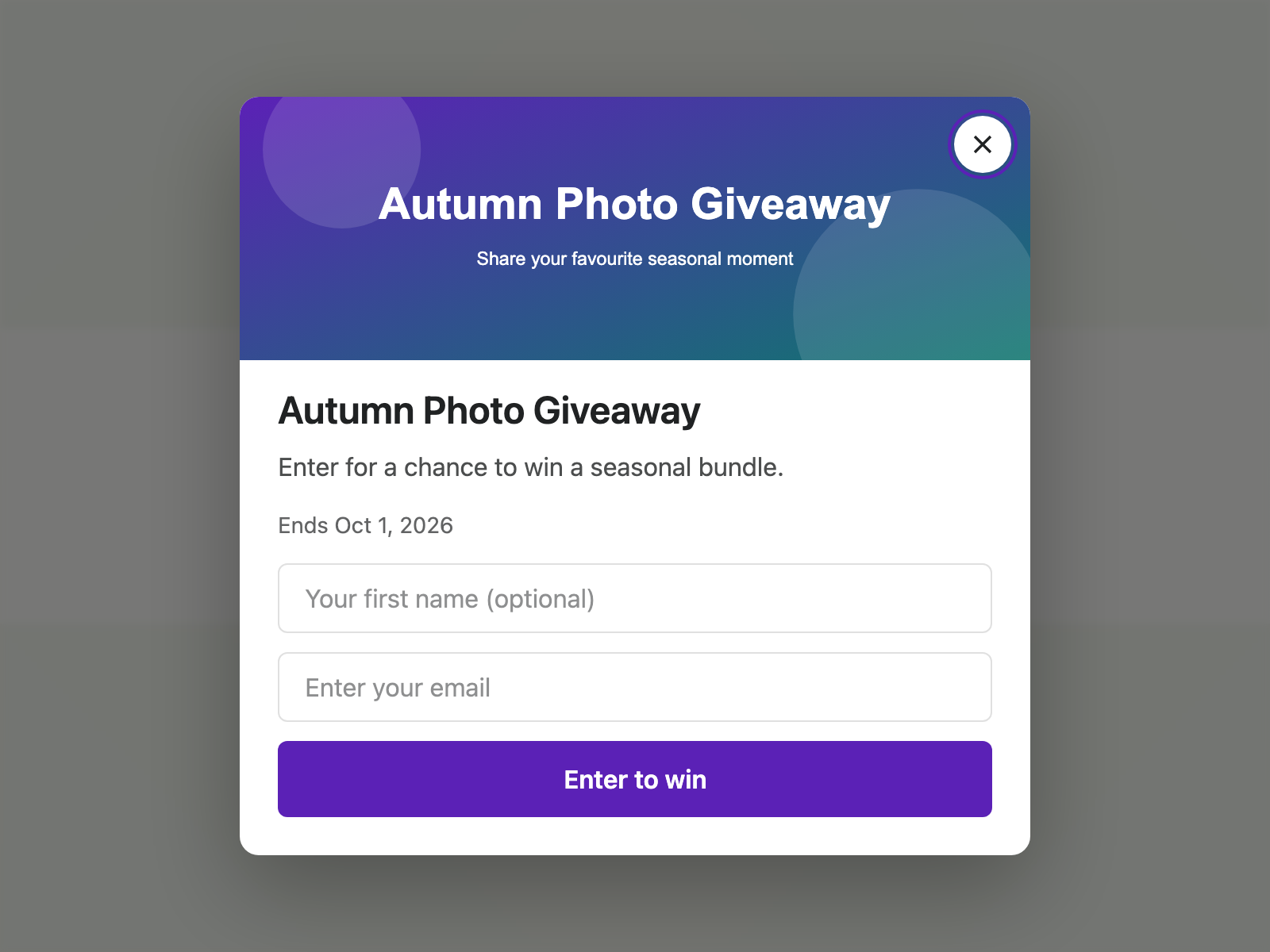
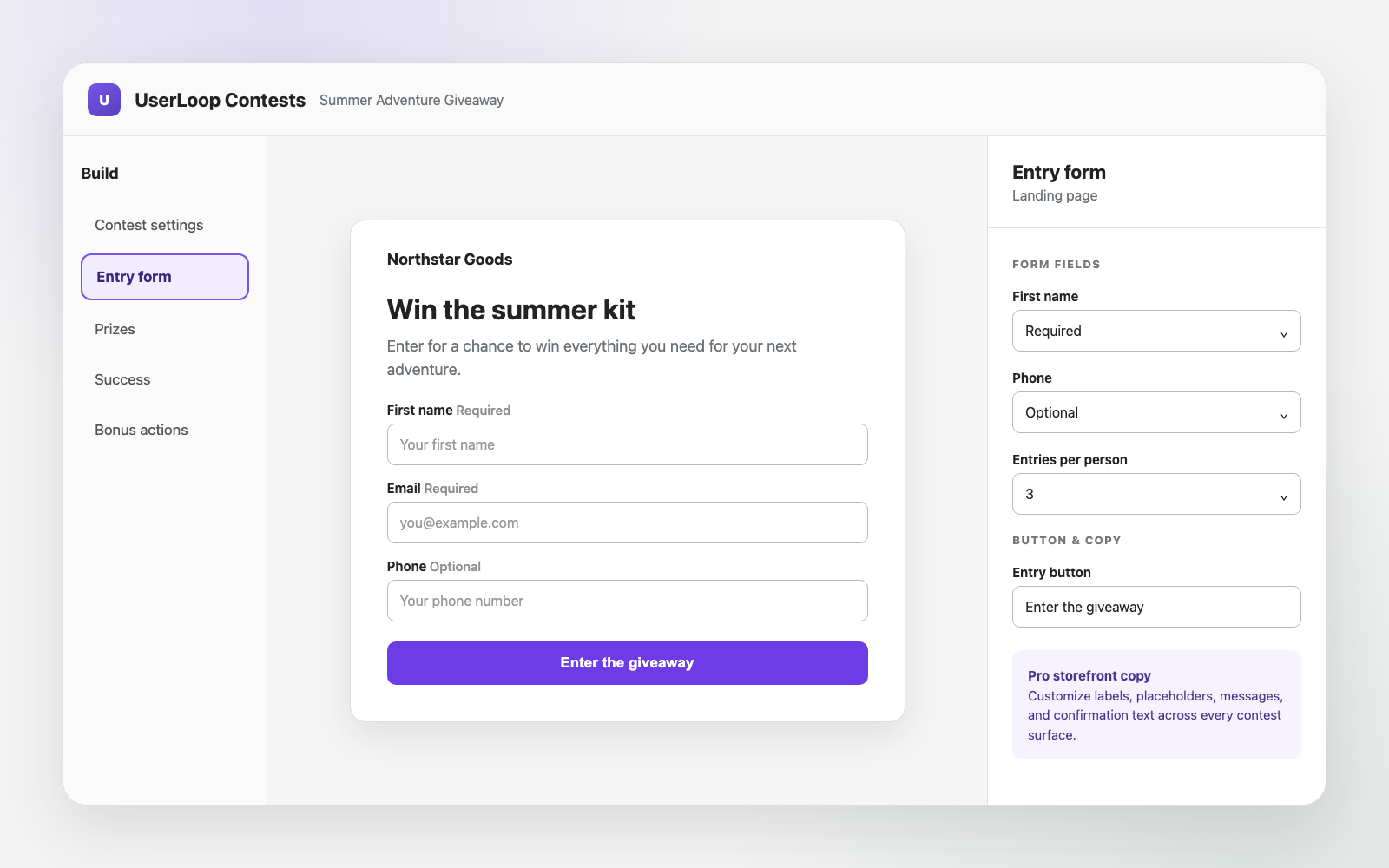
Your contest entry form can now ask for a first name and phone number. Make either field optional or required under Build > Entry form. Email remains required, and your existing entry limit still applies.

On the Pro plan, you can also change the labels, placeholders, error messages, status text, and buttons customers see. Go to Design > Custom text and update the wording for your standalone page, popup, and app block.

Use the live desktop and mobile preview to check everything before you launch.

Contest entry form settings for first name, phone number, and custom button text
Set name and phone fields as required or optional, then preview your custom entry-form text.
ContestsNew Feature

Reward Contest Entrants with Unique Discount Codes

On the Pro plan, you can now give every confirmed entrant their own Shopify discount code. Choose a percentage or fixed discount, set an expiry date, and turn it on under Build > Discount code. You'll need to grant Shopify discount access first.

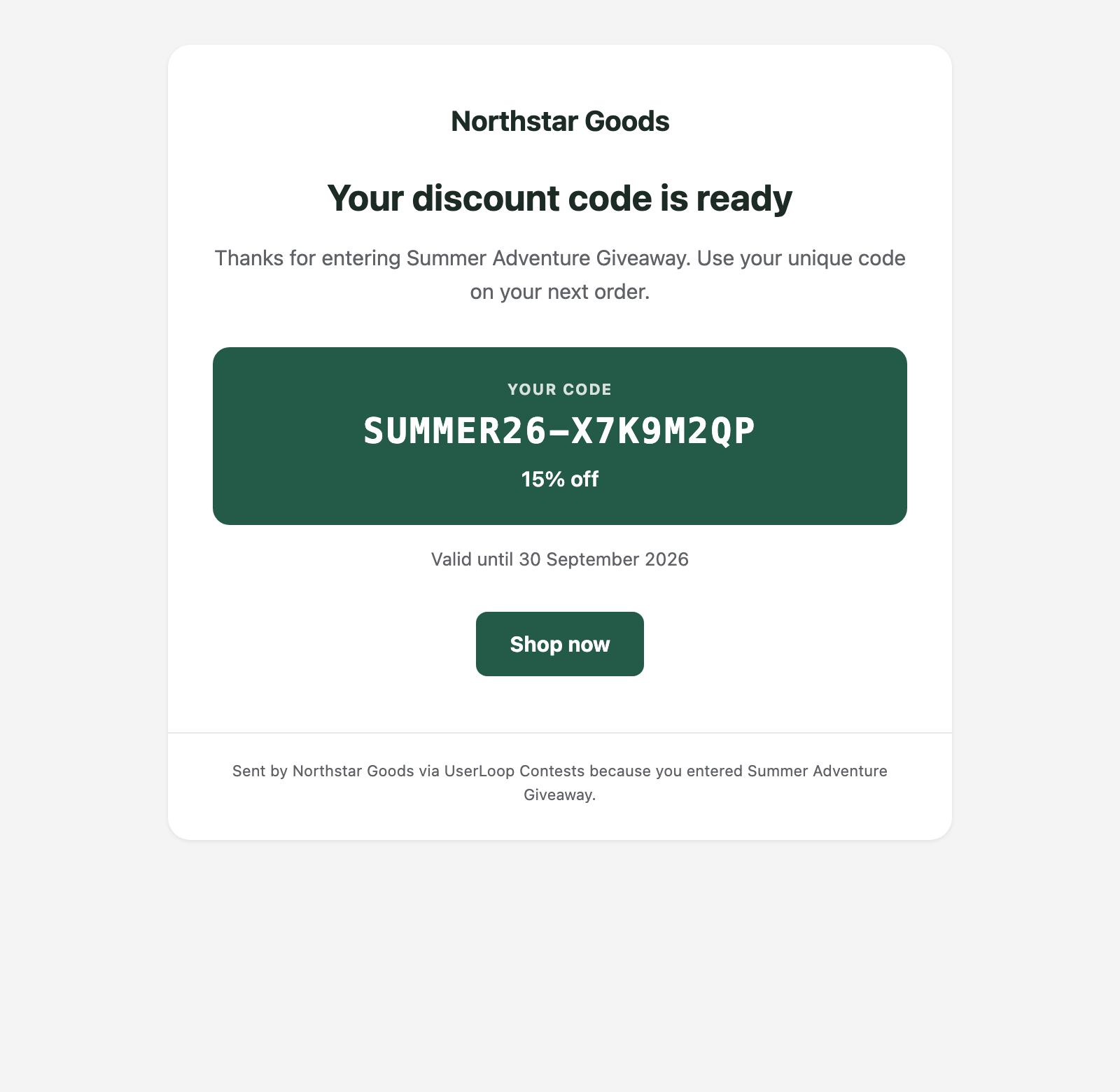
Entrants see their code as soon as they complete the contest. You can also send it by email using your contest logo, colors, offer, and expiry date. Use Send test to check the email before your contest goes live.

Every entrant receives a different code, and Shopify allows each customer to use it once. That means you don't need to share one public code with everyone.

Example contest reward email with a unique 15 percent discount code and expiry date
Example reward email showing a unique discount code, expiry date, and shop button.
ContestsNew Feature

Manage UserLoop Contests with Shopify Sidekick

You can now use Shopify Sidekick to check and manage UserLoop Contests in plain language. Ask about active contests, entries, winners, results, or trends without leaving Shopify admin.

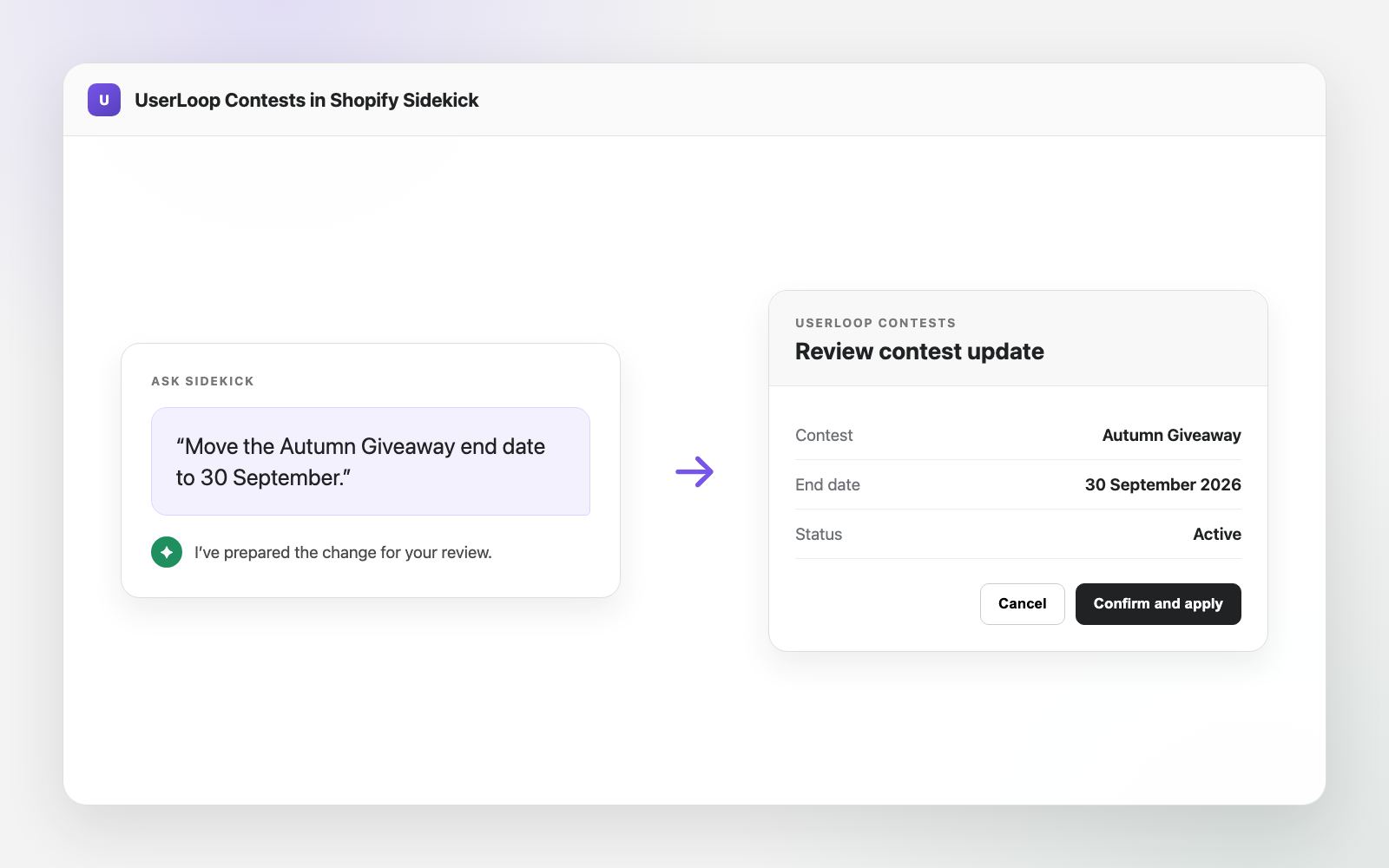
Sidekick can create a draft contest, change settings or status, add a prize, and prepare winner actions. Before it changes an existing contest, you'll see a confirmation card. Nothing changes until you select Confirm and apply.

For visual design, image uploads, theme settings, and a final customer preview, continue to use the full Contests editor.

Shopify Sidekick contest update with Cancel and Confirm and apply buttons
Review a contest update prepared by Sidekick before choosing Confirm and apply.
ContestsMajor Version

Build and Manage Contests in One Full-Screen Editor

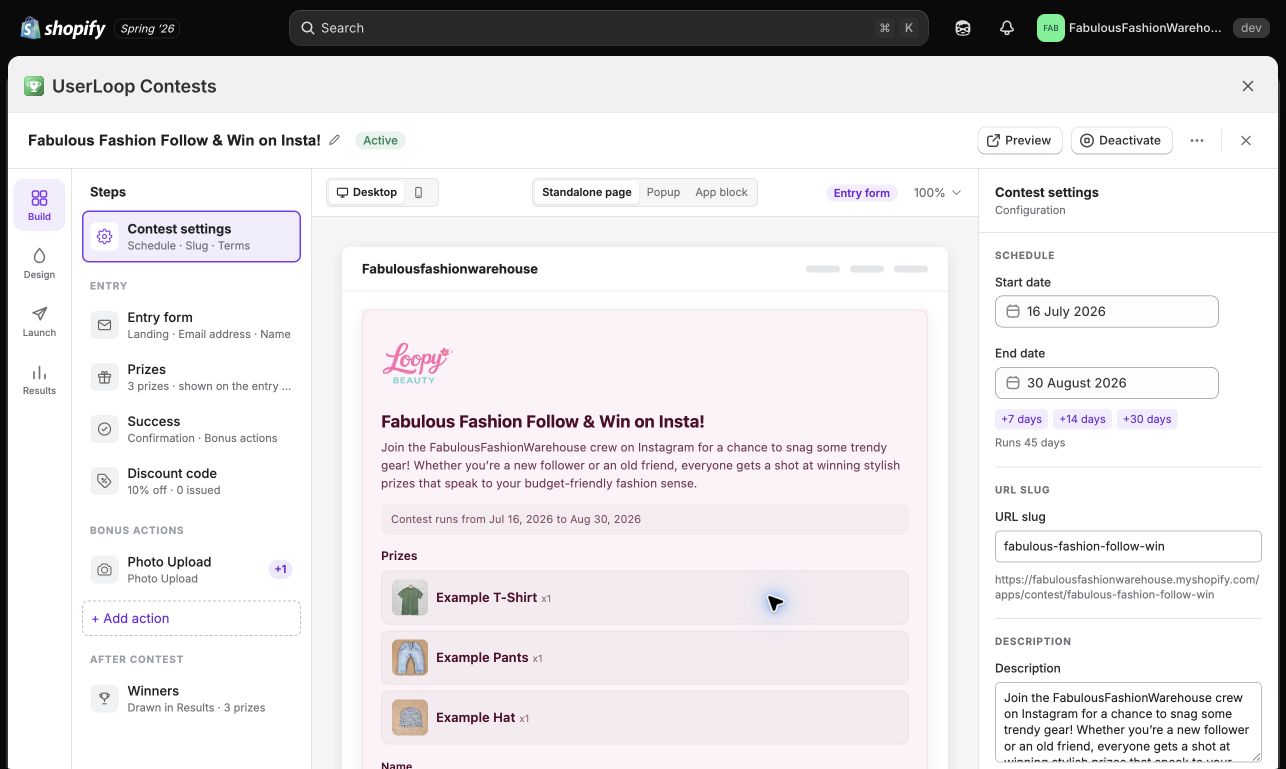
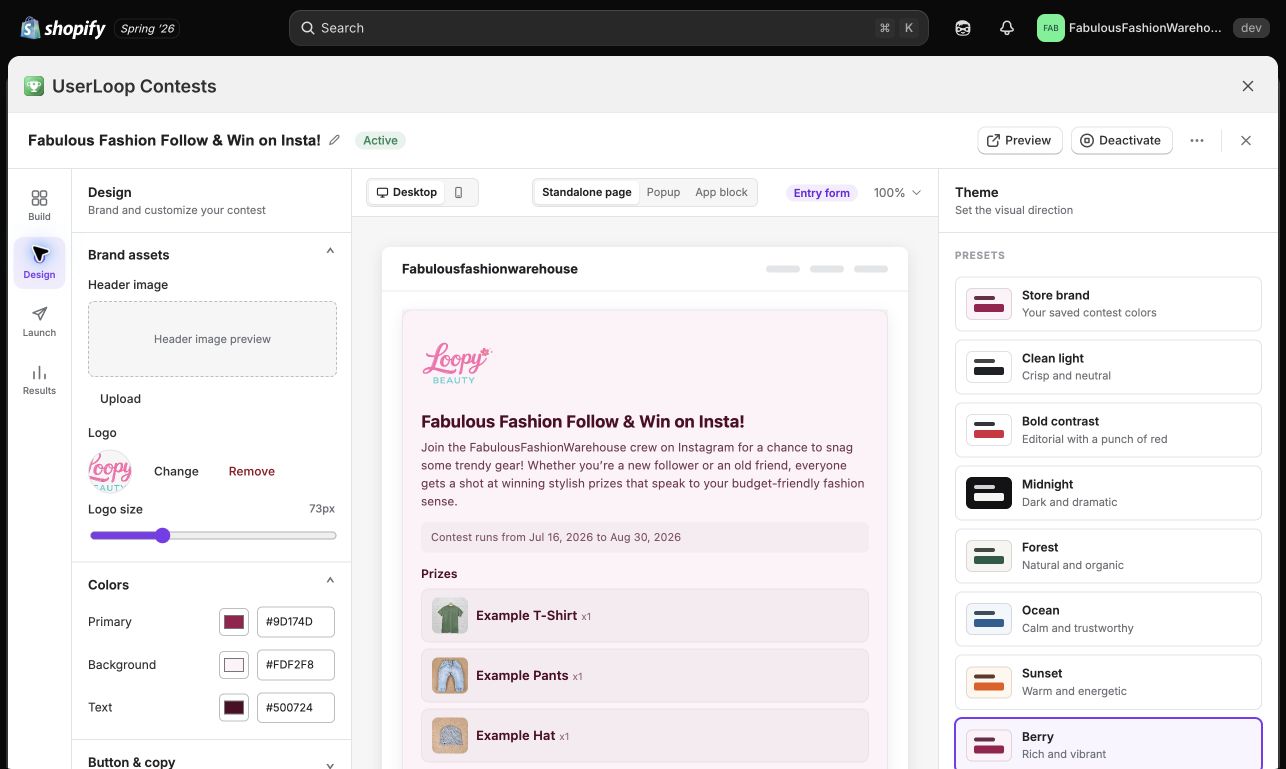
Contests now has a full-screen editor with four clear sections: Build, Design, Launch, and Results. Your settings and live storefront preview sit side by side, so you can see changes as you make them.

Start with a template or a blank contest, add the details, customize the design, and use the launch checklist before going live. Switch between desktop and mobile previews to check the entry and success screens on your standalone page, popup, and app block.

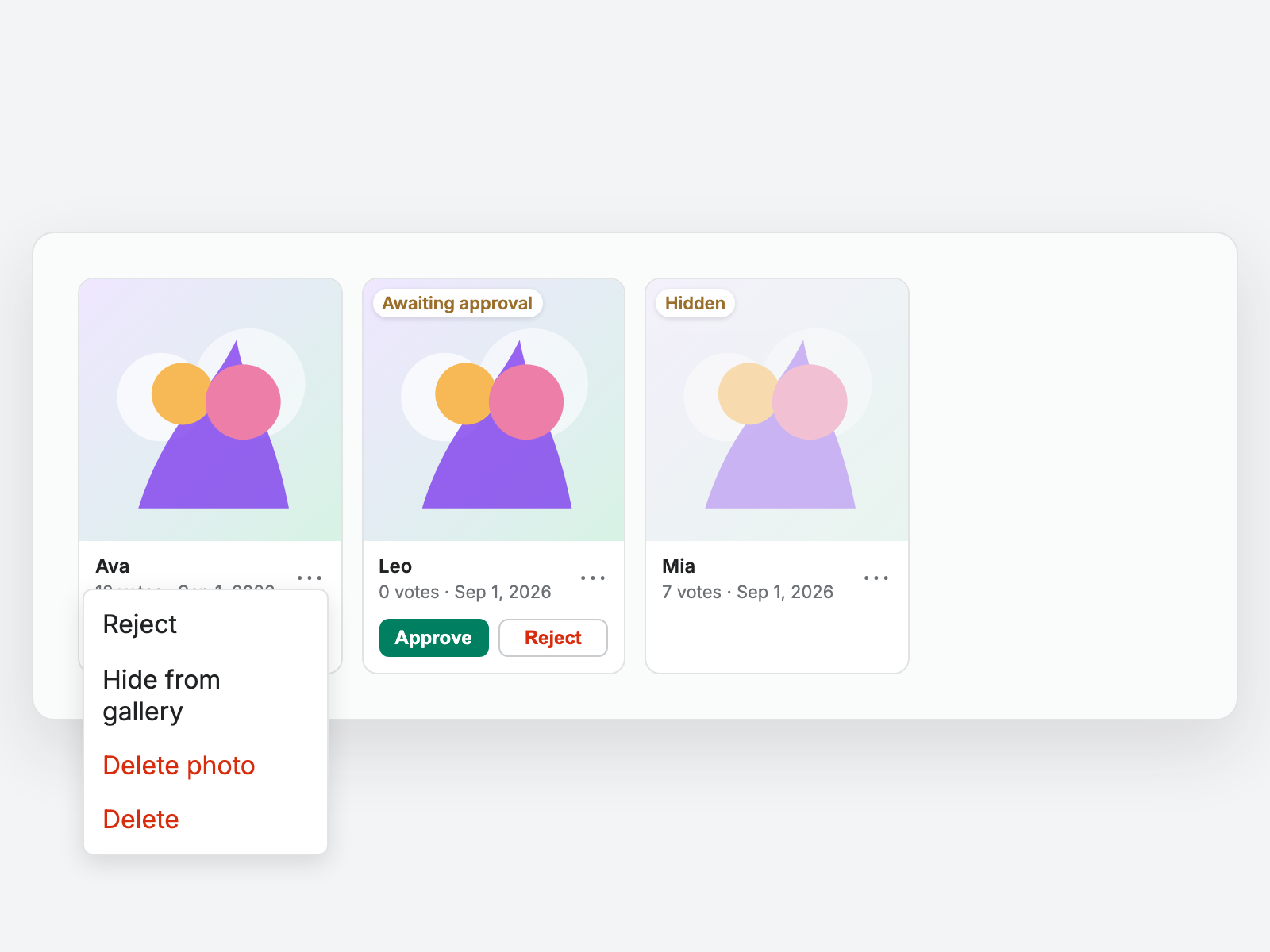
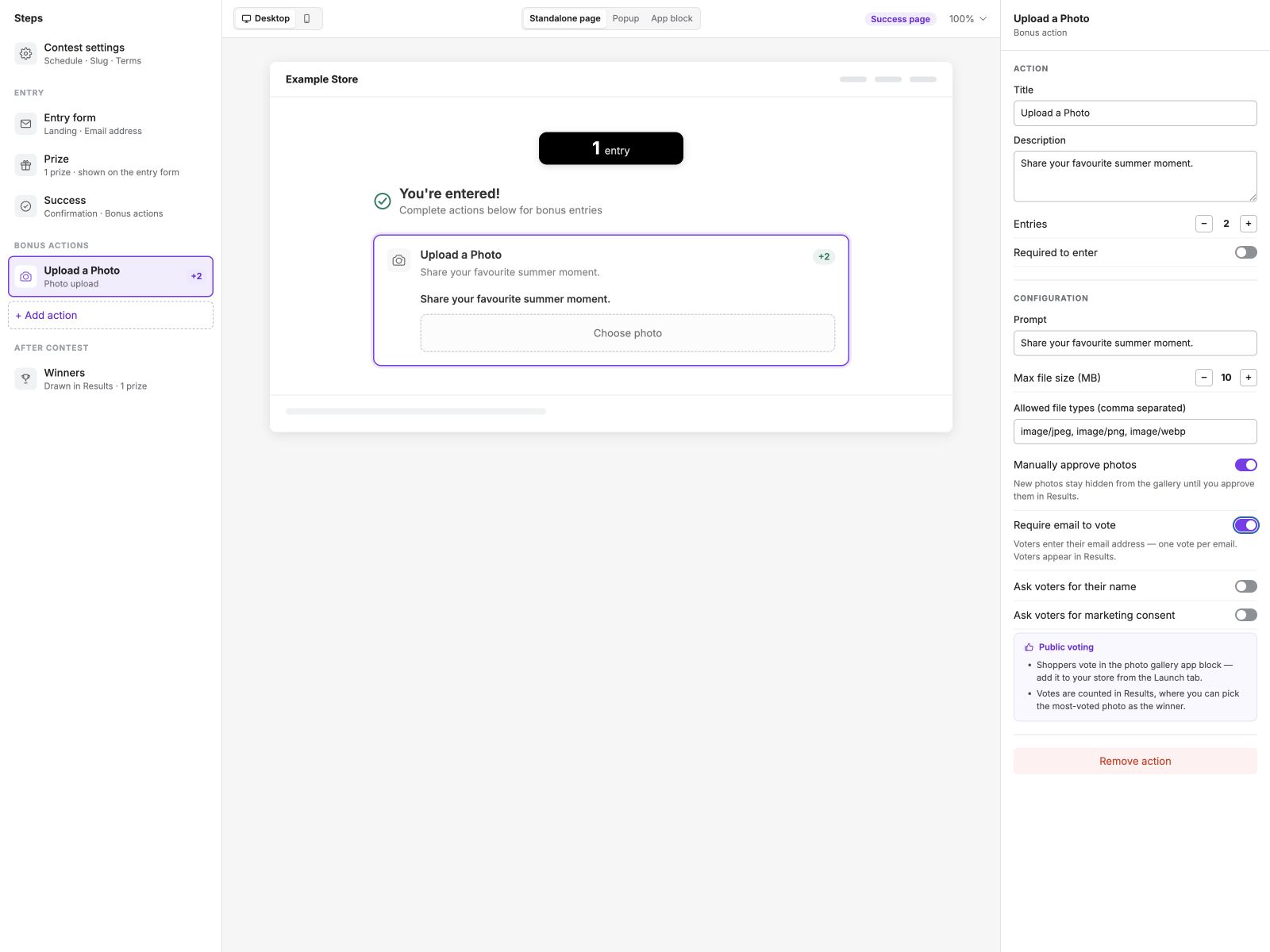
In Results, you can view statistics, search entries, export data, and choose winners in the same workspace. Photo contests also include a gallery for moderation and vote totals, and you can update prize quantities from the prize cards.

Contests Build editor with campaign steps, settings, and a live storefront preview
Keep your contest steps, live storefront preview, and settings together in the Build workspace.
Contests Design editor with logo, color, theme, and live preview controls
Preview changes to your logo, colors, and theme as you design your contest.
SurveysNew Feature

Info Screens

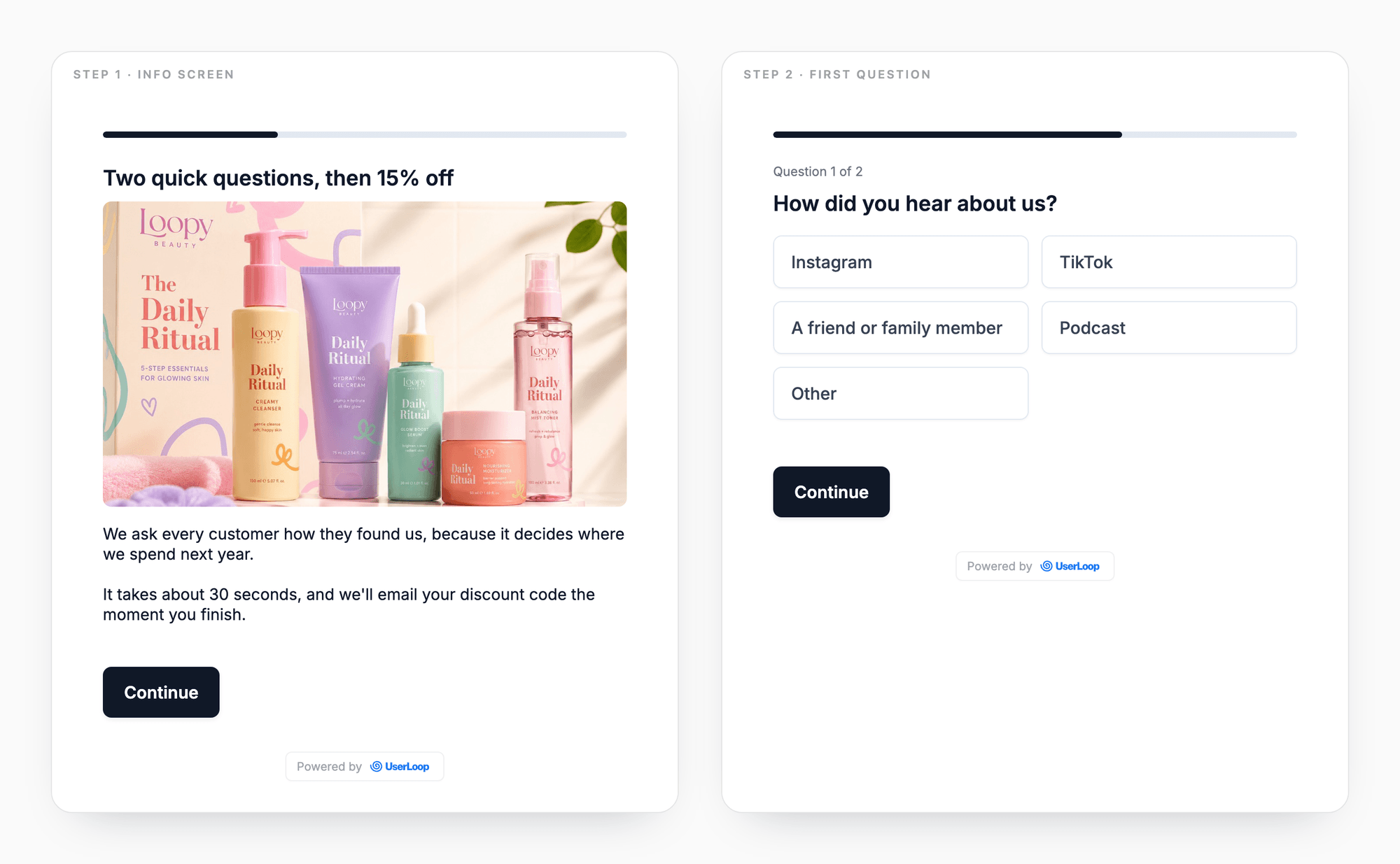
One of our most requested features is here. An Info Screen is a survey step that tells customers something instead of asking them something: a heading, an image, and body text, with a button to continue.

Use one to explain why you're asking, to advertise the discount waiting at the end, or to break a long survey into sections. Add as many as you like, anywhere in the question list.

They collect no answer, so nothing lands in your analytics or exports, and the question counter still counts only real questions. Add one by choosing "Info Screen" as the question type.

Two survey steps side by side: an info screen headed Two quick questions, then 15% off with a product image and explanatory text, and the question that follows it, labelled Question 1 of 2
An info screen opening a survey, and the question after it. The step counter skips the info screen and counts only questions.
SurveysNew Feature

Interactive Charts in Claude and ChatGPT

The UserLoop MCP server now draws your results as charts inside the conversation, instead of answering with numbers alone.

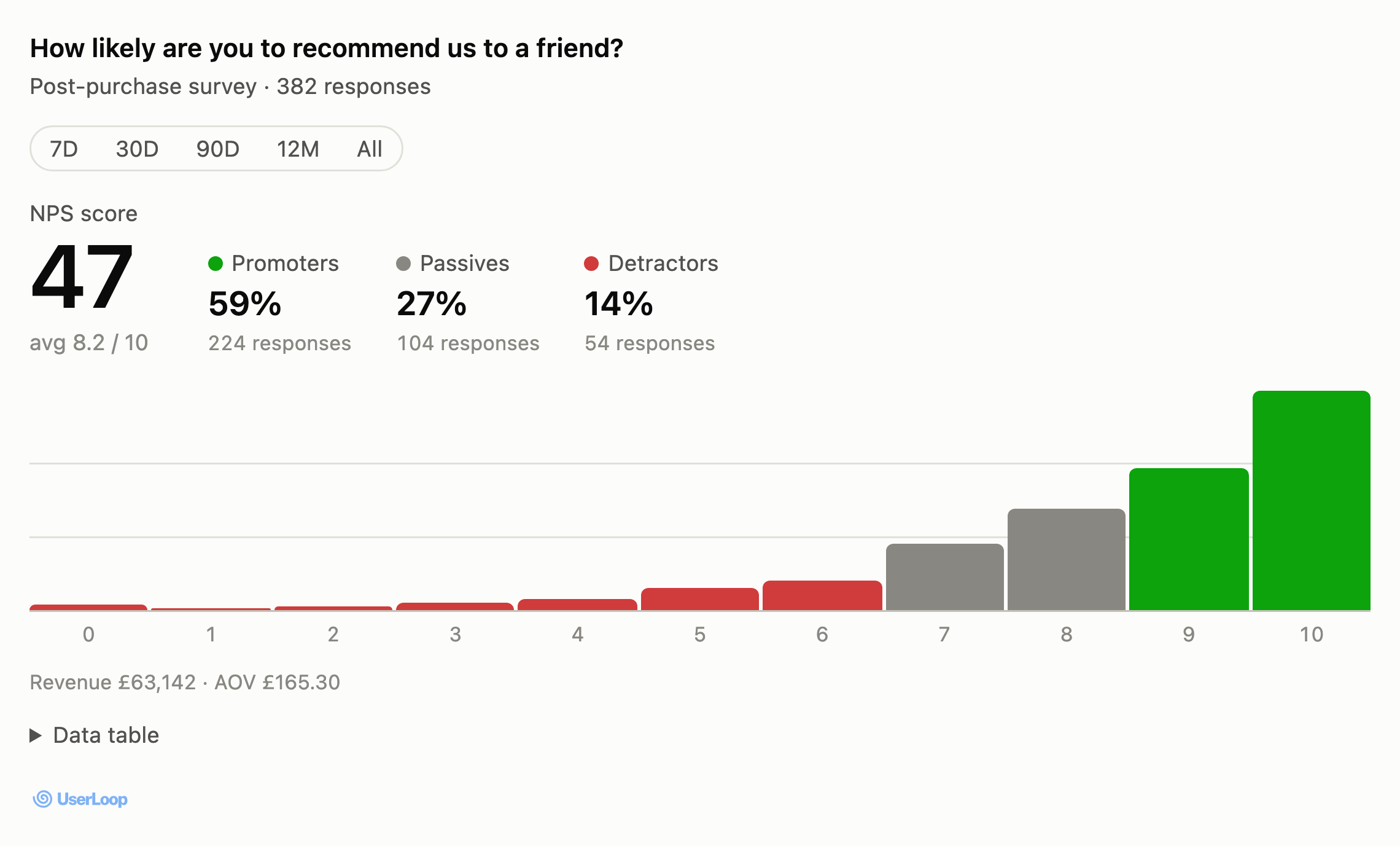
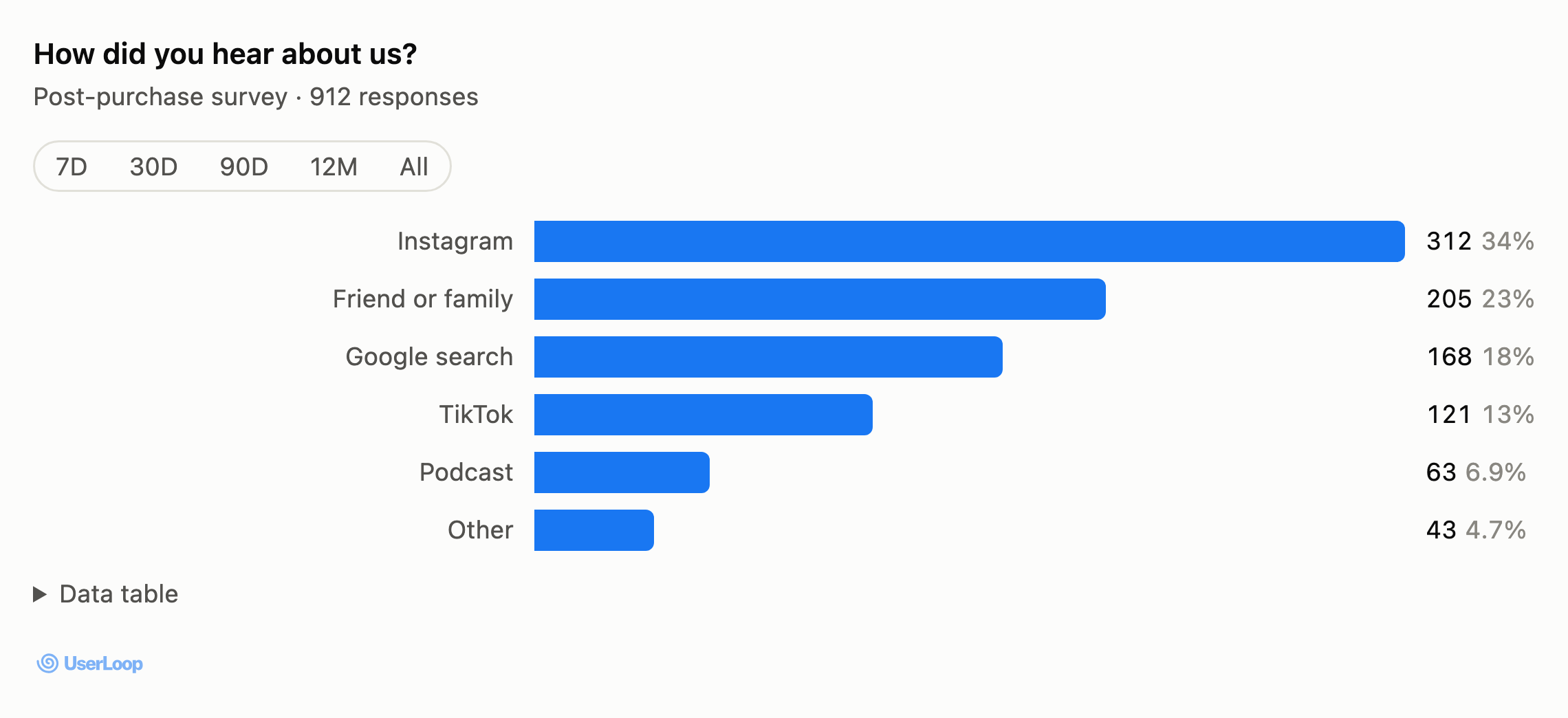
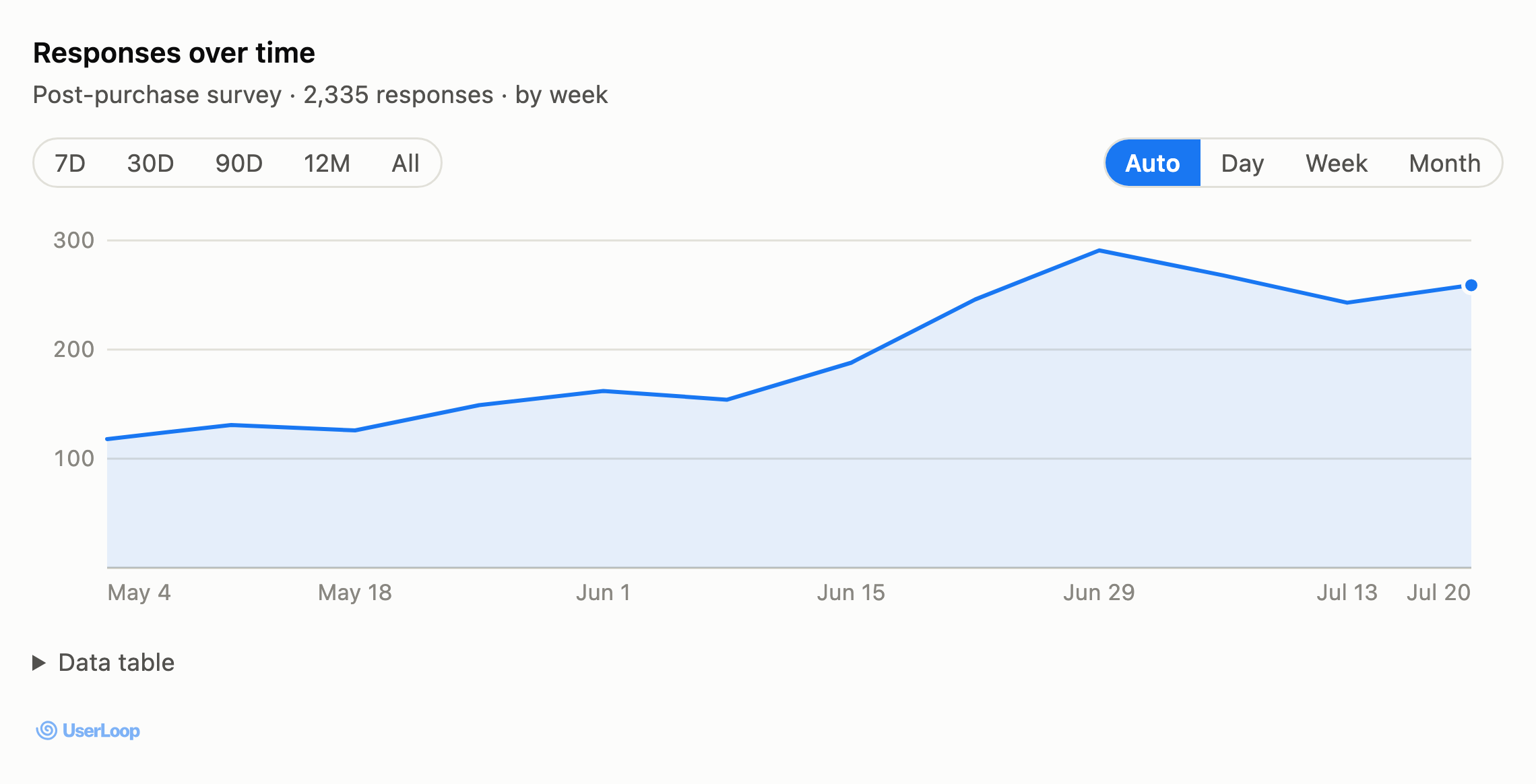
Ask about a question and the chart comes with it: loyalty scores split into promoters, passives, and detractors, answer breakdowns with revenue and AOV, and response volume over time.

Charts are live, not screenshots. Change the date range or the day, week, and month grouping and the assistant refetches from UserLoop.

Nothing to install. Charts appear automatically in clients that support them, and every other client keeps working as before.

Loyalty score chart in an AI assistant showing an NPS of 47 with promoter, passive, and detractor segments and the 0 to 10 distribution
Loyalty questions render as a headline score, segment breakdown, and the full 0–10 distribution.
Bar chart of answer counts for the question How did you hear about us, with Instagram leading at 312 responses
Multiple-choice results as a bar chart, with revenue and AOV per option on hover.
Line chart of survey response volume by week over twelve weeks, rising from around 120 to 290 responses
Response volume over time, switchable between day, week, and month.
SurveysImprovement

Checkout Survey Progress Bar

You can now enable a progress bar in your checkout surveys, this shows users how far they are through at completing a survey.  To enable it, just head to the 'Design' tab in survey settings and turn on the 'Progress Bar' toggle.

SurveysNew Feature

Custom Survey Domains

You can now use your own domain names for your surveys. Connect a domain name like survey.yourbrand.com to any of your email or link surveys by heading to the 'Settings' tab for your survey.

SurveysNew Feature

New Survey Design

We've totally redesigned our surveys for links, emails and embeds with a beautiful new design. Surveys now also support progress bars, auto proceed, follow ups and image based questions. The SDK also adds support for our new Quiz mode.  To try it out head to the 'Design' tab in your survey settings!

SurveysNew Feature

Image Answer Options

You can now add image options to your surveys, where customers can click on an image as their answer choice. Simply head to your question settings and add an image option to any of your answer choices. UserLoop can also use AI to automatically generate images for you based on your answer choices.

SurveysNew Feature

Product Recommendation Quiz

UserLoop has launched a new Quiz feature which helps you match customers to the perfect product. Embed quizzes anywhere on your store or website, and customize your products and questions. UserLoop's AI analyzes a customer's responses and recommends the right products for them, you can even set your own brand's tone of voice in the custom AI prompt.

SurveysNew Feature

PDF Survey Reports

UserLoop can now automatically generate beautifully designed PDF Reports of your survey response data. Simply head to the analytics section and press the 'PDF Report' button.  You can then customize the time frame, branding and data to be included in the report.

SurveysNew Feature

Response Feed & Filters

  • View responses as a feed or grouped by customer - Filter by customer email, survey, question, or specific answers Filter by UTM parameters (Instagram, email campaigns, etc.) - See all context with our new sidebar showing linked responses -All filters update in real-time as new responses come in - Refreshed Home Dashboard with survey list and recent response feed Questions? Chat with us using the button in the bottom right.
SurveysMajor Version

The New UserLoop

We're excited to launch the all new UserLoop, with a upgraded backend built for speed and enabling new analytics on your data.  This is the biggest update to UserLoop ever and contains tons of new features. - New home dashboard including your latest surveys and responses - A new response sidebar panel showing you the full view of a responder, with all their data in one place - New attribution data in the side panel.  See which marketing campaign the user originally came from and which page they landed on before they completed the survey. - Redesigned analytics.  Totally new analytics which are much faster and give a simple and easy view of your data.  New tables show open ended responses in line, and updated AI analysis helps you understand responses at scale. - All new email reports.  We've totally updated all our email reports which now also show the latest 10 open ended responses for each question. All the changes behind the scenes means we're also launching lots of new reports based on your data - LTV analytics is currently in beta and there's lots more to come!

SurveysNew Feature

New Question Types

New question types! Loyalty (a 0 to 10 recommendation score) and Ratings are now available across all survey types.  Track your loyalty score and ask customer questions with numerical ratings.  UserLoop automatically calculates and tracks it in analytics - and our AI can now write these new question types for you automatically.

SurveysNew Feature

Auto Proceed

Auto Proceed Introducing our latest feature: Auto proceed mode for checkout surveys, where customer responses are seamlessly submitted and transition to the next question. You can find the toggle to turn this on on the Survey Settings tab - we'll be turning this on for all customers by default in the next few weeks. Auto proceed is only available for stores who have updated to Checkout Extensibility.

SurveysNew Feature

Checkout Extensibility App Block

Checkout Extensibility is here! Don't forget to add the new checkout extensibility app block to your 'Thank you' and 'Order confirmation' pages to continue collecting survey responses. We're adding lots of new features like Auto Proceed to our app blocks - so make sure you have them installed to get all the latest features!

SurveysNew Feature

AI-Generated Survey Questions

Our AI assistant now creates amazing survey questions tailored to your store's brand, products, and customers. Just let us know the customer insights you're seeking, and we'll generate a tailored set of questions to gather that data for you. With just a click, you can seamlessly integrate these questions into your survey and begin collecting valuable information!

SurveysNew Feature

Gift Card Incentives for Email Surveys

Gift card incentives are now available for email surveys.  Reward customers who respond to your survey with a Shopify gift card to spend in your store. You can now reward customers who complete an email survey as well as a checkout survey with a gift card. UserLoop can automatically generate a gift card for a customer when they finish completing your survey.  Rewarding customers with an incentive can massively boost your response rate - and make customers more loyal. The gift card is securely emailed to them by Shopify - and you can track which customers earned a gift card from the responses tab.

SurveysNew Feature

Multilingual Surveys

Introducing multilingual surveys! Your surveys can now automatically translate into over 100 languages, making it easier to connect with customers globally. This feature supports both Shopify checkout surveys and checkout extensibility. Enjoy seamless communication in your customer's preferred language.

SurveysNew Feature

New UserLoop Analytics

New Userloop Analytics are here!  UserLoop's new AI analyzes open-ended questions, segments customers by purchase habits, & gives you actionable insights in seconds.  Try it now & tell us what you think!

SurveysNew Feature

Checkout Extensibility Support

Checkout Extensibility Support! Now you can easily add surveys to your Shopify thank you and order status pages, enhancing customer feedback collection. Upgrade your store's experience in just a few clicks.

SurveysNew Feature

Scheduled Data Exports

Scheduled Data Exports Get an automatic export of all your survey responses delivered to your email inbox every day, week or month -  automatically! Exported data now also includes much more data, including which UTM's led to the customer's purchase, and which page they originally landed on before purchasing.

SurveysNew Feature

Meta Conversion API Integration

Meta Conversion API Integration UserLoop now seamlessly integrates with the Meta Conversion API, allowing for automatic synchronization of survey response data to Meta. This feature enhances ad targeting precision and spend efficiency with minimal setup required. Availability: Now on Scale plans and above Setup Time: Approximately 5 minutes For a step-by-step guide on enabling this feature, please visit our help documentation.

SurveysImprovement

Custom Thank You Page Button

You can now add a custom URL to the button which is shown on your survey thankyou page, this is great for sending customers back to product and category landing pages on your store!

SurveysImprovement

Improved AI Suggestions

Improved AI Suggestions.  We've made some improvements to our AI answer suggester, it now makes recommendations specific to your brand and product range, and shows you a preview of all the recommendations.  You can either pick which answers you'd like to add, or add all of them.

SurveysNew Feature

UTM Data on Survey Responses

UTM data on Survey Responses. We're thrilled to announce the launch of UTM data integration in UserLoop! This new feature connects UTM data from customer orders with their survey responses. We're incorporating this data into our response analytics, giving you the opportunity to probe deeper into customer cohorts.

SurveysNew Feature

Word Clouds

Word Clouds.  Our new 'Word Clouds' feature allows you to analyze open-ended survey question responses with a visually appealing and intuitive word cloud. The cloud highlights the most frequently used words in customer responses, helping you swiftly identify the key topics resonating with your audience.

SurveysNew Feature

Response Rate Benchmarks

Response Rate Benchmarks.  'Benchmarks' gives you the power to compare your brand's survey response rate against the current average across all brands on UserLoop. It offers an easy-to-understand rating of 'Excellent', 'Average', or 'Poor', providing an immediate snapshot of your performance relative to your peers.  Check it out now on your survey analytics page!

SurveysNew Feature

Discount Emails

Discount Emails.  Now you can automatically email a customer when they respond to your survey with a discount code for their next order.  This is a great way to reward customers who respond to your survey, and boost AOV. Simply head to the 'Thankyou Page' tab in your survey settings - our AI assistant will help you set up the email in under 30 seconds!

SurveysNew Feature

Invite Team Members

Invite Team Members.  You can now invite your whole team to your UserLoop account, whether they have access to your Shopify store or not.   To invite a team member head to the new 'Team' section from the left navigation.  Team members will be able to sign in with their email address, receive reports and create surveys in your account, even if they don't have access to your Shopify store.

SurveysImprovement

Filter by Archived & Follow-Up Questions

Ability to filter your analytics by archived and follow-up questions. You can now view archived and follow up questions in your survey analytics, head over to the analytics page to try it out!

SurveysNew Feature

UserLoop SDK & API

UserLoop SDK & API. We've release a new SDK which allows you to embed your survey on any webpage.  To get started, head to your survey settings and press the new 'Embed' button. We've also released an API which allows you to query your surveys and response data for further analysis and to use in your other data platforms.  Check out our new developer documentation at https://help.userloop.io

SurveysNew Feature

New Survey Triggers

New Survey Triggers. We know it's really important that you ask customers to complete your survey at the perfect moment in the buying cycle. To help with that, we've launched 3 all new triggers for our email surveys. Now you can send a survey when... - A customer buys a specific product.  Simply select which products from your Shopify store and we'll email a survey to customers who buy those products, you can also set a custom delay. - When a customer doesn't respond to another survey.  Sometimes you want to follow up with a customer if they don't respond to one of your other surveys.  Simply select which survey to monitor and a timeframe, and if a customer hasn't responded we'll email them the new survey. - When a product is delivered in Aftership.  Our new aftership integration lets you send a survey when a product has been marked as delivered by Aftership. Drop us a message in the app chat if you need help setting them up or have any other questions and we'll be happy to help you out!

SurveysImprovement

New Dashboard

Say hello to the new dashboard! You'll notice your UserLoop homepage has a new look, we've redesigned this page to give you a quick overview of all the surveys you're running. The new dashboard is powered by OpenAI ChatGPT, and our all new analytics backend for super speed. Here's everything that's new... - OpenAI ChatGPT-4 response summaries. A quick and easy to read overview of the responses to your survey. Simply click on the summary to see a breakdown of all the actual things customers said on the analytics page. - All new analytics. We've revamped the technology behind our response analytics, so you'll see lightning fast responses for you - even if you have millions of responses. - Quick access menu. We've added a new quick access menu to do the most common things you want to change about your survey. Quickly jump to analytics, editing questions or even archiving the survey. - Select a language.  You can customize which language ChatGPT writes your summaries in, simply head to your account settings page to set your language. We hope you like these changes, don't forget you can get a weekly email summary of all the responses to your survey using our new Magic Reports feature, simply head to the settings page. Let us know if you have any feedback or ideas for improvments!

SurveysNew Feature

Magic Reports

Magic Reports ✨ UserLoop Magic Reports is the new way to get a quick overview of all the responses to your surveys. Using OpenAI, we analyze all the responses to your survey to give you actionable insights into each question - making it quick and easy to understand what you need to improve in your store. Set up in seconds, watch the demo video!

SurveysImprovement

Improved Data Exports

Improved Data Exports You can now include archived questions in your data exports, simply check the box when requesting an export. If a customer has left you a video feedback, the URL to the feedback video is also included in your export.  Follow-up questions are now also included in the export file.

SurveysImprovement

Landing Page Survey Discount Codes

Generate discount codes on landing page surveys. You can now automatically generate a unique Shopify discount code for customers who complete one of your landing page surveys. To set up your discount, head to the 'Thankyou Page' settings for your survey.  Select which discount you'd like to apply from your Shopify account and customize the promotion text. Then whenever a customer completes your survey, they'll be shown a unique discount code on the thankyou page which they can use on the next purchase in your store.