How to Create a Shopify Post-Purchase Survey
A post-purchase survey on Shopify helps store owners keep on top of what their customers want. But what happens after your customers finish their purchase?
Do you just leave them to receive their order and hope all goes well? Or do you check up on them and ask for feedback?
It’s the stores that stay in touch with their customers after they’ve completed their purchase that find the most success. By talking to your customers through a UserLoop survey, you can get the feedback you need to improve your Shopify store.
With a well-crafted post-purchase survey, Shopify customers tell you exactly what they want from your business. If you listen, your customer experience goes up so more leads turn into customers. And more customers turn into loyal brand promoters. Which in turn leads to more revenue and higher profits.
There are many ways to run a post purchase survey - at checkout, by email, link or even QR code.
**In this blog post, we’ll look at what questions you should be asking and how to create your post-purchase surveys for the best results.
What are post-purchase surveys?**

The clue is in the name in this one. Post-purchase surveys are surveys you send to customers after they purchase from your Shopify store. They provide an adaptable way of getting specific, actionable feedback from the people who know your company best.
A post-purchase survey can only be completed by customers after they've ordered from your store. So leads (people that have never purchased from your store but have visited) never muddy the results.
Your customers have had the whole experience with you, from the discovery of your product to browsing, purchasing, and experiencing that product firsthand. So you can ask your customers about any one of these aspects of your store/product.
If you are not familiar with post-purchase surveys at all, hop over to our What are Shopify Post Purchase Surveys post and get the top 3 tips for survey success. Then come back here to get the top tips for creating a successful post-purchase survey.
Post-purchase survey formats
There are several different ways you can survey customers after they've purchased. Let's take a look at a couple of the different options.
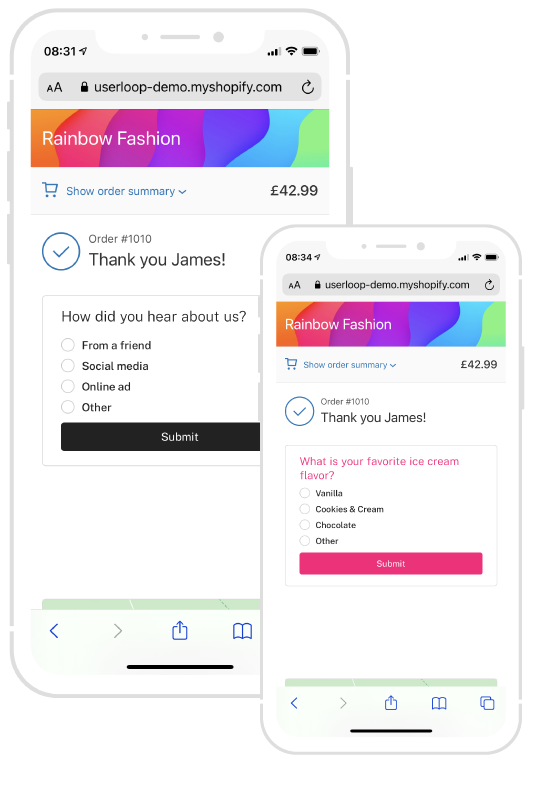
Checkout. Ask customers to complete your survey on your order confirmation page. This shows customers the survey right after they've completed their order. This is a great place to ask a HDYHAU survey to understand how customers found you, we've written a guide on HDYHAU surveys here if you'd like to dive deeper into that topic.
Email. Send an email to customers asking them to complete your survey after they've purchased. This can be great for collecting feedback about the overall purchase and delivery experience - as well as being a good time to ask the customer to leave you a positive review. Post purchase email surveys often take the form of a CSAT survey, a quick and simple way to measure overall customer satisfaction with your store.
What usable customer data can you get from post-purchase surveys on Shopify?
When you sell on Shopify, post-purchase survey results aggregate several different types of data you can use to improve your business. Moreover, each type provides information on other aspects of your business, from marketing attribution to customer experience to brand loyalty.
Simply put, you need to understand these data to increase your sales.
Marketing Attribution: The Top of Your Sales Funnel
Marketing attribution is the study of which strategies provide the most efficient use of your marketing budget. You can lose your marketing ROI if you don't pay close attention to every channel in your marketing strategy.
Not only is this a money-saving science, but it can help you improve personalization by letting you know what messages and media your customers prefer.
Marketing attribution tells you how your customer heard about you, what message they heard, and how they perceived you at first contact.
Wouldn't it be nice to know which message resonates most with your customers?
Or, perhaps you are spending too much advertising money on a platform your target audience ignores. A quick, easy-to-set-up, post-purchase sale campaign can precisely tell what each customer heard or saw that enticed them into a purchase.
Ensure a Smooth Customer Experience
Customer experience data are super-important for ironing out your sales flow. They tell you whether your website, checkout process, customer service, and products are up to snuff. Some of these rarely appear in customer reviews, but a good customer experience survey (CSAT) will pick up on them. Without a good CSAT, you may never know (or fix) the things that annoy your customers.
Not only can CSATs monitor the general flow of a user's experience, but they also serve two additional functions – damage control and testimonials. If you are on top of your CSATs, you can address negative feedback quickly and salvage a customer relationship before they drop a bad review. Furthermore, survey responses make great user-generated content for additional marketing!
Gauge Loyalty and Calculate Your NPS Score
Word-of-mouth advertising is hardly a thing of the past. Indeed, the advent of social media has lengthened the reach of everyone's voice. So how valuable can a loyal customer be for your business, whether they live in Singapore, L.A., or Dakar? Your Net Promoter Score (NPS) helps track your customer base's overall satisfaction and loyalty.
Put simply; your NPS is the difference between the customers who love buying from you and would recommend you to others and those who would not. The magic of an NPS lies in its ease of use. After each sale, you can start tracking your customers' thoughts about your business with a straightforward question and a simple formula.
**2 Types of Post Purchase Survey Questions You Should Ask…
Post-purchase surveys use many types of questions to ferret out data.** However, you can break them down into two broad categories – open-ended and closed-ended questions. Each type is better suited to different data, so you should customize your survey questions to ensure you're getting what you need. Here is a quick intro to the benefits of each.
Open-ended questions come straight from the mouth of the customer. They give you their opinion in their own words, which can provide great insight into their mindset, motivations, and personal context. You can analyze these qualitative data to determine how your customers perceive your business and learn whether their perception fits your intention. Open-ended questions ask why and welcome abstract analyses like word clouds.
Yes or no, closed-ended questions are better suited to analyze broad trends. They focus on a single data point, such as a 1 to 10 scale of satisfaction, a multiple-choice question about what a customer liked best, or a yes-no question about whether they would enjoy a particular service. Yes or no questions ask what, and you can plot the quantitative data on a chart or graph.
10 Examples of Post-Purchase Survey Questions
You should remember the strengths of each type of question when you design your post-purchase surveys. Moreover, make sure to ask open or closed-ended questions to determine the why or the what.
As an integral part of the post-purchase experience, examples of survey questions should be divided according to the three major shopping experiences you could investigate with them – marketing attribution, user experience, and customer satisfaction.
Here are some ideas of questions for each of these shopping experiences you can use to make the most of your Post-Purchase Surveys:
**Ask Post-Purchase Survey Questions about Marketing Attribution…
How did you hear about us?**
Ask this if you want to understand your marketing attribution. The data from this question can help you understand more about where your customers are coming from and the attribution value.
What about our marketing appeals to you?
This open-ended version of the first question is great to figure out how your first touch-points affect potential customers. They may like (or dislike!) the aesthetic, venue, message, or many other factors. This granular data can help you make fine tweaks to your ad campaigns.
Did you find our search feature useful?
If you want to know how useful your search feature is, ask this question. Customers will be very forthcoming with their opinions of your search facility. And this provides data you can use to improve the shopping experience.
Is there anything we can do to improve our search feature?
While the last question lets you know whether your customers are using search, this version can clue you in on issues like poor (or excellent!) placement, missing functionality, or anything else that may encourage customers to engage with your Shopify page longer.
Develop Great CSAT Questions
Was it easy to find the product you wanted in our store?
This is a variation of the question above. But this question provides data more focused on the navigation of your store. Data you can use to improve the customer shopping experience.
What did you like or dislike about our store's interface?
If you allow shoppers to precisely explain what they found smooth or clunky about your store, you can build a list of design changes.
How would you rate the quality of our product?
Ask this if you want to know how your customers feel about the quality of your products.
The list in this section really could be endless. Ask any question you want to ask about your specific products to learn what your customers think of them.
How would you suggest we improve our product/service?
Knowing the proportion of customers who value your product is handy, and you can root for specifics by using this open-ended version. Their answers could give you specific, actionable takeaways to help you add value to your product.
If the purpose of your post-purchase survey is to improve customer experience, you want to focus on the questions related to this. We’ve created an entire list of CSAT Survey questions that you can use. Just follow that link to find them.
Build Brand Loyalty with a High NPS Score

If you intend to measure your NPS score, you need to ask questions like “On a scale of 0-10 (where 0 is not at all likely and 10 is extremely likely), how likely are you to recommend us to your friends and family?”. NPS Surveys give you a score you can use to measure customer loyalty and happiness.
Why would (or wouldn't) you recommend us to your friends and family?
This version of the questions gives customers a forum to voice their thoughts on any aspect of the buyer experience. It's a great way to pick up on issues that slip through the wording of any of your other questions.
Was our product/service worth the cost?
If you want to know if your pricing is right this is a great question. It’ll let you know if you need to increase or decrease costs to improve profits.
Furthermore, you can learn whether you have clearly communicated the value of your product to the consumer. Although this question does not help calculate the NPS, it bears directly on the overall satisfaction and happiness of the customer.
In what way does our product add value?
This open-ended alternative encourages the customer to restate your product's value proposition in their own words. This feedback is a great way to learn what aspects of your product/service you should focus on to give the customers something they really want.
How to implement your Post-Purchase Survey…
Okay, so you’ve picked what you want to learn and you’ve chosen the best question to get this data. Now what?
Now you build your post-purchase survey. Today we’ll look at 2 ways you can do this with UserLoop.
There’s no hard and fast rule for when you should send the post-purchase survey as this depends on what you want to learn from your customers.
Embed your survey in the checkout
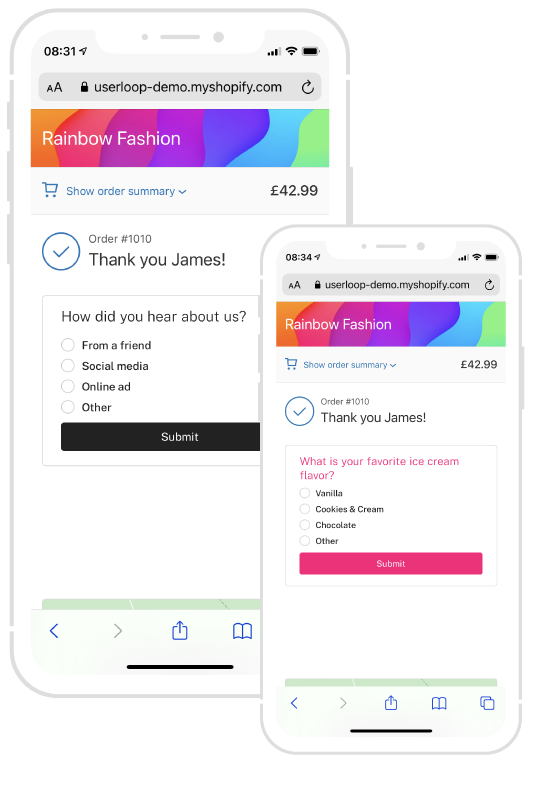
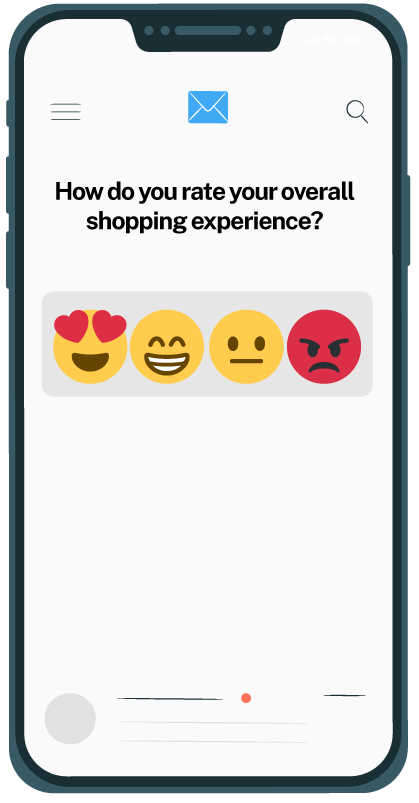
For data not related to the product, you can use embedded surveys at the end of the checkout process. Check the image above for a great example of this.
This approach has a high response rate because the customer is already engaged and it takes just one extra click to provide the information you’re asking for.
Simplicity is key to getting more valuable data you can use to improve your customer experience and grow your store.
Get the UserLoop Shopify app here and start with 50 free responses per month!
Send a post-purchase email survey
You can also use UserLoop to send buyers on Shopify, post purchase email surveys. The simplicity of a one-click survey should entice more customers to complete it. A short message asking them to complete the survey in seconds is enough to go along with the survey.
We’ve created a free checklist and email template to help you get started with this. Just download our free guide to create the perfect survey email here.
Get UserLoop to Start Collecting Data in 10 Minutes!
With so much data at your fingertips, where will you start?
Use the information in this post to create your first or next post-purchase survey that brings in responses you can use to grow your business and improve your customer experience.
Post-Purchase surveys are easy with UserLoop. Get your 50 free responses per month when you sign up for UserLoop today.
Choose your next survey question
Browse 56 ecommerce survey questions with answer options and a free CSV, then use UserLoop’s Shopify post-purchase surveys to collect answers linked to orders.


The agentic growth toolkit for Shopify
Ask your customers anything
UserLoop talks to your customers at scale with surveys and contests that feed one AI-queryable dataset. AI does the setup and the analysis.
- SurveysFind out why customers buy: checkout, email, link & QR.
- ContestsGiveaways that grow your list and social following.
Free plans on both apps · live in minutes