What are Shopify Post Purchase Surveys and why are they important for your business?
We’ve all heard of surveys. You’ve almost definitely filled one out at some point in your life. But have you ever been asked about your buying experience after making a purchase?
If you have…
How did you feel when you were asked? Cared for? Important? Like the company wanted to support you?
If you haven’t…
Would you have liked the opportunity to tell the company about an issue you experienced? Or something that would have made your experience so much better?
Companies that send post-purchase surveys show their customers they want to get better. And that they care about your opinion. So if you’re not sending them, now is the time to get started.
So what is a post-purchase survey?
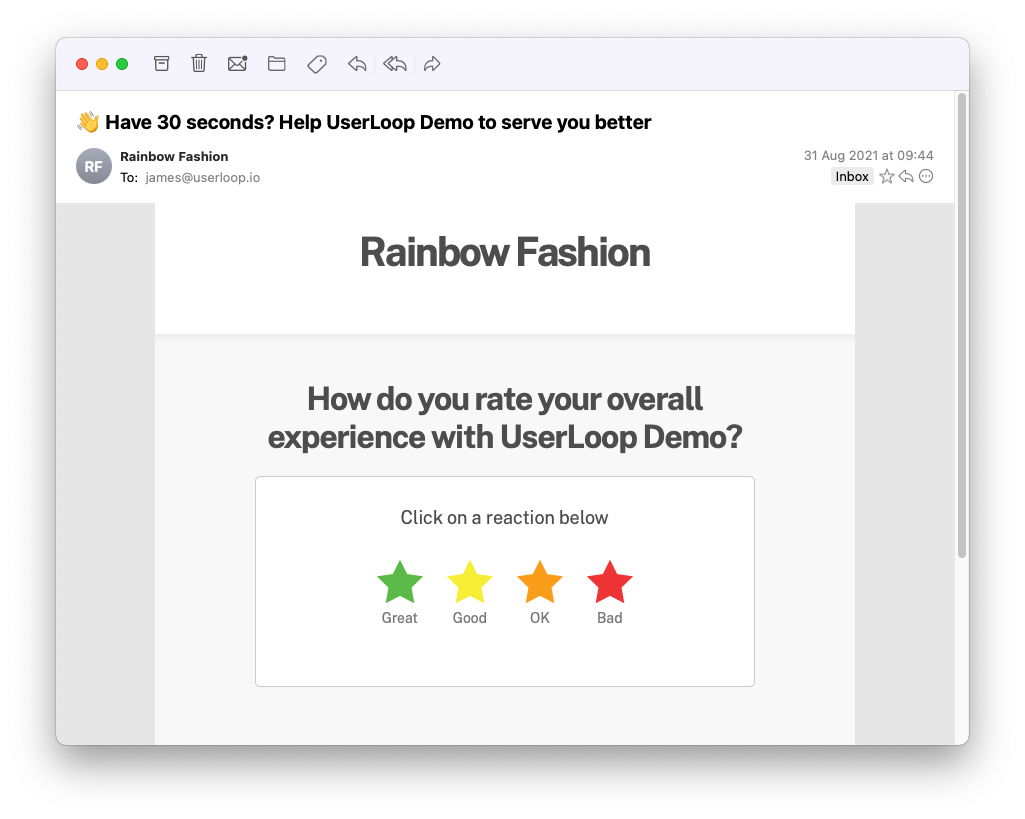
Put simply, it’s a survey you send to customers that have purchased from your Shopify store. Post-purchase surveys provide data you can use to help with marketing and improving your store.
There are many ways to do a post-purchase survey - such as embedding a survey right in your Shopify checkout, or sending an email when an order arrives.
UserLoop makes it easy, quick and effective with automated surveys you can set and forget!
And why are post-purchase surveys important?
First of all, they let your customers know you care. The survey gives them an opportunity to express any feelings whether positive or negative. And it’s this open communication that is the foundation to building loyalty.
But post-purchase surveys have to be done right if you want to see results.
Let’s look at 3 important practices you should follow to get the best results from your post-purchase surveys on Shopify:
1. Make them quick and easy to complete
Customers will not spend 5 minutes filling out a long and complex survey. Ask just one question that’s easy to answer. UserLoops one-click surveys allow your customers to complete a survey in seconds!
You can add a survey right on your Shopify checkout page, or automatically email one to the customer after their order arrives.
2. Ask the right questions
There’s no point in running a survey if it doesn’t gather usable data. For example, asking questions about your products would be pointless if you’re looking to improve your purchase process.
Think about what you want to learn from the survey and choose a question that will collect the data you need. Want some inspiration about what questions to ask? Check out our blog on boosting your customer experience with surveys. Tip #1 provides some great questions you could use.
3. Deliver your survey fast
Make sure to send your post-purchase survey while your customer is thinking about you. Prime times include:
● directly after they buy something in your Shopify store
● as part of the order confirmation email
● around the time the product will be delivered. Calculate shipping times and send a survey about your product at that time.
**How to create a post-purchase survey on your Shopify store in around 10 minutes…
Step 1**
First, you need to select and install a survey app from the Shopify store. Choose from the top 10 Shopify Survey Apps in this ranked list…
Step 2
Create your survey in the app using the best practices above
Step 3
Launch your survey and start getting data you can use to boost your growth and revenue.
If you choose to use UserLoop to build and deploy your post-purchase surveys you’ll get excellent customer support no matter what plan you choose (even the free one).
So let us help you grow your business with powerful post-purchase surveys that get results! Get started with 50 free responses per month here…
Oh, and download our Shopify app for free by clicking here. Not on your computer? No worries, just share this link to your business email so you can do it next time you’re at your desk!
We look forward to supporting you on your Shopify post-purchase survey journey!


The agentic growth toolkit for Shopify
Ask your customers anything
UserLoop talks to your customers at scale with surveys and contests that feed one AI-queryable dataset. AI does the setup and the analysis.
- SurveysFind out why customers buy: checkout, email, link & QR.
- ContestsGiveaways that grow your list and social following.
Free plans on both apps · live in minutes