"How to Collect Customer Feedback on Shopify: 7 Methods Compared"
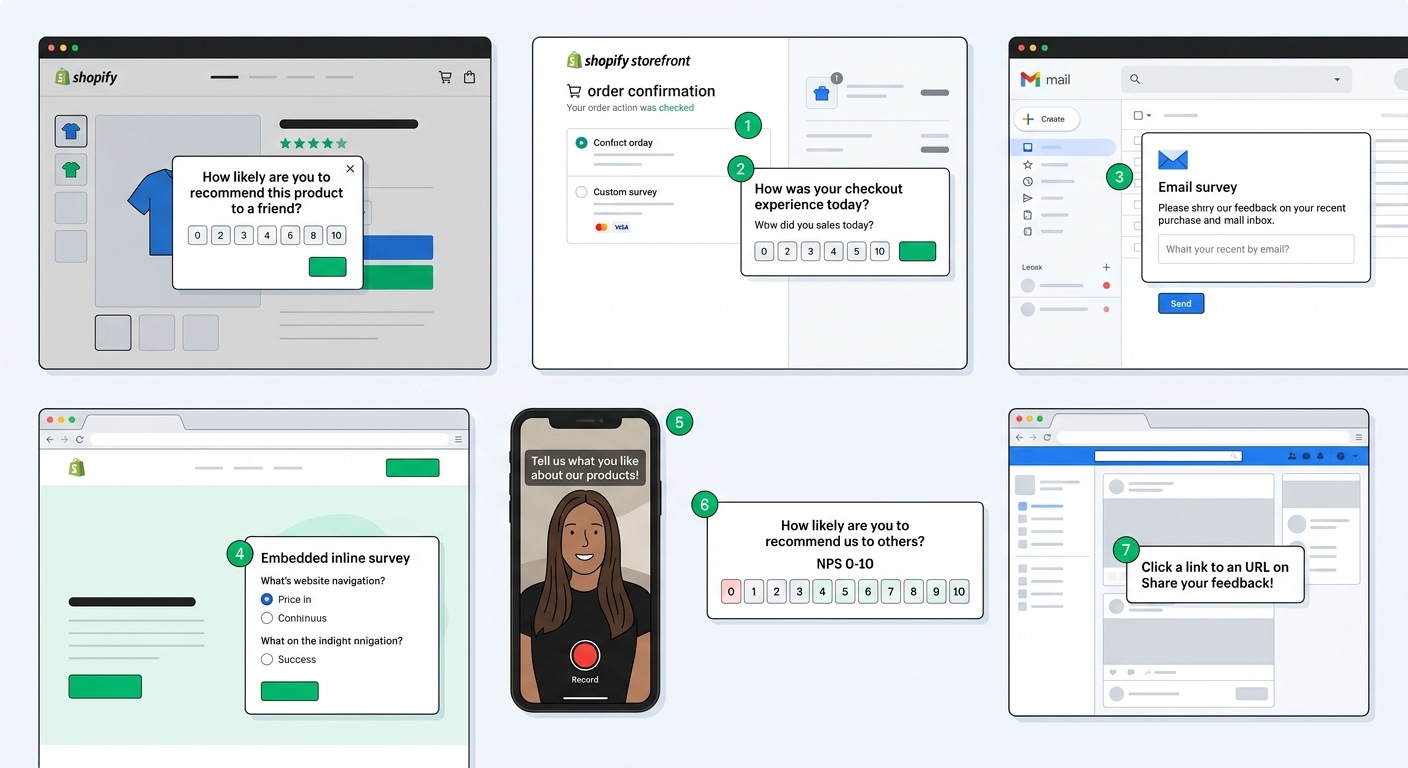
Every Shopify store collects some form of customer feedback. The question is whether you're collecting it deliberately or letting it trickle in through random support tickets and product reviews. Most stores rely on one or two channels and assume that's enough. It usually isn't.
The problem with a single feedback channel is coverage bias. Post-purchase email surveys only reach people who bought. Product reviews only capture opinions strong enough to motivate someone to write. Support tickets only surface problems bad enough to trigger a complaint. Each channel shows you a slice of reality, and you make decisions based on that slice as if it's the whole picture.
A complete feedback strategy uses multiple methods that cover different customer segments and different moments in the journey. This guide compares seven methods available to Shopify stores, explains when each one works best, and shows how to combine them into a system that captures what you're currently missing.
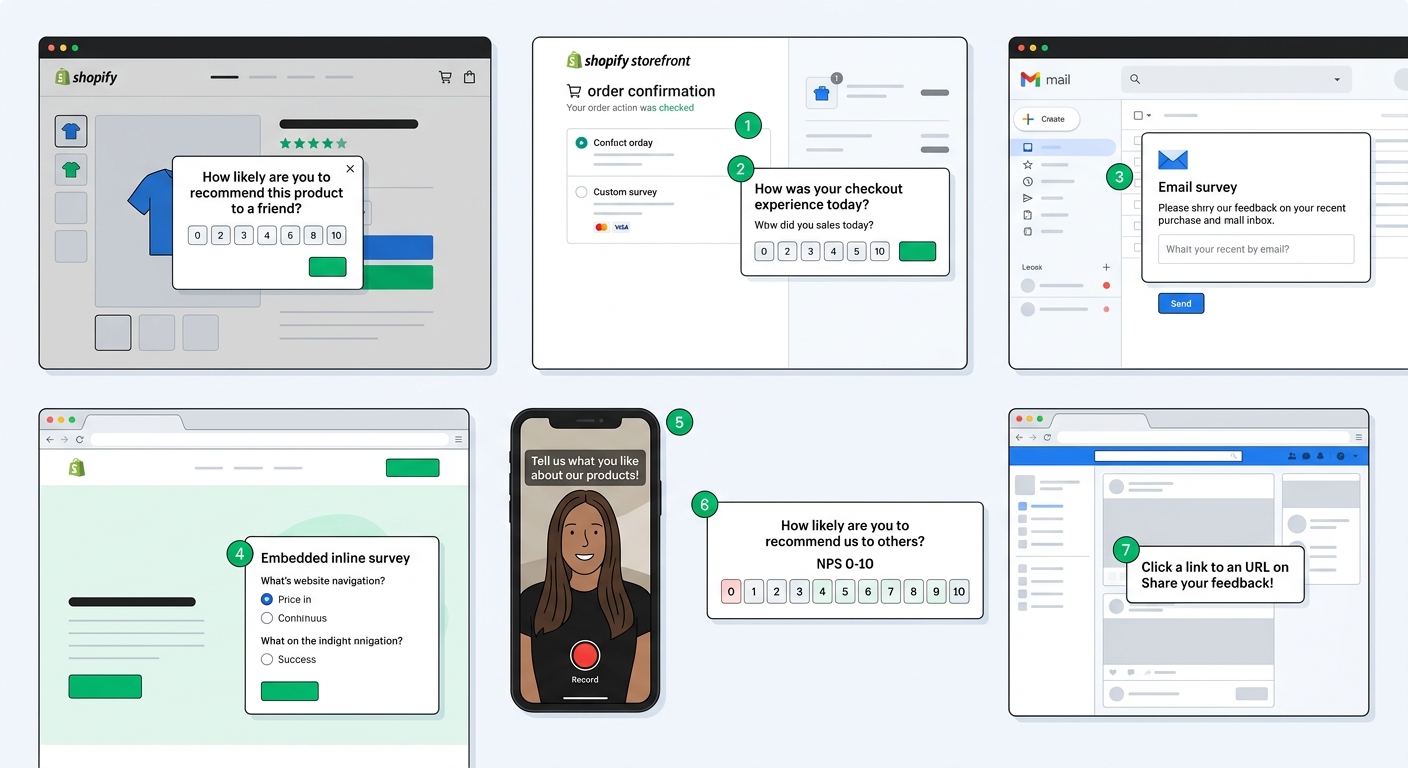
Method 1: Post-purchase checkout surveys
Checkout surveys appear on the order confirmation page immediately after a customer completes their purchase. The timing is significant: the customer just committed money, the transaction is fresh, and they're still on your site.
What it captures: Attribution data ("How did you hear about us?"), purchase motivation, product discovery path, and first impressions. Checkout surveys excel at post-purchase attribution because customers can accurately recall what led them to buy when the purchase just happened.
Response rates: 40-60%. Checkout surveys consistently outperform every other method because the customer is already engaged and the survey appears inline with the order confirmation they're waiting to see.
Strengths:
- Highest response rates of any feedback method
- Perfect timing for attribution questions
- No additional email or notification required
- Captures every customer, not just those who open emails
Limitations:
- Only reaches customers who complete a purchase
- Too early for product satisfaction or quality feedback
- Limited to a few questions (you don't want to slow down the post-checkout flow)
- Can't reach visitors who browse but don't buy
Best questions to ask: "How did you hear about us?" with open-text response and AI channel grouping, "What almost stopped you from buying?", "Is this a gift or for yourself?"
Method 2: Popup surveys
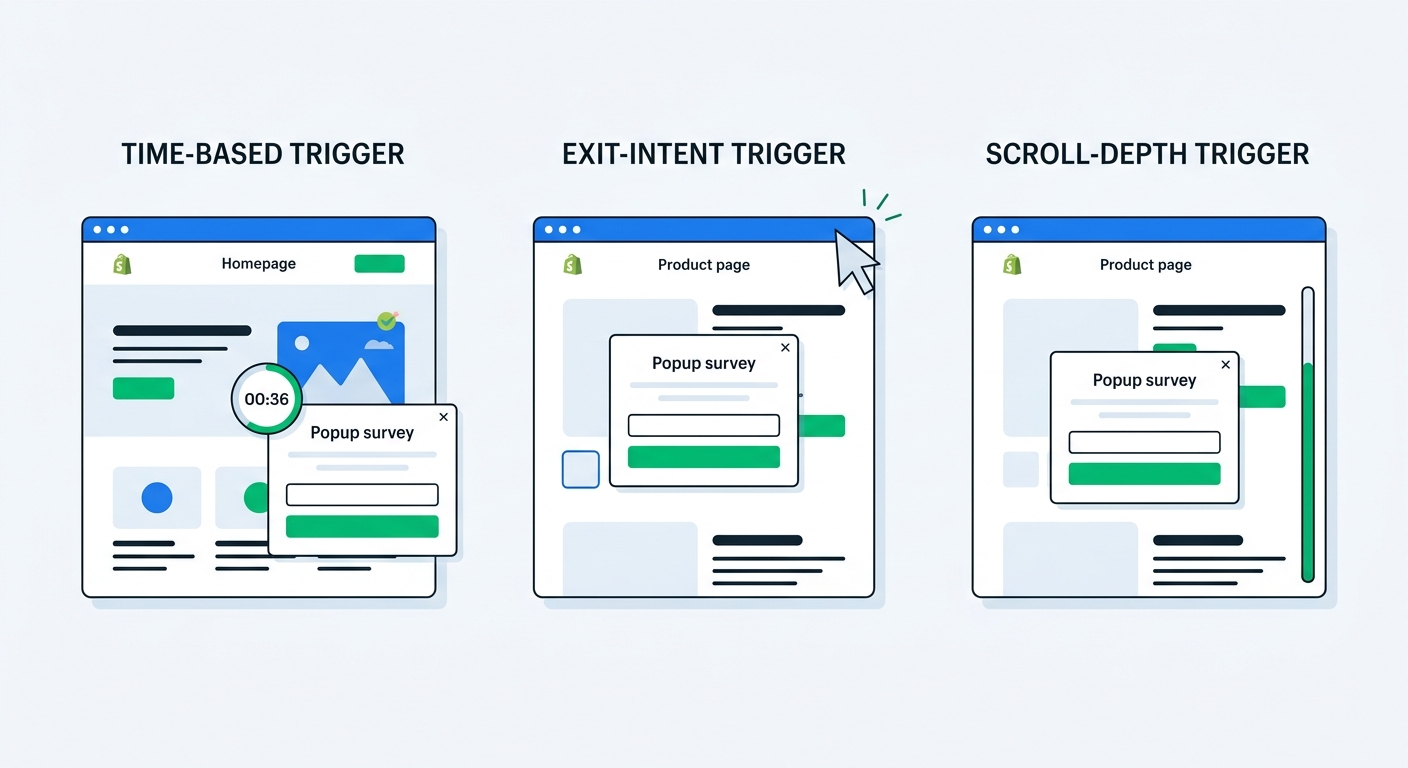
Popup surveys display as modal overlays on any page of your store, triggered by timer, exit intent, or scroll depth. They're the only feedback method that reaches every visitor, not just customers who've purchased.
What it captures: Visitor intent, browsing obstacles, exit reasons, zero-party data preferences, and pre-purchase sentiment. Popup surveys fill the biggest gap in most feedback strategies: understanding why people visit but don't buy.
Response rates: 5-15% depending on trigger type and incentive. Exit intent popups perform best because they catch visitors at a decision point. Adding a discount code as a survey reward can push response rates above 20%.
Strengths:
- Reaches non-buyers and anonymous visitors
- Covers your entire site traffic, not just the purchasing segment
- Exit intent triggers capture feedback at the moment someone decides to leave
- Discount-on-completion drives both responses and conversions
Limitations:
- Lower response rates than checkout or email surveys
- Risk of annoying visitors if poorly timed or too frequent
- Responses tend to be shorter since visitors haven't invested much in the interaction
- Can't ask product satisfaction questions to people who haven't purchased
Best questions to ask: "What brought you to our store today?", "What's stopping you from purchasing?", "What product are you looking for that you can't find?", "How did you discover us?"
Method 3: Email surveys
Email surveys are sent after delivery, typically 7-14 days post-fulfillment. They're the workhorse of customer feedback because the customer has actually used the product and can give informed opinions.
What it captures: Product satisfaction, delivery experience, quality assessment, repurchase intent, and detailed qualitative feedback. Email surveys produce the richest responses because customers have context and time to think.
Response rates: 10-25% depending on subject line, timing, and survey length. The complete guide to Shopify post-purchase surveys covers timing optimization in detail.
Strengths:
- Customer has used the product, so feedback is genuine and informed
- Longer surveys are acceptable (3-5 questions work well)
- Can include both quantitative (ratings, scales) and qualitative (open-text) questions
- Easy to segment sends by product, customer type, or order value
Limitations:
- Only reaches customers who purchased and provided an email
- Dependent on email deliverability and open rates
- 7-14 day delay means issues aren't caught immediately
- Over-surveying can train customers to ignore your emails
Best questions to ask: "How would you rate the quality of [product]?", "Was there anything about the product that surprised you?", "What would you improve?", "Would you buy from us again?"
Method 4: App block (embedded) surveys
App block surveys are embedded directly into your Shopify theme as inline sections. They render as part of the page content, inheriting your theme's fonts and styling. No trigger, no overlay. The survey is just there when the page loads.
What it captures: Page-specific feedback, ongoing attribution, product questions, and pre-purchase research data. App blocks work best for persistent, always-on feedback collection on specific pages rather than one-time survey campaigns.
Response rates: 3-10%. Lower than popup or email surveys because there's no trigger to draw attention. But because they appear on every page load, the total volume of responses can be substantial on high-traffic pages.
Strengths:
- Non-intrusive: doesn't interrupt the browsing experience
- Always visible on every page load (not a one-time trigger)
- Inherits theme styling for a native look
- Can target by customer status (new vs. returning visitors)
Limitations:
- Easy to scroll past if the page has lots of content
- Lower per-visit response rates than triggered methods
- Needs a high-traffic page to generate meaningful response volume
- Less suitable for time-sensitive feedback campaigns
Best questions to ask: "How did you hear about us?" (on product pages for pre-purchase attribution), "What are you looking for today?" (on collection pages), "How was your last order?" (on account pages for returning customers)
Method 5: NPS and CSAT surveys
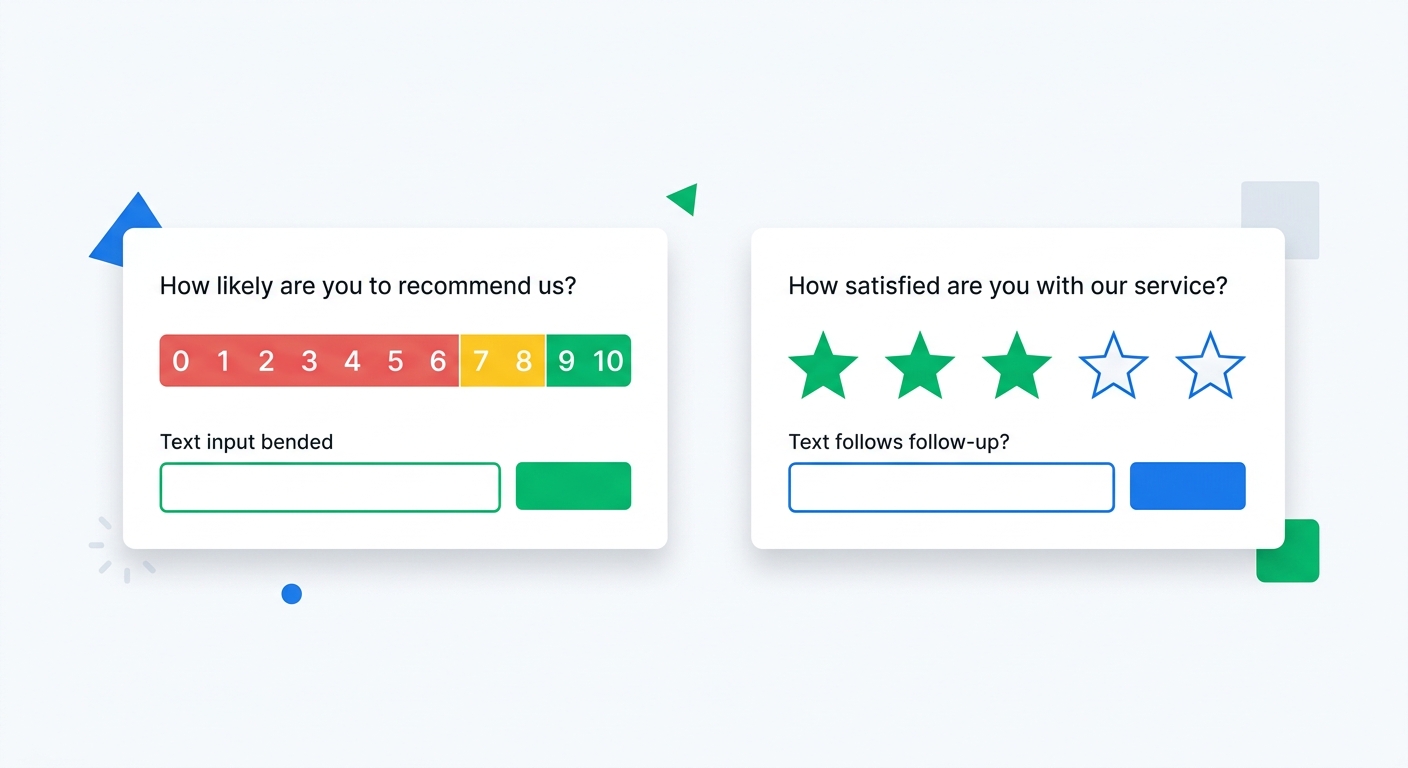
Net Promoter Score and Customer Satisfaction surveys measure overall sentiment using standardized scales. NPS uses a 0-10 recommendation likelihood scale. CSAT uses a 1-5 satisfaction scale. Both produce benchmarkable metrics that track trends over time.
What it captures: Overall customer loyalty (NPS), transaction-specific satisfaction (CSAT), and the qualitative follow-up that explains the score. Revenue-aware NPS analytics connect these scores to actual order data, revealing how satisfaction correlates with spending. For a full setup walkthrough, see our guide to NPS surveys on Shopify.
Response rates: 15-25% for email-triggered NPS. Inline CSAT (e.g., after a support interaction) can hit 30-40%.
Strengths:
- Standardized metrics enable benchmarking against industry data
- Trend tracking shows whether things are improving or declining
- Segment-level analysis reveals satisfaction by product, channel, or customer tier
- Follow-up questions produce high-quality qualitative data
Limitations:
- The score alone is meaningless without the follow-up response
- NPS without revenue context can be misleading (as covered in our NPS guide)
- Customers can experience survey fatigue if you run NPS too frequently
- A single metric can't capture the full complexity of customer experience
Best questions to ask: Standard NPS ("How likely are you to recommend us?") with conditional follow-ups based on the score segment. CSAT ("How satisfied were you with your recent purchase?") with an open-text "Tell us more."
Method 6: Video testimonials
Video testimonial surveys ask customers to record a short video response instead of typing text. The customer taps a link, records on their phone or webcam, and submits. No app download, no editing, no friction.
What it captures: Authentic customer stories, product demonstrations in real environments, emotional responses that text can't convey, and social proof content you can use in ads and on your site. Video testimonials are feedback and marketing asset rolled into one.
Response rates: 3-8%. Lower than text surveys because recording video requires more effort. But the value per response is dramatically higher. One genuine video testimonial can outperform dozens of written reviews in conversion impact. For the full case on video vs. other content types, see our UGC vs. paid influencer content comparison.
Strengths:
- Produces reusable marketing content (ads, landing pages, social)
- Conveys authenticity and emotion that text reviews can't match
- Captures product-in-use footage you can't get any other way
- Differentiates your brand with real customer voices
Limitations:
- Lowest response rates of any method (recording video is a bigger ask)
- Not suitable for negative feedback collection (customers won't record complaints on video)
- Requires a follow-up workflow to review, approve, and deploy videos
- Best reserved for satisfied customers, not your entire customer base
Best timing: Send to customers who scored 9-10 on NPS, left a positive review, or made repeat purchases. Pre-qualifying recipients by satisfaction level dramatically improves response rates and content quality.
Method 7: Link surveys
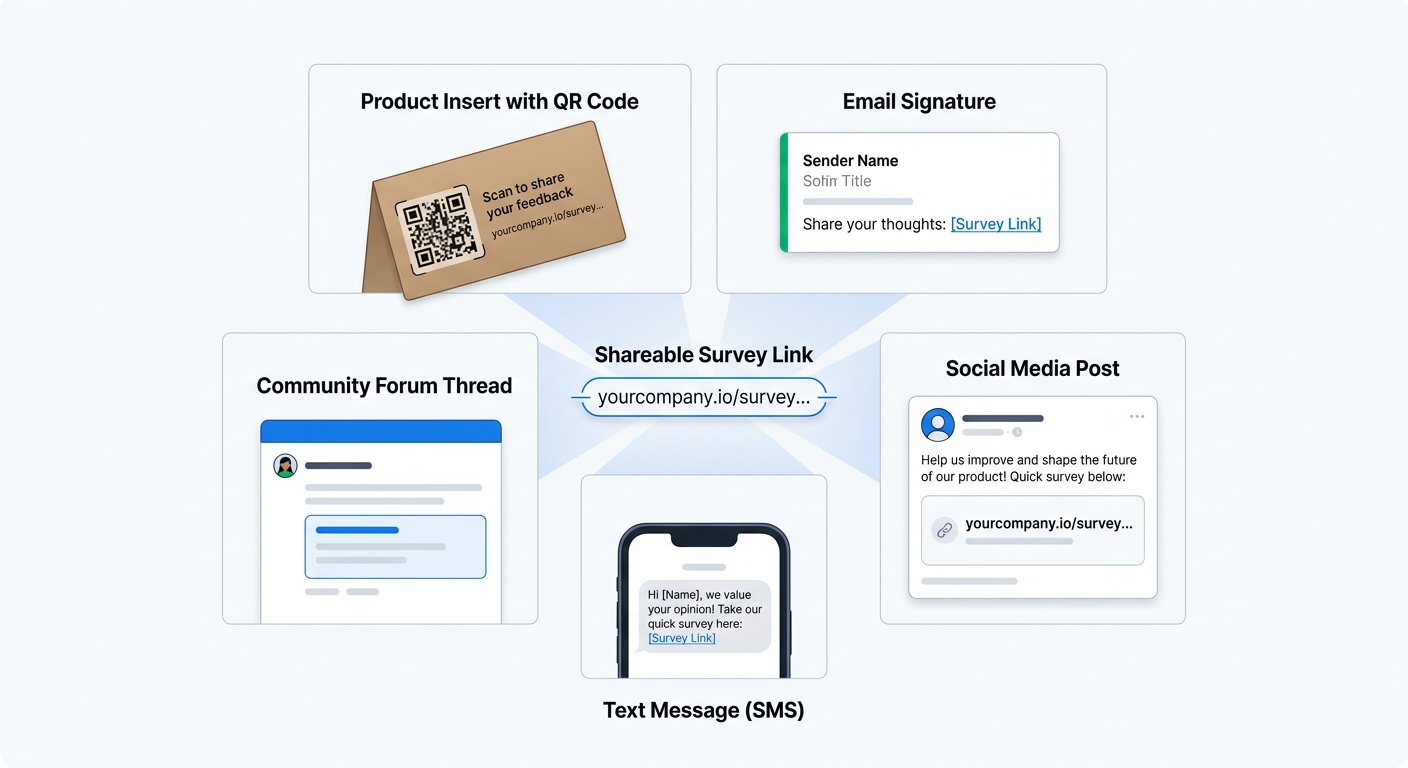
Link surveys generate a shareable URL that works anywhere: email signatures, social media posts, QR codes on packaging, SMS messages, or customer community forums. The survey loads in the browser with no login required.
What it captures: Anything you want to ask, but the context depends entirely on where you share the link. A link in a post-purchase email captures product feedback. The same link on a social media post captures follower sentiment. The link itself is method-agnostic.
Response rates: Varies wildly by distribution channel. Embedded in a targeted email: 10-20%. Shared on social media to a general audience: 1-3%. QR code on product packaging: 5-15%.
Strengths:
- Maximum flexibility in distribution
- Works outside the Shopify ecosystem (social media, physical packaging, events)
- No Shopify integration required for the respondent
- Can be shared by partners, influencers, or customers themselves
Limitations:
- No automatic trigger; you manually distribute the link
- Responses may not connect to Shopify order data unless the customer identifies themselves
- Harder to control who responds (self-selection bias)
- Requires manual effort to maintain and distribute
Best use cases: QR codes on product inserts ("Scan to tell us what you think and get 10% off your next order"), social media audience research, post-event feedback, beta product testing groups, and partner or wholesale feedback.
Comparing all seven methods
Each method has a unique reach and produces a distinct type of insight. The right combination depends on your store's traffic, order volume, and the specific questions you need answered.
By audience reach:
- Popup surveys: All visitors (buyers and non-buyers)
- App block surveys: All visitors on specific pages
- Checkout surveys: All customers who complete a purchase
- Email surveys: Customers who purchased and have deliverable email addresses
- NPS/CSAT: Customers who purchased (usually triggered by fulfillment)
- Link surveys: Anyone you share the link with
- Video testimonials: Satisfied customers you specifically invite
By response quality:
- Email surveys produce the most detailed, thoughtful responses
- Video testimonials produce the most emotionally rich and reusable content
- Checkout surveys produce the most accurate attribution data
- NPS/CSAT produces the most benchmarkable trend data
- Popup surveys produce the most volume from the broadest audience
By effort to maintain:
- Checkout surveys: Set once, runs automatically on every order
- Email surveys: Set once with fulfillment triggers, runs automatically
- NPS/CSAT: Set once with triggers, review scores periodically
- Popup surveys: Configure triggers and targeting, update questions occasionally
- App block surveys: Place in theme, update questions occasionally
- Video testimonials: Requires review and approval workflow for each submission
- Link surveys: Manual distribution for each campaign
Building a feedback stack that covers the full journey
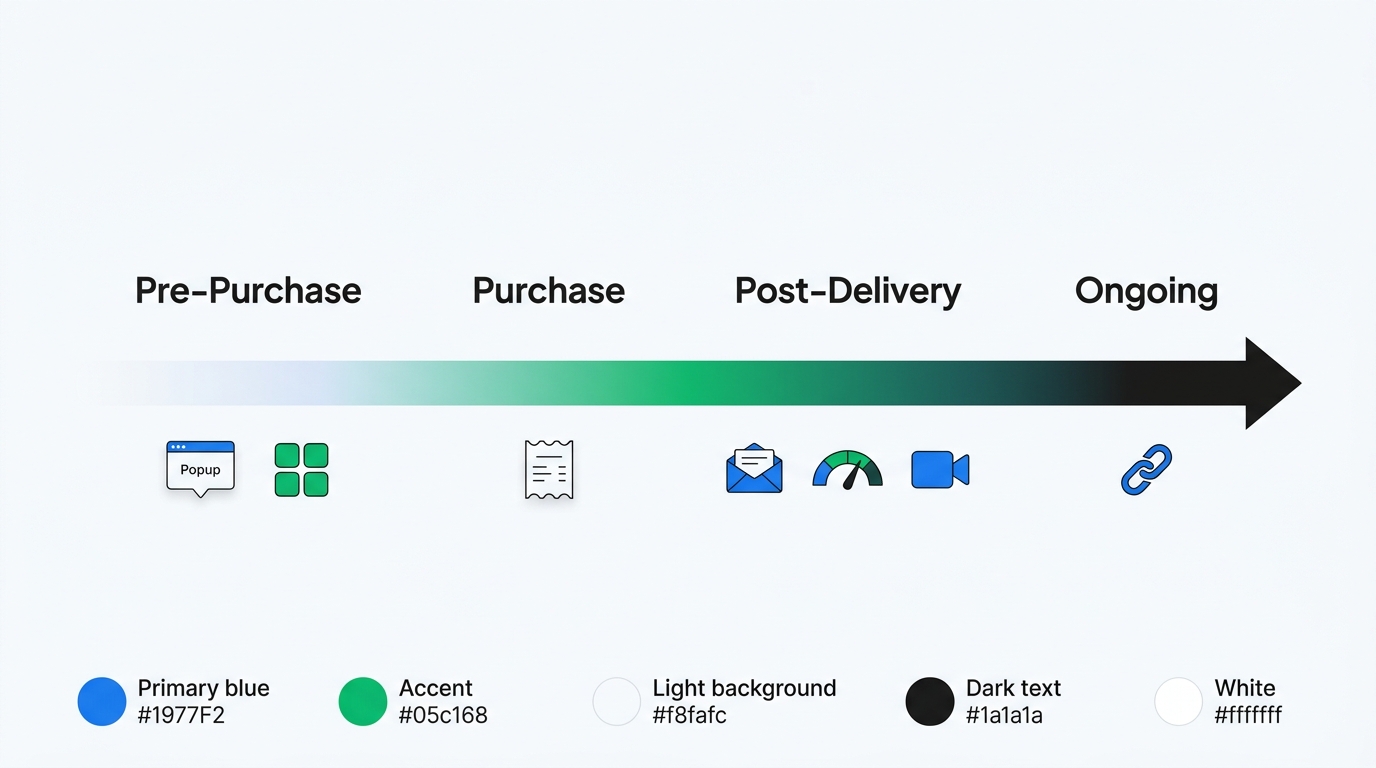
No single method captures the complete picture. The goal is to cover four stages of the customer journey with different methods:
Pre-purchase (browsing): Popup surveys and app block surveys. These are your only methods for understanding non-buyers. Run an exit intent popup asking "What stopped you from purchasing today?" and embed an app block on product pages asking "How did you discover us?"
Purchase moment: Checkout surveys. Capture attribution and purchase motivation while the decision is fresh. One or two questions max.
Post-delivery: Email surveys, NPS, and video testimonials. Wait 7-14 days after fulfillment, then send a product feedback survey. Follow up with NPS on a quarterly cadence. Route promoters to video testimonial requests.
Ongoing/everywhere: Link surveys for situations outside the normal Shopify flow. Product inserts, social media, partner channels.
A practical starting setup for most Shopify stores:
- Checkout survey with "How did you hear about us?" for attribution
- Popup survey with exit intent on product pages for bounce feedback
- Email survey 10 days post-delivery for product satisfaction
- NPS survey quarterly for loyalty tracking
That's four methods running simultaneously, each automated, each covering a different segment and moment. Add video testimonials and link surveys as your feedback program matures.
Analyzing feedback across all channels
Collecting feedback from seven different sources creates a new problem: fragmentation. If your checkout survey data lives in one dashboard, your email survey responses in another, and your NPS scores in a third, you're back to making decisions based on incomplete pictures.
This is where a unified platform matters. UserLoop runs all seven survey types from a single dashboard. Checkout, popup, app block, email, link, NPS, and video surveys all feed into the same analytics layer. Every response connects to Shopify order data automatically, so you can cross-reference feedback across methods without manual exports or spreadsheet joins.
For deeper analysis, UserLoop's MCP integration lets you query all your feedback data conversationally through Claude or ChatGPT. Ask "What are the top complaints from customers who scored below 7 on NPS?" and the AI pulls from all your survey channels to give you a unified answer. Or ask "Compare what exit intent popup respondents say versus what email survey respondents say about shipping" to see how feedback differs by collection method.
AI-powered theme extraction groups open-text responses across all your surveys into common themes automatically. Instead of reading 500 individual responses, you see that 34% mention shipping speed, 22% mention product quality, and 15% mention sizing. That works across all survey types simultaneously, giving you the aggregate view that fragmented tools can't provide.
Start with coverage, then optimize
The biggest mistake isn't choosing the wrong feedback method. It's using only one and assuming it represents all your customers. A checkout survey tells you nothing about why visitors leave without buying. NPS tells you nothing about what attracted customers in the first place. Exit intent popups tell you nothing about whether buyers are satisfied after delivery.
Start with the four-method minimum: checkout, popup, email, and NPS. Each one takes under 10 minutes to set up. Within two weeks you'll have feedback covering every stage of the customer journey, and you'll almost certainly discover insights that a single-method approach would have missed.
Ready to build a complete feedback strategy? Install UserLoop on Shopify and set up your first multi-channel feedback stack in under an hour.


The agentic growth toolkit for Shopify
Ask your customers anything
UserLoop talks to your customers at scale with surveys and contests that feed one AI-queryable dataset. AI does the setup and the analysis.
- SurveysFind out why customers buy: checkout, email, link & QR.
- ContestsGiveaways that grow your list and social following.
Free plans on both apps · live in minutes