Exit Intent Popup Surveys for Shopify: Learn Why Visitors Leave (and Win Some Back)
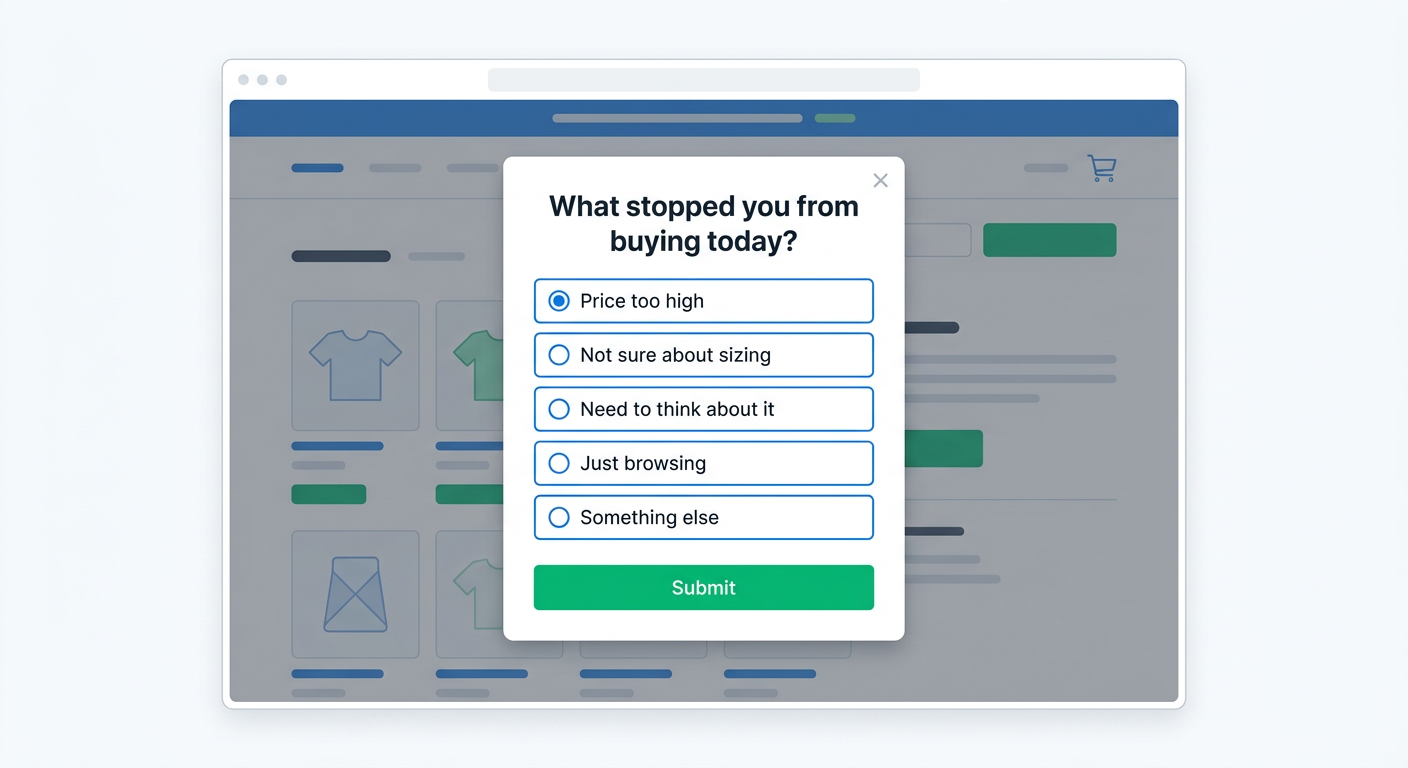
95% of visitors leave your Shopify store without buying. Most leave without doing anything at all. No signup, no add-to-cart, no clue about what went wrong.
Exit intent popups try to catch these visitors on the way out. But almost every exit intent popup on Shopify does the same thing: "Enter your email for 10% off." That captures an email address, but it tells you nothing about why the visitor was leaving.
Exit intent popup surveys take a different approach. Instead of asking for an email, you ask a question. "What stopped you from buying today?" or "Did you find what you were looking for?" The visitor answers in two seconds, you learn something useful, and you can still offer a discount code as a reward for answering.
This guide covers how to set up exit intent popup surveys on Shopify, what questions to ask on different page types, and how to use the "survey for a discount" mechanic to recover sales while collecting actionable feedback.
What is an exit intent popup survey?
An exit intent popup is a message that appears when a visitor is about to leave your site. On desktop, this triggers when the mouse cursor moves toward the browser's address bar or the close button. On mobile, it can trigger on back-button taps or rapid upward scrolls.
Most exit intent popups are simple email capture forms. An exit intent popup survey replaces the email field with a question. It could be multiple choice, a rating scale, or a short open-text prompt.
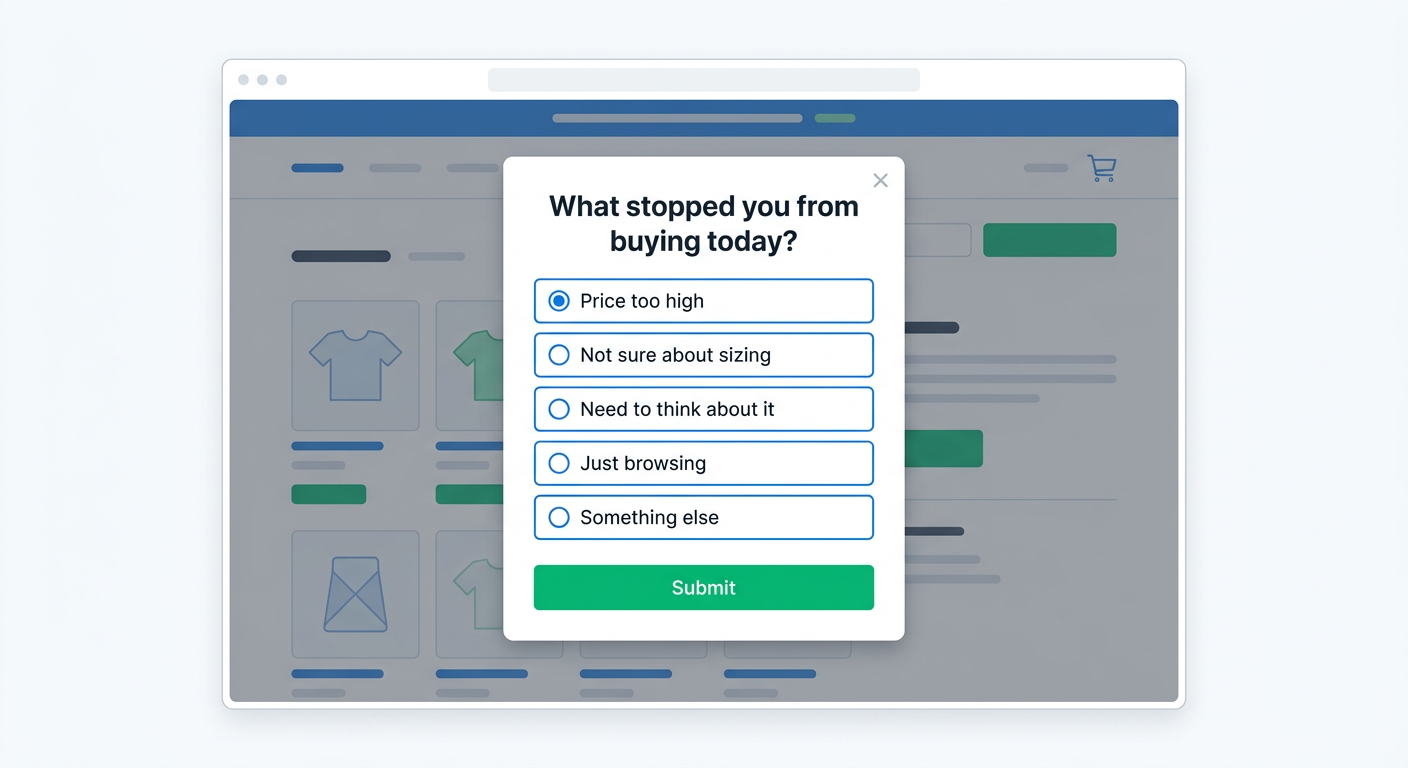
The difference matters. An email popup gives you a contact. A survey popup gives you information. And with the right setup, a survey popup gives you both: the visitor answers a question, and you reward them with a discount code they can use right away.
Why exit intent surveys outperform email-for-discount popups
The standard exit intent playbook on Shopify goes like this: visitor moves to leave, popup appears offering 10% off for an email address. Some visitors enter their email, receive a code, and maybe come back to buy later. Most dismiss the popup and leave anyway.
This approach has three problems.
You learn nothing. An email address tells you how to reach someone, not why they were leaving. Were they confused about sizing? Shocked by shipping costs? Just browsing? You have no idea.
The discount is untargeted. You're offering the same 10% to everyone, whether they were one click from checkout or landed on the wrong site entirely. That's expensive when it works and wasted when it doesn't.
Email follow-up is slow. Even if you capture the email and send a drip sequence, you're competing with every other brand in their inbox. The moment of highest intent was on your site, not in their email later.
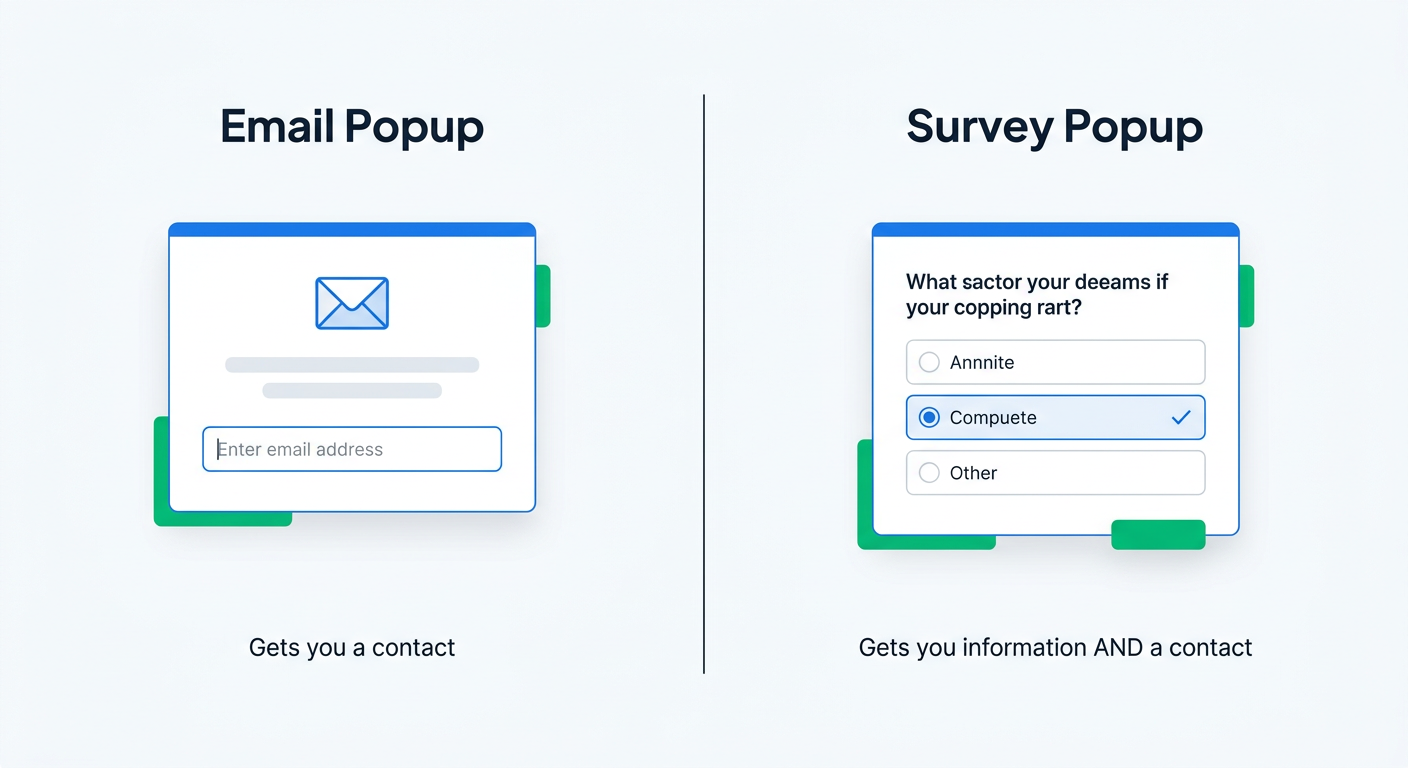
Exit intent surveys solve all three:
- You learn why visitors leave. Patterns emerge quickly. If 40% of exit responses on your product pages mention shipping costs, that's a clear signal to address shipping on those pages.
- You can target discounts. Offer a discount code to survey completers, not just email subscribers. Someone who tells you "I wasn't sure about the sizing" and then gets a 10% off code is far more likely to convert than a random email subscriber.
- You act on feedback in real time. Survey responses feed directly into your analytics. No waiting for email engagement data to trickle in.
What to ask in exit intent surveys (by page type)
The best exit intent survey questions are short, specific to the page, and easy to answer. One question is ideal. Two is fine. Three is the maximum before completion rates drop.
Product pages
Product pages are where exit intent surveys deliver the most value. A visitor made it to a specific product, looked at it, and decided to leave. That's high-signal behavior.
Best questions:
- "What stopped you from buying today?" (Multiple choice: Price too high / Not sure about sizing / Need to think about it / Looking for something else / Other)
- "What would help you decide?" (Multiple choice: More product photos / Size guide / Customer reviews / Lower shipping cost / Other)
- "How does our price compare to what you expected?" (Scale: Much lower / About right / A bit high / Too high)
Collection pages
Visitors on collection pages are browsing, not buying. They're looking for something specific or exploring your catalog.
Best questions:
- "Did you find what you were looking for?" (Yes / No, with an optional follow-up: "What were you looking for?")
- "What brought you to our store today?" (Multiple choice: Saw an ad / Friend recommended / Searching for [product type] / Other)
Cart page
A visitor on the cart page had intent to buy. If they're leaving, something went wrong. This is the highest-value exit intent survey you can run.
Best questions:
- "Is anything stopping you from completing your order?" (Multiple choice: Shipping cost / Delivery time / Payment options / Want to compare prices / Just saving for later)
- "Was anything unclear about shipping, returns, or payment?" (Yes, with open text / No)
Homepage
Homepage visitors are early in the journey. Keep questions broad and brand-focused.
Best questions:
- "How did you find us?" (Multiple choice: Google search / Social media / Friend or family / Ad / Other)
- "What are you looking for today?" (Multiple choice tailored to your product categories)
How to set up exit intent popup surveys on Shopify
Here's how to set up an exit intent popup survey using UserLoop. The whole process takes about 5 minutes.
1. Create the survey
In your UserLoop dashboard, create a new survey. Add your exit intent question as the first (or only) question. Multiple choice questions get the highest completion rates because they require one tap to answer.
If you want to capture emails too, add an optional email question after the main question. Making it optional keeps completion rates high while still collecting contact information from visitors who are willing to share it.
2. Set the trigger to exit intent
When creating a popup survey, set the trigger type to exit intent. This tells UserLoop to display the survey only when the visitor shows signs of leaving the page.
On desktop, this means the cursor moving toward the top of the viewport. On mobile, the popup adapts to a bottom-sheet format for easy, thumb-friendly interaction.
3. Choose your page targeting
Enable the popup on the pages where you want to collect feedback:
- Homepage
- Product pages
- Collection pages
- Cart page
- Blog pages
- Other pages
For your first exit intent survey, start with product pages only. That's where exit feedback is most actionable.
4. Configure display settings
Choose the popup position (center with overlay is standard for exit intent) and width. UserLoop automatically handles mobile sizing with a responsive bottom-sheet layout.
The popup shows once per visitor. If someone completes or dismisses it, they won't see it again in that session. No repeat annoyance.
5. Add a discount reward (optional but recommended)
Attach a discount code to the survey. When a visitor completes the survey, they immediately see a unique Shopify discount code they can copy and use at checkout. More on this in the next section.
6. Activate and monitor
Publish the survey and check your response dashboard after a day or two. You'll start seeing patterns quickly, especially on high-traffic product pages.
The discount code strategy: survey for a discount
This is the mechanic that makes exit intent surveys a direct competitor to email-for-discount popups, with one critical advantage: you get feedback and conversions.
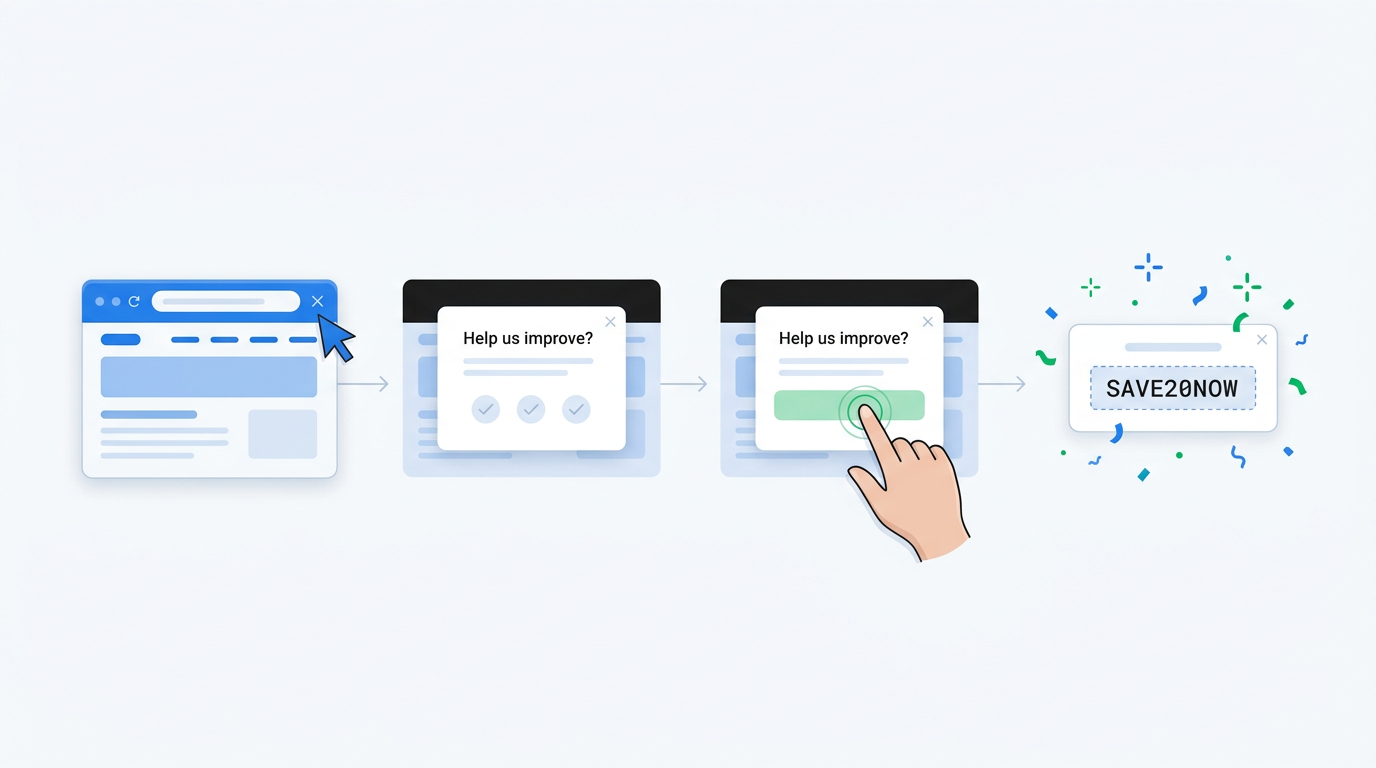
Here's how it works:
- Visitor moves to leave your product page
- Popup appears: "Quick question before you go: what stopped you from buying today?"
- Visitor taps their answer (one click)
- Popup reveals a unique 10% discount code: "Thanks! Here's 10% off your order"
- Visitor copies the code and goes straight to checkout
The visitor gets their discount. You get data about why people leave. Compared to email-for-discount:
Faster conversion. The discount is delivered instantly, not buried in an email 5 minutes later. The visitor is still on your site, still in buying mode.
Higher completion rates. Answering a multiple choice question is easier than typing an email address. One tap versus keyboard input.
Actionable data. Every discount you give is tied to a specific reason. You can see that "shipping cost" is the #1 objection on your flagship product, while "not sure about sizing" dominates your apparel pages.
Over time, you build a dataset that tells you exactly what to fix. Reduce shipping costs on your top product, add a sizing guide to apparel pages, and your exit rate drops before you even touch the popup again.
What to do with the responses
Collecting exit intent survey data is only valuable if you act on it. Here's a practical framework.
Spot patterns weekly
Check your survey responses at least once a week. Look for:
- The top 2-3 responses across all pages. These are your biggest opportunities.
- Page-specific outliers. If one product page has "price too high" at 60% while others sit at 20%, that product may be mispriced or poorly positioned.
- Changes over time. Did you add a sizing guide last week? Watch whether "not sure about sizing" drops as a result.
Use AI to analyze open-text responses
If your survey includes an optional open-text field, you'll quickly accumulate hundreds of freeform responses. Reading them one by one doesn't scale.
UserLoop's AI insights automatically group open-text responses into themes, so you can see "shipping concerns" or "wants more color options" without tagging anything manually. You can also connect your survey data to Claude or ChatGPT using UserLoop's MCP server and ask questions like "What are the top reasons people leave our product pages?" in plain English.
Close the loop
The most important step: fix the issues visitors flag.
- "Shipping cost" is the top exit reason? Add shipping cost messaging earlier on the product page. Consider a free shipping threshold.
- "Need more reviews" keeps coming up? Add a review section above the fold, or start collecting video testimonials from existing customers.
- "Not sure about sizing" is common? Build a sizing guide and link it prominently from each product description.
Every fix you make based on real visitor feedback reduces your exit rate. The survey tells you what to fix. The discount code recovers some sales in the meantime.
Best practices for exit intent popup surveys
Keep it to one question. The best exit intent surveys are a single multiple choice question. Completion rates drop with every additional question. If you want more detail, add an optional open-text follow-up, but don't require it.
Write clear, specific answer options. Avoid vague choices like "Other reason." Include the 4-5 most common objections for your product type, then add "Other" with an optional text field at the end.
Don't show the popup on every page immediately. Start with your highest-traffic product pages. Measure for a week, analyze the results, then expand to collection pages and the cart.
Mobile matters. Over 70% of Shopify traffic is mobile. Make sure your popup works as a bottom sheet, not a tiny centered modal that's hard to tap. UserLoop handles this automatically with a full-width bottom sheet on mobile devices.
Respect the visitor. Show the popup once per session. If someone dismisses it, don't show it again. Aggressive popups hurt brand perception more than they help conversion.
Test your discount amount. Start with 10% and measure redemption rates. Some stores find that free shipping converts better than a percentage discount. The survey data itself will tell you: if "shipping cost" is the #1 exit reason, a free shipping code is more compelling than 10% off.
Start collecting exit intent feedback today
Every day you don't run an exit intent survey, visitors leave your store and you learn nothing from it. The "email for a discount" popup is familiar, but it's a missed opportunity. You could be learning why people leave while still offering that same discount.
UserLoop popup surveys take about 5 minutes to set up. Create a survey, set the trigger to exit intent, add a discount code, and publish. You'll have your first batch of responses within a day.
Install UserLoop from the Shopify App Store to get started with a free plan. Popup surveys with discount code automation are included in the Pro plan at $19/month.


The agentic growth toolkit for Shopify
Ask your customers anything
UserLoop talks to your customers at scale with surveys and contests that feed one AI-queryable dataset. AI does the setup and the analysis.
- SurveysFind out why customers buy: checkout, email, link & QR.
- ContestsGiveaways that grow your list and social following.
Free plans on both apps · live in minutes