The Ultimate Guide to Shopify Survey Apps for Cart Abandonment
Cart abandonment is a common challenge for Shopify store owners. Nearly 70% of online shoppers abandon their carts before completing a purchase. This issue can significantly impact your revenue, but the good news is that it’s also an opportunity. By understanding why customers leave without buying, you can take steps to improve your checkout process, boost conversions, and ultimately increase sales. One of the most effective ways to gather this insight is through surveys. In this guide, we'll explore how Shopify survey apps can help you reduce cart abandonment and turn lost sales into growth.
Why Do Customers Abandon Their Carts?
Before diving into survey apps, it's crucial to understand the common reasons for cart abandonment. According to a Shopify blog, the top reasons include:
- Unexpected costs: Shipping, taxes, and fees that aren't visible upfront.
- Complicated checkout process: Too many steps or requiring account creation.
- Security concerns: Lack of trust in the website's payment security.
- Slow delivery: Long estimated delivery times.
- Lack of payment options: Limited payment methods or inability to use preferred ones.
Understanding these pain points is the first step in addressing them, and that's where survey apps come into play.
How Shopify Survey Apps Help Reduce Cart Abandonment
Survey apps allow you to ask customers directly why they didn’t complete their purchase. This feedback is invaluable as it gives you the exact reasons from your audience's perspective. Here’s how these apps work:
- Triggering Surveys at the Right Time: Survey apps like UserLoop allow you to send a survey immediately after a cart is abandoned. This ensures the feedback is fresh and relevant.
- Customizable Questions: You can tailor your questions to address specific concerns, such as asking if unexpected costs were a factor or if the checkout process was too complicated.
- Incentivizing Responses: Encourage customers to complete the survey by offering a discount code or special offer, which can also entice them to return and finish their purchase.
- Analyzing Responses: The best survey apps come with analytics tools that help you understand common themes and issues. For example, if many customers cite high shipping costs, you might consider offering free shipping or more affordable options.
Choosing the Right Shopify Survey App
When selecting a survey app for your Shopify store, consider the following features:
- Ease of Use: The app should be easy to set up and use, with an intuitive interface.
- Customizable Surveys: Look for an app that allows you to create surveys tailored to your store and customers.
- Integration with Shopify: The app should integrate seamlessly with your Shopify store, linking survey responses to specific orders and customer profiles.
- Analytics and Reporting: Choose an app that provides detailed insights and actionable recommendations based on survey data.
- Incentive Features: If you plan to offer discounts or special offers, ensure the app supports this feature.
What types of questions should I include in an abandonment survey?
Focus on short, straightforward questions that get to the heart of why the customer abandoned their cart. Examples include:
- "What was the main reason you didn't complete your purchase?"
- "Did anything about the checkout process cause you to hesitate?"
- "Were the shipping costs higher than you expected?"
- "Were you unable to find a preferred payment method?"
How long should an abandonment survey be?
Keep the survey short, ideally no more than 2-3 questions. A brief survey increases the likelihood that customers will complete it, providing you with valuable feedback without requiring too much of their time.
Can I incentivize customers to complete abandonment surveys?
Yes, offering an incentive like a discount code or free shipping can increase the chances that customers will complete the survey. This not only provides you with feedback but can also encourage customers to return and complete their purchase.
How do abandonment surveys integrate with Shopify?
Many survey apps, like UserLoop, seamlessly integrate with Shopify. They can automatically trigger surveys based on customer behavior, and responses can be linked to specific orders and customer profiles for detailed analysis.
How should I analyze the results from abandonment surveys?
Look for common themes in the responses to identify recurring issues. For example, if many customers mention high shipping costs, you might consider offering free or reduced shipping. Use these insights to make targeted changes to your checkout process.
Are there any best practices for abandonment surveys?
To maximize response rates and get the most useful feedback:
- Keep surveys short and focused.
- Ask specific, actionable questions.
- Send surveys soon after cart abandonment.
- Consider offering an incentive for completing the survey.
- Regularly review and adjust your survey questions based on the feedback you receive.
- Act on Feedback Quickly - use the insights from your surveys to make immediate improvements to your checkout process.
How can I measure the effectiveness of my abandonment surveys?
Monitor key metrics such as survey response rates, changes in cart abandonment rates, and customer feedback trends over time. This will help you assess how well your surveys are identifying issues and how effectively your changes are reducing abandonment.
Top Shopify Survey Apps for Cart Abandonment
Here are some of the best survey apps you can use to reduce cart abandonment on your Shopify store:
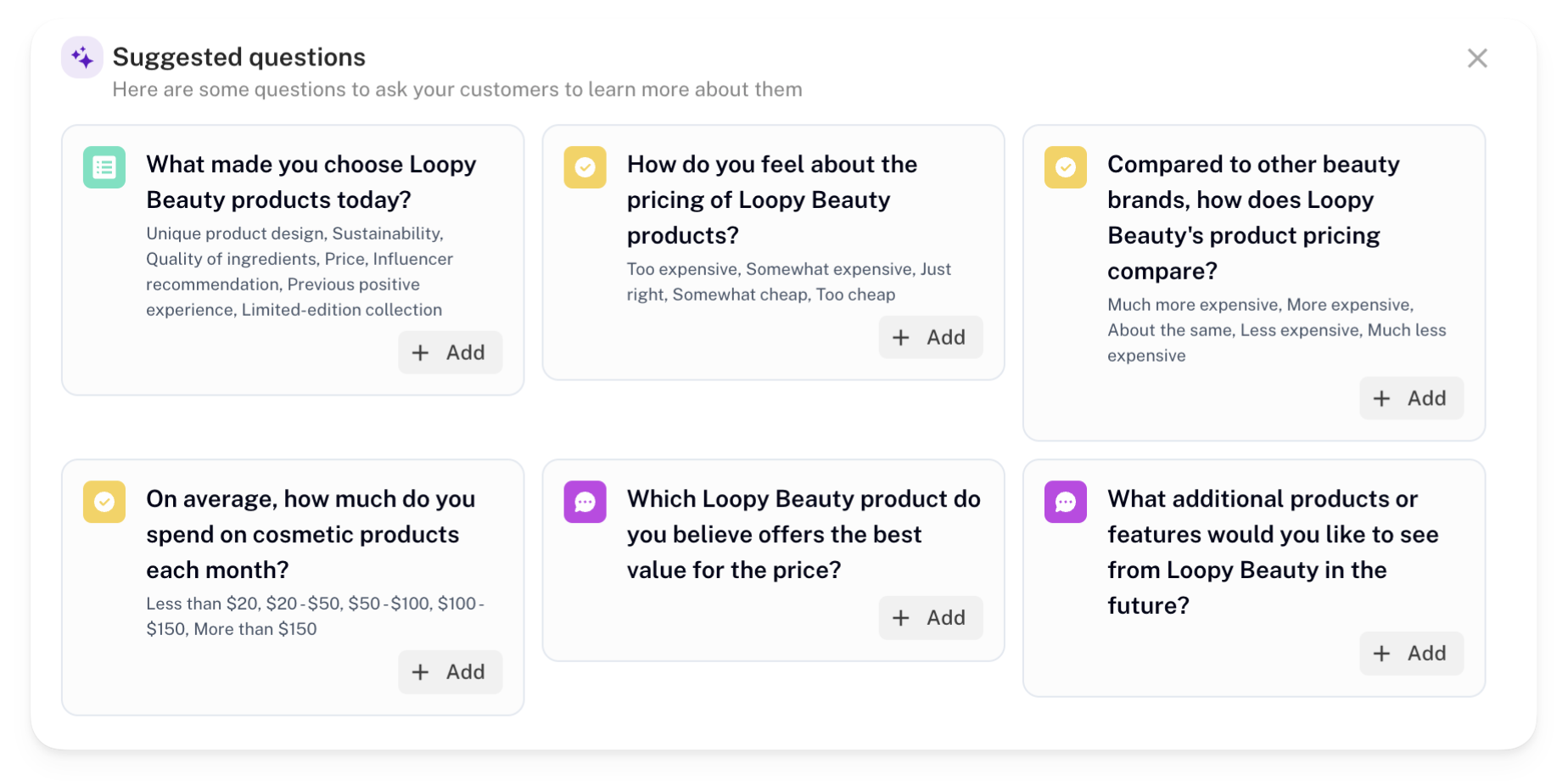
- UserLoop: UserLoop is a powerful survey tool designed specifically for Shopify. It allows you to trigger surveys after cart abandonment, analyze responses, and segment data by customer spend and behavior. Plus, you can offer discount codes to encourage customers to complete the survey and return to their cart.
- Nudgify: Nudgify helps reduce cart abandonment by providing real-time social proof and urgency notifications. While it’s not a traditional survey app, it includes features that allow you to gather feedback on why customers abandon their carts and optimize your checkout accordingly.
- CartHook: CartHook is another excellent tool that focuses on post-purchase and cart abandonment upsell campaigns. It allows you to gather feedback and offers upsell opportunities to recover lost sales.
Cart Abandonment Tactics - Beyond Survey Apps
While survey apps are an excellent way to understand why customers abandon their carts, they’re just one piece of the puzzle. To effectively reduce cart abandonment, it’s important to implement a broader range of tactics that address the various reasons customers might leave before completing their purchase. Here are some additional strategies to help you optimize your checkout process and boost conversions:
- Simplify the Checkout Process
A complicated checkout process is one of the leading causes of cart abandonment. Streamline your checkout by reducing the number of steps required to complete a purchase. Consider implementing a one-page checkout that gathers all necessary information on a single screen. - Offer Guest Checkout Options
Forcing customers to create an account before purchasing can be a major deterrent. Offer a guest checkout option to make the process faster and more convenient. If you want to encourage account creation, provide a prompt after the purchase is complete. - Provide Clear Shipping Costs Upfront
Unexpected shipping costs are a common reason for cart abandonment. Make sure shipping fees are clearly displayed as early as possible in the checkout process. You might also consider offering free shipping for orders over a certain amount to incentivize purchases. - Use Trust Signals
Customers need to feel confident that their payment information is secure. Display trust signals like SSL certificates, security badges, and customer reviews prominently on your checkout page to reassure shoppers that their information is safe. - Offer Multiple Payment Options
Different customers prefer different payment methods. To accommodate everyone, provide a variety of payment options, including major credit cards, digital wallets like PayPal or Apple Pay, and buy now, pay later services. - Implement Exit-Intent Popups
Exit-intent popups can be a powerful tool for recovering abandoned carts. These popups appear when a customer is about to leave the checkout page, offering a discount, free shipping, or another incentive to complete their purchase. - Enable Cart Recovery Emails
Cart recovery emails are an essential tactic for bringing back lost customers. If a shopper abandons their cart, send a follow-up email reminding them of the items left behind. Sweeten the deal by including a discount code or highlighting limited stock to create urgency. - Optimize for Mobile
A significant number of customers shop on mobile devices, so ensuring your checkout process is mobile-friendly is crucial. Use responsive design, large buttons, and autofill features to make mobile checkout as smooth as possible. - Display Delivery Times
Uncertain delivery times can cause hesitation. Provide clear, estimated delivery dates during checkout to set customer expectations and reduce the likelihood of abandonment. - Leverage Social Proof and Urgency
Showcasing social proof, like customer reviews and real-time purchase notifications, can encourage customers to complete their purchase. Additionally, using urgency tactics like countdown timers or limited stock indicators can prompt quicker decisions.
UserLoop
UserLoop is leading the way by introducing AI into the customer feedback process. It's innovative AI-powered solutions speed the survey creation process, whilst providing personal branding options, results focused analytics, and easy-to-access data. Start building your customer feedback survey and emails today.
Discover what UserLoop can do for you with a free 14-day trial. Kick off your first customer survey in just a few minutes and start unlocking valuable insights for your brand and customers!
Conclusion
Cart abandonment is a significant challenge, but it’s also an opportunity to learn and grow. By using Shopify survey apps, you can gather valuable insights directly from your customers and make data-driven decisions to improve your checkout process. Whether you’re just starting out or looking to refine your existing strategies, surveys are a powerful tool to help you reduce cart abandonment and increase conversions.
However, reducing cart abandonment requires a comprehensive approach. By implementing a range of tactics—like simplifying the checkout process, offering multiple payment options, and using trust signals—you can create a seamless and reassuring shopping experience that keeps customers engaged and more likely to complete their purchases. Combining these strategies with insights from your survey data will help you optimize your store for higher conversions and greater customer satisfaction.
Cart Abandonment FAQ
1. What is cart abandonment?
Cart abandonment occurs when a customer adds items to their online shopping cart but leaves the website without completing the purchase.
2. Why is cart abandonment a problem for my Shopify store?
Cart abandonment can significantly impact your revenue. When customers abandon their carts, it means missed sales opportunities and potential lost customers. Understanding and reducing cart abandonment is key to improving your conversion rates.
3. What are the most common reasons for cart abandonment?
Some of the top reasons include:
- Unexpected costs (like shipping and taxes)
- A complicated or lengthy checkout process
- Concerns about payment security
- Lack of preferred payment options
- Long delivery times
4. How can survey apps help reduce cart abandonment?
Survey apps allow you to gather direct feedback from customers who abandoned their carts. By understanding their reasons, you can make targeted improvements to your checkout process, address specific pain points, and ultimately reduce the rate of cart abandonment.
5. What kind of questions should I ask in cart abandonment surveys?
Focus on questions that reveal the key barriers to completing a purchase, such as:
- "What prevented you from completing your purchase today?"
- "Was there anything about the checkout process that was confusing or difficult?"
- "Did unexpected costs impact your decision not to complete your purchase?"
6. What are some other strategies to reduce cart abandonment?
Beyond using survey apps, you can:
- Simplify your checkout process
- Offer guest checkout options
- Display shipping costs upfront
- Use trust signals to reassure customers
- Offer multiple payment options
- Implement exit-intent popups
- Send cart recovery emails
- Optimize your store for mobile devices
7. How can cart recovery emails help?
Cart recovery emails remind customers about the items they left in their cart. By sending a friendly reminder, often with an incentive like a discount, you can encourage them to return and complete their purchase.
8. Why should I offer a guest checkout option?
Forcing account creation can deter customers from completing their purchase. A guest checkout option makes the process quicker and easier, reducing the chances of abandonment.
9. What are trust signals, and why are they important?
Trust signals, such as security badges, SSL certificates, and customer reviews, help reassure customers that their payment information is secure. Displaying these prominently during checkout can reduce abandonment caused by security concerns.
10. How does mobile optimization affect cart abandonment?
With many shoppers using mobile devices, a checkout process that isn’t optimized for mobile can lead to frustration and abandonment. Ensuring your site is mobile-friendly with responsive design and easy-to-use features can significantly improve your conversion rates.
11. Can urgency and social proof reduce cart abandonment?
Yes, showing social proof (like customer reviews) and using urgency tactics (such as countdown timers or low-stock alerts) can encourage customers to complete their purchases more quickly, reducing the likelihood of abandonment.
12. How do exit-intent surveys work?
Exit-intent popups detect when a customer is about to leave your site and display a last-minute offer or message to encourage them to stay and complete their purchase. These can be effective in recovering potential lost sales.
13. What is an abandonment survey?
An abandonment survey is a brief questionnaire that is triggered when a customer abandons their shopping cart. It asks them why they decided not to complete their purchase, helping you understand the reasons behind cart abandonment.
14.When should I send an abandonment survey?
Abandonment surveys are most effective when sent shortly after a cart is abandoned, while the experience is still fresh in the customer's mind. This could be immediately after they leave the site, or via email within a few hours.


The agentic growth toolkit for Shopify
Ask your customers anything
UserLoop talks to your customers at scale with surveys and contests that feed one AI-queryable dataset. AI does the setup and the analysis.
- SurveysFind out why customers buy: checkout, email, link & QR.
- ContestsGiveaways that grow your list and social following.
Free plans on both apps · live in minutes