How to run a giveaway on Shopify
If you’re running a store on Shopify, you’re always looking for ways to get in front of new customers, and to boost sales from your existing customers.
A proven way of increasing engagement iis to run giveaways, which can generate buzz and excitement around your brand.
Giveaways not only increase brand awareness but also encourage engagement and build customer loyalty. They can be a cost-effective way to attract new customers and keep existing ones coming back for more.
They’re quick and easy to set up and can make a meaningful impact to your bottom line.
Benefits of running giveaways on Shopify
In this article we’re focussing specifically on the Shopify platform. Running a giveaway on Shopify is a great way to take advantage of the platform's features and reach a wider audience, and because of it’s rich app ecosystem - it’s super easy to start your giveaway, no coding required!
Shopify giveaway apps help you can easily create and manage your promotions, track entries, and select winners. You can also integrate your giveaway with your email marketing and social media channels, maximizing the impact of your campaign.
In this post, we'll walk you through the steps to run a successful giveaway on Shopify, including tips and best practices to ensure maximum impact
Examples of effective Shopify Giveaways
Before we dive into how to plan and execute a giveaway on Shopify, we wanted to take a look at some examples of leading brands best practice.
You’ll most likely have noticed many of the leading D2C brands on Shopify running a giveaway, constest or promotion at some point.
MrBeast’s Feastables
MrBeast, a prominent YouTuber known for his grand gestures and massive giveaways, has become a master of viral marketing. With millions of followers and a knack for creating buzzworthy content, MrBeast can teach us a thing or two about hosting successful Shopify giveaways.
Recently his Feastables brand ran a giveaway to celebrate the launch of Carl’s Gummies, giving followers the chance to win a massive $10k.
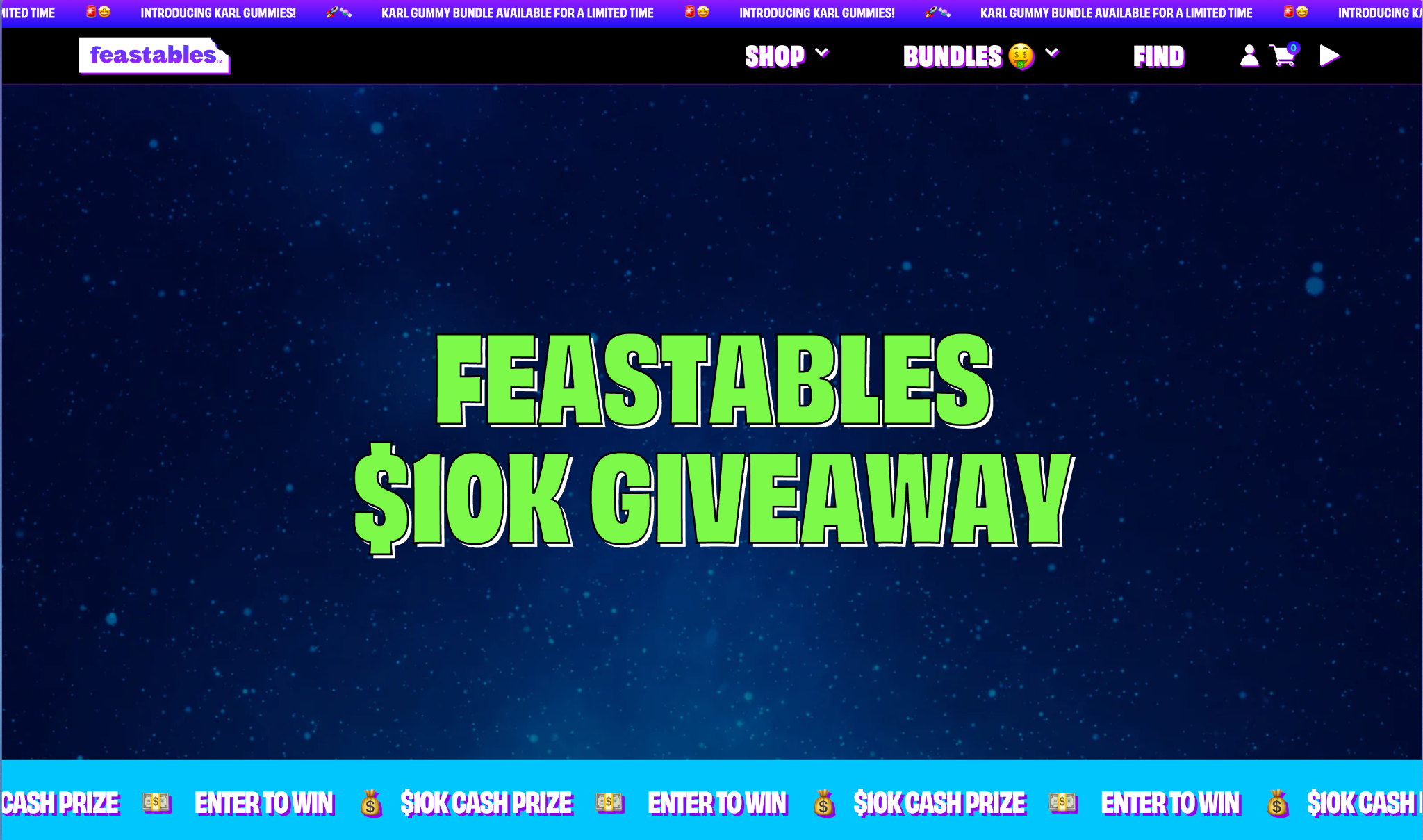
Let’s take a look at this giveaway, it’s a great example of how your brand can generate buzz.
This giveaway was particularly innovative as the primary way of entering was through scanning a QR code on a pack of Carl’s Gummies, the new product.
This meant the main goal of this giveaway was to reward customers who’d already bought the product, as well incentivising customers to place their first order.
Once you scanned the QR code on the packaging you got a quick and simple entry form.
Clear and Simple Entry Process
Just like the example provided above, make sure the entry process for your giveaway is straightforward and easy to follow. It’s a super simple form - customers just need to provide a few details to enter.
This will encourage more people to participate and minimize confusion or frustration.
Offer Desirable Prizes
MrBeast is known for giving away items that generate excitement and interest. Choose prizes that are both relevant to your target audience and valuable enough to entice people to enter.
Set Realistic Entry Limits
To ensure fairness and prevent abuse, set reasonable limits on the number of entries per person. This will discourage fraudulent behavior and help maintain a level playing field for all participants.
Leverage Social Media
Utilize your social media platforms to create hype around your giveaway. Engage with your audience, encourage sharing, and use relevant hashtags to increase visibility.
Create Urgency
Create a sense of urgency by setting a clear deadline for your giveaway. This will motivate participants to enter promptly and generate buzz as the deadline approaches.
Provide Clear Terms and Conditions
Clearly outline the rules, eligibility requirements, and prize details for your giveaway. This will minimize disputes and ensure participants understand the parameters of the contest.
Follow-up with Participants
After the giveaway ends, be sure to follow up with participants. Announce the winners, thank everyone for participating, and consider offering a special discount or promotion to those who didn't win as a gesture of goodwill.
Surreal Protein Cereal
Some brands use giveaways as a way of introducing their product to new customers who’ve neve placed an order before.
Here, we’re going to take a look at an example of a giveaway that was run by the protein cereal brand Surreal.
This campaign offered new customers a free box of cereal, in exchange for a fair an honest review.
This is a great way of not only getting new customers to try your product, but also to build up positive reviews when you launch a new product.
The giveaway was run through a simple form, where customers filled out their details. They then received a box of cereal through the post and were sent automatically triggered emails to prompt them to leave their review.
So to summarize, running a free giveaway like this can help you…
Build up your mailing list from potential new customers
Introduce your product to new customers
Build up positive reviews when launching a new product
Increase long term returning customers through reordering.
Planning Your Shopify Giveaway
A successful giveaway requires careful planning and preparation. Here are some important steps to consider:
Setting goals and objectives
Before you start planning your giveaway, it's important to identify your goals and objectives. What do you hope to achieve through the giveaway? Are you looking to increase brand awareness, generate leads, drive sales, or reward loyal customers?
Here are some examples of specific goals you might set for your Shopify giveaway:
Increase social media followers and engagement (we saw this in the MrBeast giveaway)
Collect email addresses for future marketing campaigns (we saw this in the Surreal giveaway example)
Boost website traffic and sales
Promote a new product or collection
By setting clear goals and objectives, you'll be able to tailor your giveaway to meet your specific needs and measure its success more effectively.
Determining Your Target Audience
Before launching a giveaway on Shopify, it's important to identify your target audience. Who are you hoping to reach with your promotion?
Consider factors such as age, gender, location, interests, and purchasing habits.
By understanding your audience, you can tailor your giveaway to better resonate with them and increase your chances of success.
For example, if your Shopify store sells fitness apparel and accessories, your target audience may be active individuals who value health and wellness. Consider promoting your giveaway on fitness-related social media pages or partnering with fitness influencers to reach this audience.
Choosing a Prize
Choosing the right prize is key to the success of your giveaway on Shopify.
Your prize should be something that will resonate with your target audience and incentivize them to participate in the promotion. Depending on your budget, this could range from giving away a free product, to a huge cash reward.
Some popular prize options for ecommerce giveaways include:
Your own product(s): Offering your own products as the prize is a great way to generate interest in your brand and promote your products.
Gift cards or store credits: Providing a gift card or store credit as the prize allows winners to choose their own reward, while still promoting your brand and encouraging future purchases.
Exclusive experiences or merchandise: Offering exclusive experiences or limited-edition merchandise as the prize can create a sense of urgency and excitement among participants.
Deciding on the Giveaway Format
There are several formats to consider when running a giveaway on Shopify. Each format has its own benefits and drawbacks, so it's important to choose one that aligns with your goals and target audience. Some popular giveaway formats include:
Sweepstakes: In a sweepstakes, participants enter their information for a chance to win a prize, with one winner selected at random. This format is easy to set up and can quickly generate a large number of entries.
Photo or video contests: In a photo or video contest, participants submit their own content related to your brand or product for a chance to win a prize. This format can be highly engaging and create user-generated content for your brand.
Referral contests: In a referral contest, participants are incentivized to refer friends or family members to your Shopify store for a chance to win a prize. This format can help increase your reach and generate new leads for your business.
Setting Rules and Guidelines
Once you've determined your target audience, prize, and giveaway format, it's important to set clear rules and guidelines for your promotion.
Here’s an example of the rules required to enter the MrBeast giveaway: https://feastables.com/pages/10kgiveaway-official-rules
This helps to ensure that the giveaway is fair and transparent for all participants. Some important considerations when setting rules and guidelines for your Shopify giveaway include:
Eligibility criteria: Clearly define who is eligible to participate in the promotion, based on factors such as age, location, and relationship to your brand.
Entry methods: Specify how participants can enter the giveaway, such as by filling out a form or submitting a photo.
Prize details: Clearly outline the details of the prize, such as its value, how it will be awarded, and any restrictions or limitations.
Promotion timeline: Set a clear start and end date for your giveaway, and communicate these dates to participants.
By setting clear rules and guidelines, you can ensure that your Shopify giveaway runs smoothly and without any confusion or disputes.
Setting Up Your Giveaway on Shopify
Once you have planned your giveaway and chosen a prize, it's time to set it up on your Shopify store. Here's a step-by-step guide on how to do it.
Choosing a Shopify app for giveaways
Shopify has several apps available for running giveaways. Some popular options include SocialBoost, UserLoop and Audience. Each app has its own unique features, so choose one that best fits your needs. We wrote a blog post reviewing the best contest apps for Shopify here.
Creating a landing page for your giveaway
Creating a landing page for your giveaway is an essential step in the setup process. This page should provide all the necessary information about the giveaway, including the prize, rules, and how to enter.
You can use Shopify's built-in landing page builder or a third-party app like Shogun to create a professional-looking landing page quickly.
If you’re using a giveaway app that allows you to embed your contest like UserLoop, you can drop the contest embed code on the page directly.
Customizing the look and feel of your landing page
Customizing the look and feel of your landing page can help you make it stand out and capture visitors' attention. Use a theme that matches your brand and make sure the design is consistent with your overall website. Use high-quality images and graphics to make the page visually appealing.
Integrating your giveaway with your email marketing tool
Integrating your giveaway with your email marketing tool is essential for building your email list and nurturing leads.
Use an email marketing tool like Mailchimp or Klaviyo to capture entrants' email addresses and send them follow-up emails after the giveaway is over.
Promoting your giveaway on social media and other channels
Promoting your giveaway on social media and other channels can help you reach a wider audience and increase participation. Use social media platforms like Facebook, Instagram, and Twitter to promote your giveaway and encourage people to enter.
You can also promote it through email marketing, paid advertising, and other channels to maximize visibility.
By following these steps, you can set up a successful giveaway on your Shopify store and drive engagement and sales for your ecommerce business.
Running Your Giveaway
Now that you have planned and set up your giveaway on Shopify, it's time to run it. Here are the key steps to follow:
Announcing the winner(s)
Once your giveaway has ended, it's time to announce the winner(s). You can do this by sending an email to all participants or by posting the winners on your social media channels. Be sure to thank everyone who participated and announce any future giveaways you may have planned.
Depending on which giveaway platform you decided to use, it may have a random winner generator built in. If not you can use a winner picker like WheelOfNames or for social contests, CommentPicker.
Delivering the prize to the winner(s)
It's important to deliver the prize to the winner(s) promptly and efficiently. You can do this by contacting the winner(s) directly and arranging for delivery. Be sure to follow up to ensure that the prize has been received and to ask for feedback.
Collecting feedback and evaluating the success of your giveaway
After your giveaway has ended, it's important to collect feedback and evaluate its success. You can do this by sending a follow-up survey to participants and analyzing the data. You can use a Shopify Survey app like UserLoop to survey customers once the contest is over.
Consider the following metrics to evaluate the success of your giveaway:
Number of participants: How many people participated in your giveaway? Did you meet your target audience?
Engagement: How engaged were participants in your giveaway? Did they share or comment on social media posts about your giveaway?
Conversion rate: How many participants became customers after the giveaway ended?
Return on investment: Did your giveaway generate a positive return on investment?
By collecting feedback and analyzing the data, you can determine the success of your giveaway and make improvements for future giveaways.
Conclusion
In this post we’ve looked at some best practice examples on how to run a giveaway on Shopify, seeing what leading DTC brands like Feastables and Surreal are doing.
Giveaways can be an effective way to drive traffic and engagement to your Shopify store, while also building brand awareness and customer loyalty. By following the tips and best practices outlined in this guide, you can create a successful giveaway campaign that resonates with your target audience and achieves your marketing objectives.
To recap, the key takeaways from this guide are:
Giveaways are a powerful marketing tool for ecommerce businesses
Before planning your giveaway, it's important to set goals, identify your target audience, choose a prize, and decide on the giveaway format and rules
There are several Shopify apps available for running giveaways, which can help simplify the process and integrate with your email marketing tool
Make sure you include formal rules, terms and conditions and follow the required laws for the regions you’re running your giveaway.
Promoting your giveaway on social media and other channels can help increase visibility and engagement
Following up with entrants and winners can help maintain a positive relationship with your audience and encourage future participation
Remember to maintain compliance with laws and regulations, maintain transparency and authenticity, and encourage social sharing and engagement throughout your giveaway campaign.
Giveaways and contests are an amazing way to engage with new and existing customers, and can be a way to stretch your marketing budgets. We can’t wait to see what ideas you come up with to run your next contest!


The agentic growth toolkit for Shopify
Ask your customers anything
UserLoop talks to your customers at scale with surveys and contests that feed one AI-queryable dataset. AI does the setup and the analysis.
- SurveysFind out why customers buy: checkout, email, link & QR.
- ContestsGiveaways that grow your list and social following.
Free plans on both apps · live in minutes