Best Shopify Feedback Apps in 2024
Listening to customers is one of the most important things any ecommerce business can do. It’s how you learn what to improve, what to do more of and what’s not working.
In this competitive market, understanding and responding to customer feedback is not just important; it's essential for growth and customer satisfaction.
This year, we saw record numbers of customer answering simple survey questions over BFCM, and we’re only going to see that trend continue into 2024.
In this post, we’re going to take a look at how to collect customer feedback on Shopify.
What are the best apps? What methodologies should you use? How do you analyze responses from customers and turn that into improvements to your bottom line?
We’re going to cover all that and more.
Why Customer Feedback on Shopify is More Crucial Than Ever
The digital landscape has shifted significantly since 2022. With the rise of AI and advanced analytics, customer expectations have soared. Feedback isn't just about avoiding negative reviews anymore; it's about creating an exceptional, personalized shopping experience.
Directly asking customers to answer simple questions not only helps supercharge the rest of your marketing stack with zero party data, it lets you learn who your customers actually are on a deeper level.
Negative feedback still plays a role, but the focus now is on leveraging positive feedback to build brand loyalty and trust.
Studies show that a highly engaged customer is likely to spend 60% more per transaction.
Collecting feedback should also be a Win/Win scenario, with customers being rewarded with discounts and gift cards for responding to surveys. Our data suggests that offering customers an incentive boosts your survey response rates by 40%!
How to Ask for Shopify Customer Feedback in 2024
The way you ask for customer feedback can significantly impact the quality and quantity of the responses you receive.
Let's delve into the best practices for each:
1. In the Shopify Checkout Flow
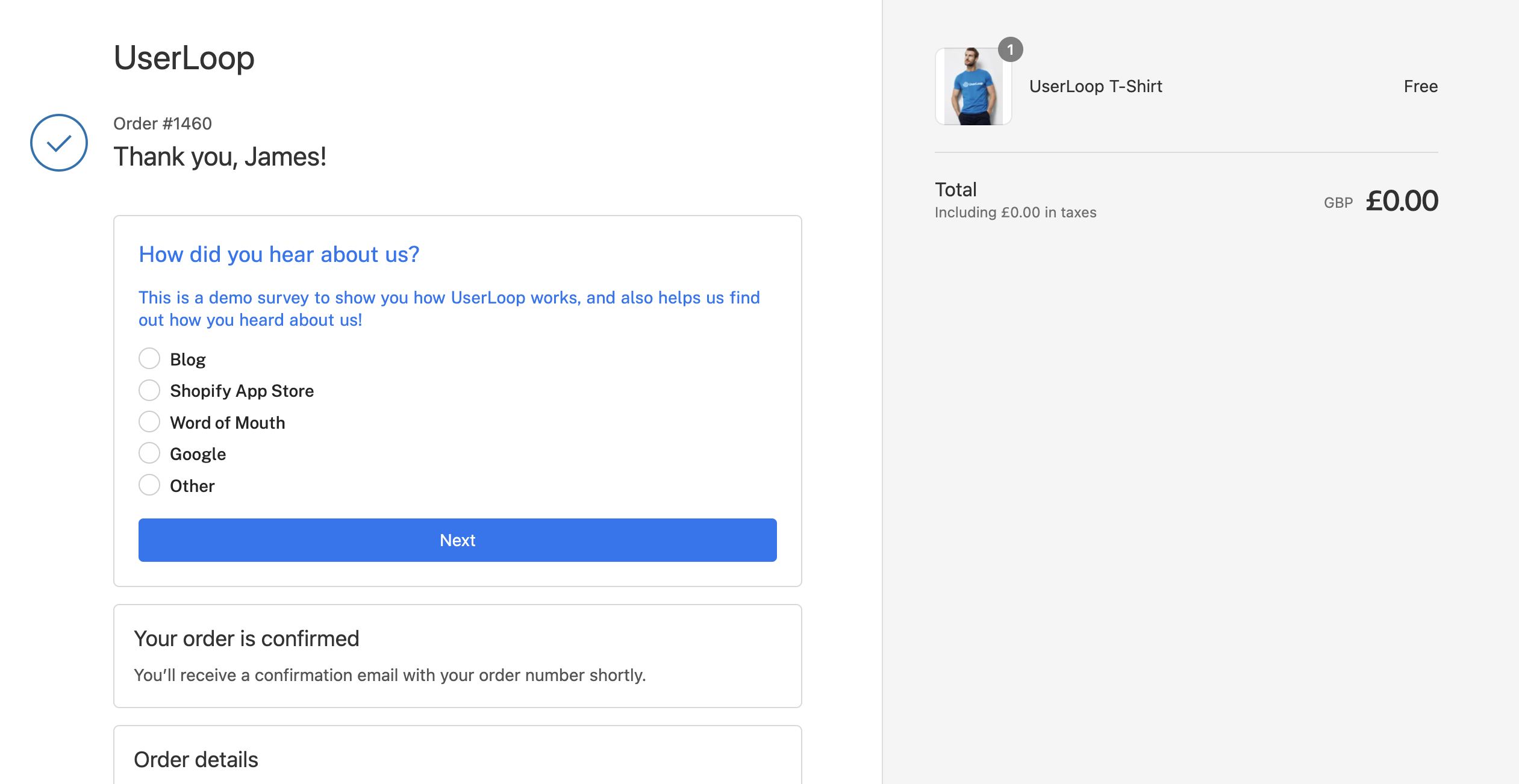
Timing and Placement: Integrate a brief feedback form directly into the checkout flow, on the order confirmation page. This captures real-time impressions of the shopping and checkout experience. UserLoop lets you install a survey on your Shopify order confirmation page in 1 click.
Simplicity and Relevance: Use concise, targeted questions like rating scales or yes/no options to minimize disruption. For instance, "How would you rate your checkout experience today?" with a simple star rating. Simple questions with low cognitive load mean more customers willing to respond.
Personalization: Leverage AI to customize questions based on the customer's shopping cart. For example, asking about the about specific aspects of a product they purchased.
2. By Email After Purchase
Timely Follow-Up: Send a feedback request email within a few days post-delivery. This ensures the shopping experience is fresh in the customer's mind.
Customization and Branding: Design emails that reflect your brand's voice and ethos. Personalize the content to acknowledge the specific purchase.
Incentivization: Encourage feedback by offering a small incentive, like a discount on the next purchase or entry into a giveaway. Our research shows that offering an incentive can boost your response rate by over 40%.
3. By Link
Versatility and Accessibility: Share feedback links across various platforms – social media, digital receipts, newsletter or even QR code. Collect feedback from the customer in the real world. A great place to ask is on your product’s packaging.
Context-Specific Sharing: Tailor the messaging around the link to fit the platform it's shared on. For example, a more casual tone on social media versus a formal approach in newsletters.
Multi-Device Compatibility: Ensure the linked feedback form is responsive and user-friendly across devices, considering the increasing trend of mobile usage.
4. By SMS
Concise and Immediate: SMS is best for quick, immediate feedback. Send a text soon after a purchase or interaction, asking for a brief rating or one-sentence feedback.
Personal Touch: Personalize the SMS to include the customer's name and reference the specific product or service.
Ease of Response: Use a simple rating system (e.g. 1-5) or a yes/no question to facilitate easy responses on mobile devices.
Compliance and Privacy: Ensure compliance with SMS marketing regulations and maintain customer privacy by giving them an option to opt out of such communications.
Automating Shopify Customer Feedback
Having a process in place to collect feedback from customers automatically is super important if you want to keep your data up to date and fresh.
Running a static survey just gives you a snapshot in time of how customers feel about any particular question.
Having an automated tool in place to survey customers constantly ensures you always have access to up to date response information, and can track trends in customer responses over time.
Top 5 Shopify Feedback Tools in 2024
We’ve reviewed all the top Shopify Feedback Apps for 2024, you can see our full rundown here.
1. UserLoop
Rating: 5 (20 reviews)
Pricing: Free Trial (all features) / $29pm - $149pm
Key Features:
Customizable smart checkout and post-purchase email surveys
ChatGPT integration for question suggestions and analytics
Shopify discount functionality integration for survey incentives
Video feedback collection
Pros:
50 free responses per month
Combines email and checkout survey responses
Linked responses to Shopify order and product data
Cons:
- No reported major issues
2. Kno Commerce
Rating: 4.9 (44 reviews)
Pricing: Free / $99pm - $249pm
Key Features:
Quick setup with various question types
Integrations with platforms like Triple Whale, Peel, Klaviyo
Comparative result analysis
Pros:
Provides insightful customer data
User-friendly and easy setup
Excellent customer service
Cons:
- No significant drawbacks noted
Rating: 5 (136 reviews)
Pricing: Free (all features) / $10pm - $50pm
Key Features:
Pre-built post-purchase surveys
Email surveys
Customizable surveys and polls
Pros:
Good features in free version
Simple to use with reliable support
Cons:
- Limited customer insights and analysis
4. Fairing Post Purchase Surveys (Formerly Enquire Labs)
Rating: 5 (154 reviews)
Pricing: Free trial / $49pm - $299pm
Key Features:
Embeddable post-purchase surveys on checkout pages
Question Stream™ for post-survey questions
Marketing Attribution Analytics
Pros:
Seamless integration with marketing platforms
Insightful marketing attribution data
Cons:
- Focus mainly on attribution, limited in other data types
5. Grapevine Post-Purchase Survey
Rating: 5 (145 reviews)
Pricing: Free or $5pm - $15pm
Key Features:
Customizable survey questions
Survey revenue analysis
Quick response surveys
Pros:
Straightforward setup and use
Cost-effective
Cons:
Limited survey customization
Only one live question per survey
So, which feedback app should you choose?
There's tons of great high quality apps built to help you collect feedback on Shopify. Any of the apps on our list will help you understand your customers better.
However, if you're looking for an app that surveys across all platforms easily, has a deep Shopify integration and AI powered suggestions - we have to recommend UserLoop as the best feedback app to go for, you can install it for free and there are price plans to suit every size brand.
In 2024, the Shopify landscape is all about understanding and predicting customer needs. The right feedback tool is not just about collecting data; it's about creating a conversation with your customers, leading to a more personalized, engaging shopping experience.
Whichever tool you choose, remember that the goal is not just to gather feedback but to act on it, continuously improving and personalizing the customer experience.


The agentic growth toolkit for Shopify
Ask your customers anything
UserLoop talks to your customers at scale with surveys and contests that feed one AI-queryable dataset. AI does the setup and the analysis.
- SurveysFind out why customers buy: checkout, email, link & QR.
- ContestsGiveaways that grow your list and social following.
Free plans on both apps · live in minutes